Export
Building a project gets you something you can run in the Editor. Exporting gets you something you can ship: a standalone release build with its launcher, its packaged assets, and nothing that depends on O3DE being installed on the machine that runs it.
OPAL drives O3DE’s own export-project pipeline, so the output is a normal O3DE export — OPAL supplies the configuration and the progress reporting.
Start an export
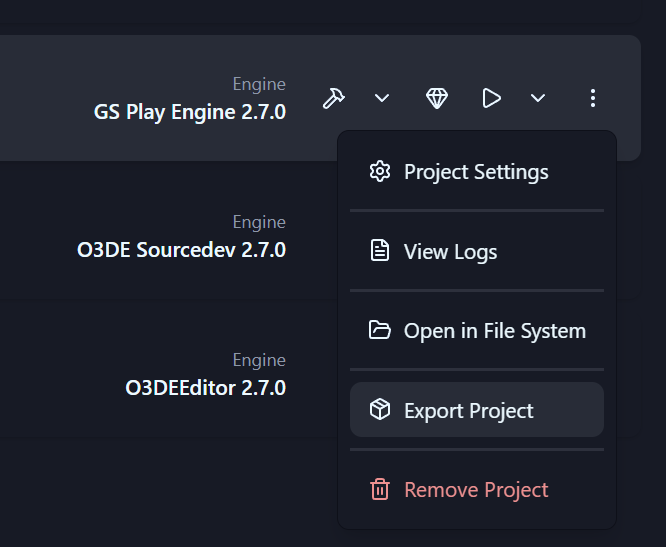
Open a project’s action menu and choose Export Project. The export dialog collects everything the pipeline needs.
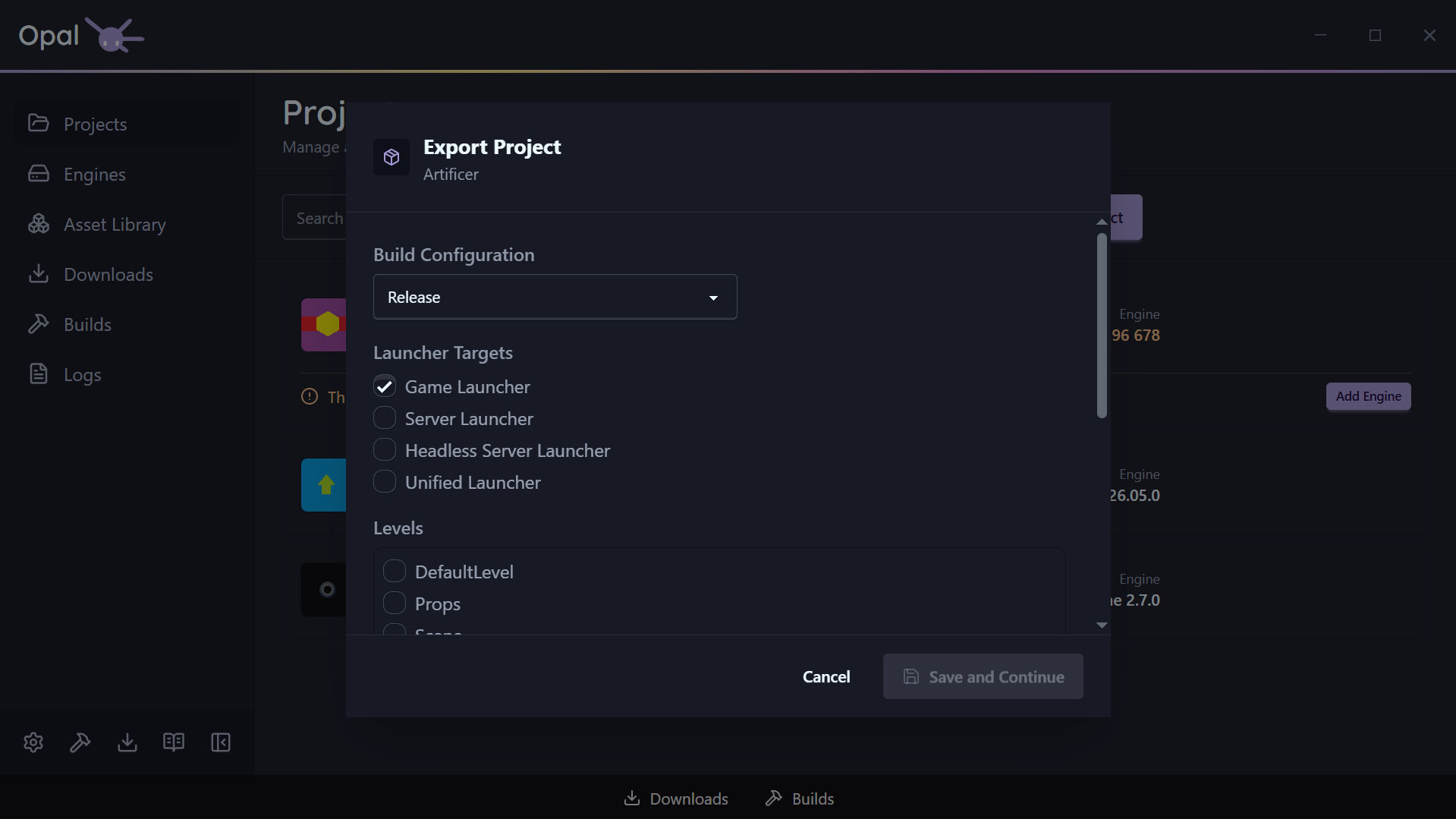
Build configuration
Debug, Profile, or Release. This is the compiled code that ends up in the shipped build, and it defaults to Release.
Launcher targets
Which executables to produce. At least one is required:
| Target | Produces |
|---|---|
| Game Launcher | The standard client executable (selected by default) |
| Server Launcher | A dedicated server build |
| Headless Server Launcher | A server build with no rendering |
| Unified Launcher | A single executable that can act as client or server |
Levels
OPAL reads the levels out of your project’s Levels folder and lists them. Tick the ones to include — at least one is required, because the level selection is what seeds the asset bundle. Everything those levels reference is gathered automatically; you do not have to hand-build a seed list.
If the list comes up empty, the project has no levels where O3DE expects them.
Assets
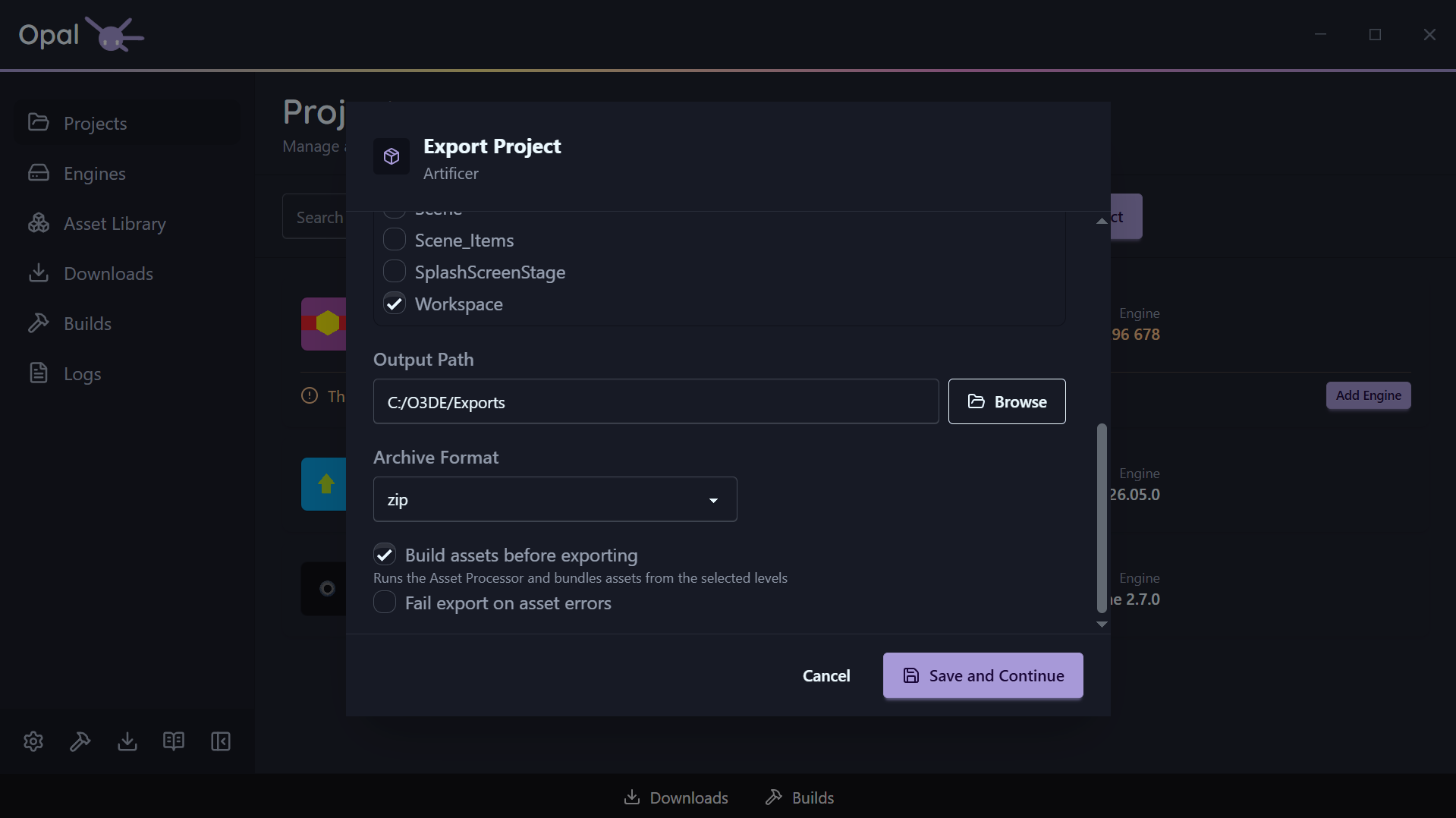
- Build assets before exporting (on by default) runs the Asset Processor and bundles the assets the selected levels pull in. Leave it on unless you have just processed assets yourself.
- Fail export on asset errors (off by default) turns asset processing errors into a hard stop instead of a warning. Turn it on for a release you intend to actually ship.
Archive format
Package the output as zip, gzip, bz2, or xz, or choose None (folder only) to leave it as a plain directory. Defaults to zip.
Output path
Where the exported build is written. Choosing a folder triggers a disk space check.
The space estimate is an estimate
OPAL estimates the space required from your already-processed assets and existing build output, and doubles it when an archive format is selected — the export needs the unpacked folder and the archive on disk at the same time. A project that has never been built or asset-processed will be undercounted. If the destination doesn’t have room, OPAL saves your settings but will not start the export.Where the settings are stored
Save and Continue writes your choices into the project’s .command_settings file using O3DE’s own export-project-configure command. That file lives in the project root and is the standard O3DE export configuration — so your settings survive, can be read by anyone on the team, are versionable alongside the project, and remain usable from the command line without OPAL.
Nothing is stored in a private OPAL format. Re-opening the dialog on a project you have exported before will run against the same .command_settings the pipeline uses.
Build tools
Exporting compiles launcher targets, so it needs the same toolchain a build does. If the required build tools are missing, OPAL still saves your export settings and tells you what is missing, with an Install Build Tools shortcut. The export starts once the toolchain is in place.
This also means export is unavailable in Script-Only mode, which deliberately hides source-compilation workflows.
Watching it run
An export joins the Builds queue and behaves like a build: same progress bar, same Pause / Resume, Cancel, reorder, and View Log controls. Builds and exports share one concurrency pool, because both drive the same CMake toolchain and would otherwise contend for it.
The queue item reports the stage it is in:
| Stage | What is happening |
|---|---|
| Building tools | Compiling the asset tooling the export needs |
| Building assets | Running the Asset Processor over the project |
| Bundling assets | Packing the level dependencies into .pak files |
| Compiling launcher | Building the launcher target(s) — reports real compile progress |
| Archiving | Packaging the output into the chosen archive format |
Export has one pause checkpoint, before the launcher compile begins. Once compiling starts, the item is no longer pausable — the same rule the Builds queue applies to a project build after its configure step.
Output is written to the Logs viewer as a project-export log for the duration, and OPAL raises a notification when the export finishes or fails.