Engines are large. When you no longer need one, OPAL removes it and cleans it out of the O3DE manifest. Source engines go to the operating system’s recycle bin / trash, not a permanent delete. Installer-based engines do not: they are uninstalled and are not recoverable from the recycle bin.
Remove a single engine
Use the Remove action on an engine (available from the engine list and from an invalid-installation warning row). OPAL confirms, unregisters it from the manifest, and removes the engine:
- Source engines are moved to the OS recycle bin / trash, so a mistake is recoverable.
- Installer-based engines are uninstalled and are not sent to the recycle bin. Removing one is permanent, so reinstall it if you need it back.
Prune unused engines
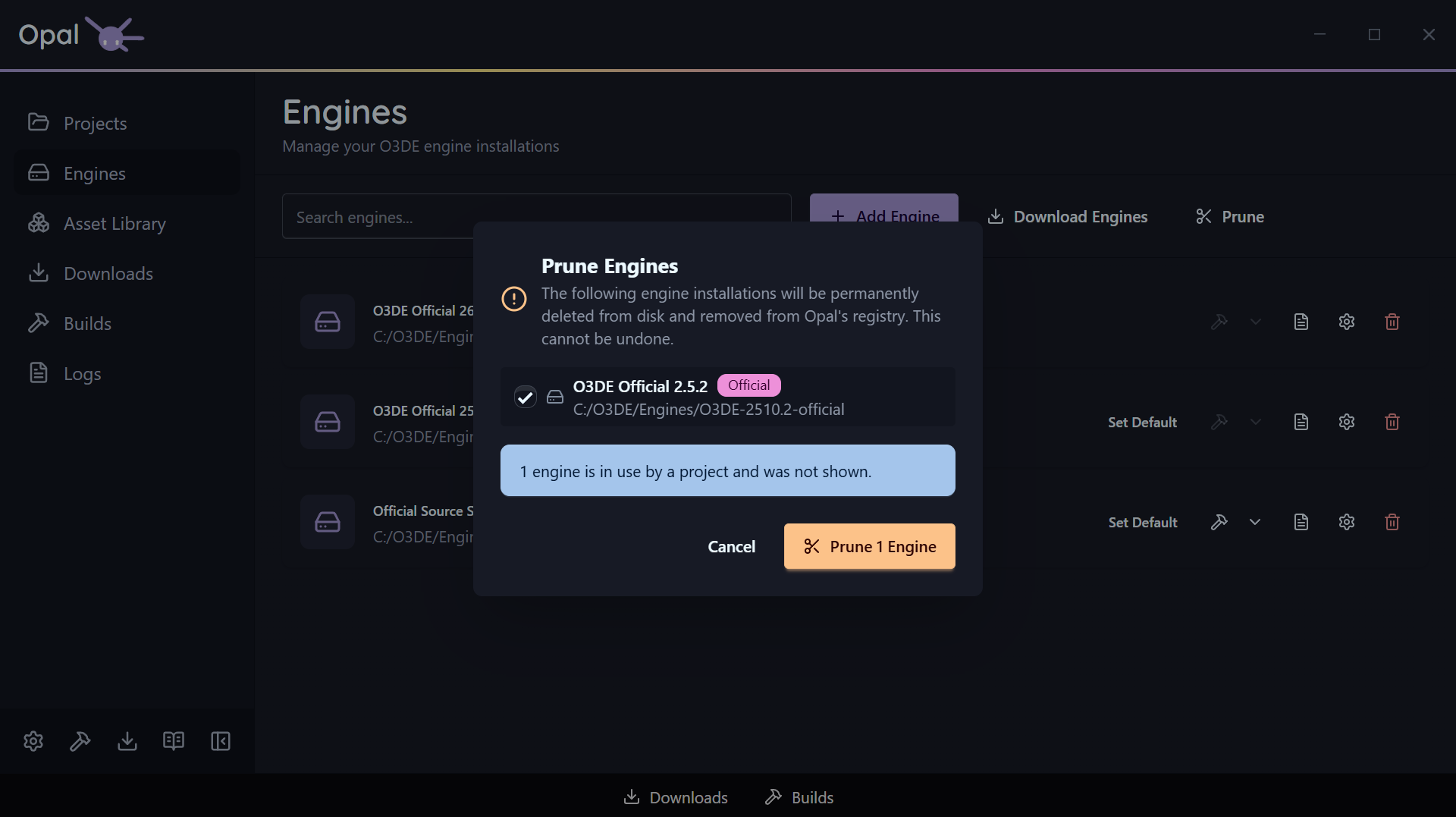
Prune, on the Engines page, reclaims space in one pass — and it only ever offers you engines that nothing is using.
Two exclusions are applied before you see the list:
- Your default engine is never listed. It is kept no matter what.
- Any engine a registered project resolves to is held back, and OPAL tells you how many were excluded for that reason. Pruning can’t take an engine out from under a project you still have.
If nothing is left after those exclusions, OPAL says so rather than presenting an empty confirmation.
Fine-tune the selection
Everything that survives the filter is listed with a checkbox, and all of them start ticked. Untick anything you want to keep — an engine you’re about to pin a new project to, a pre-release you’re still testing against — and the confirm button updates to match, reading Prune 2 Engines for two, and so on. It stays disabled while nothing is selected, so you can’t fire an empty prune.
Each row shows the engine’s name, version, path, and whether it is an official build, so you can tell near-identical installs apart before you commit.
What actually happens
For every engine you confirmed, OPAL removes its entry from the O3DE manifest, then removes the engine the same way as a single removal: source engines are moved to the OS recycle bin / trash (recoverable), while installer-based engines are uninstalled and are not recoverable from the recycle bin.
What happens to pinned projects
If a project was pinned to an engine you remove, the project stays in your list but flags a missing-engine state. See Project status & health for how to reassign or reinstall.
Because Prune skips in-use engines, this only comes up after a single Remove — or if an engine folder is deleted outside OPAL.