Documentation
Welcome to the OPAL documentation — the reference guide for installing, configuring, and using OPAL, the O3DE Project Asset Launcher.
If you’re brand new: start with Getting Started.
If you just want a feature rundown: see Features.
If something’s broken: jump to Support below.
How this is organized
Each major area of OPAL has a root page that orients you, plus categorical subpages that go deep on the specific tasks in that area. Start at a root page and drill down as needed.
Sections
Install OPAL, run the first-time wizard, install your first engine, and launch your first project — end to end.
Install O3DE from the launcher, manage installed engines, build from source, and prune what you don’t need.
Create, import, build, run, and export projects. Status states, run states, and missing-engine recovery.
Browse the Asset Library, configure gems per project, and manage repositories, local gems, and watch folders.
Download and build queue controls: pause/resume, reorder, parallelism, speed limits, and schedule windows.
The unified log viewer — where OPAL gathers every relevant O3DE log for debugging builds, launches, and asset processing.
Every configurable option in OPAL, grouped by category, with the defaults called out.
Common symptoms, fixes, and recovery procedures.
Short answers to the questions we get most often.
Release notes for OPAL.
Licence, EULA, privacy, branding, and press.
Support
Join Discord: Real-time help and community — https://discord.gg/vhUPep5ckf
Send a message: Contact form for bug reports, feature requests, licensing, media, or enterprise.
Email: support@opallauncher.com
Follow the project
1 - Getting Started
Install OPAL, run the setup wizard, install an engine, and launch your first project.
This guide takes you from “I don’t have OPAL yet” to “I’m looking at the O3DE Editor with my project open.” No prior O3DE knowledge required — but if you’ve used Unity Hub or the stock O3DE Project Manager, the flow will feel familiar.
1. Install OPAL
Head to the Download page and grab the build for your platform. Run the installer (Windows/macOS) or launch the AppImage (Linux).
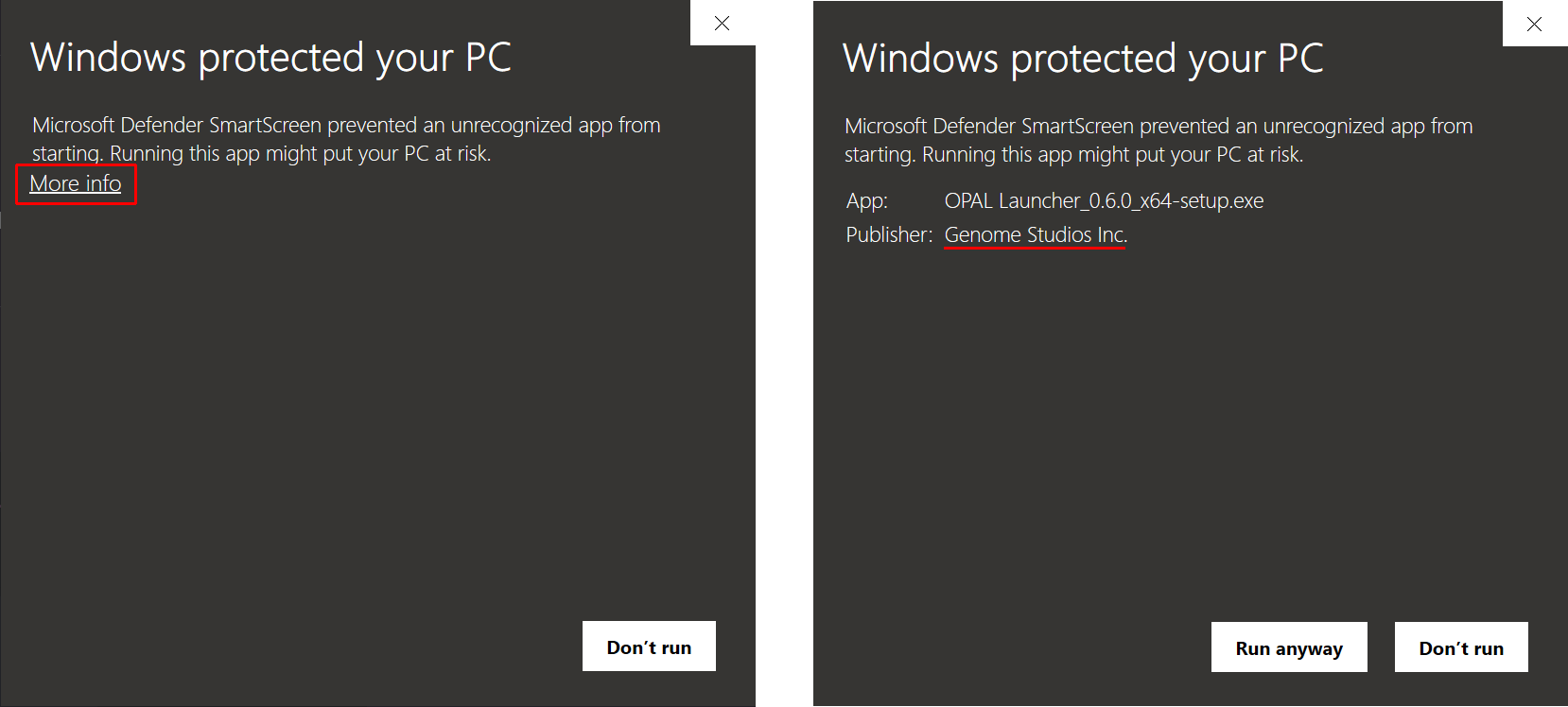
Windows Smart Screen
On Windows you will be prompted by Windows Smart Screen. To proceed:
- Select “More Info”.
- Verify the Publisher says Genome Studios Inc. then [Run Anyway].
2. Run the setup wizard
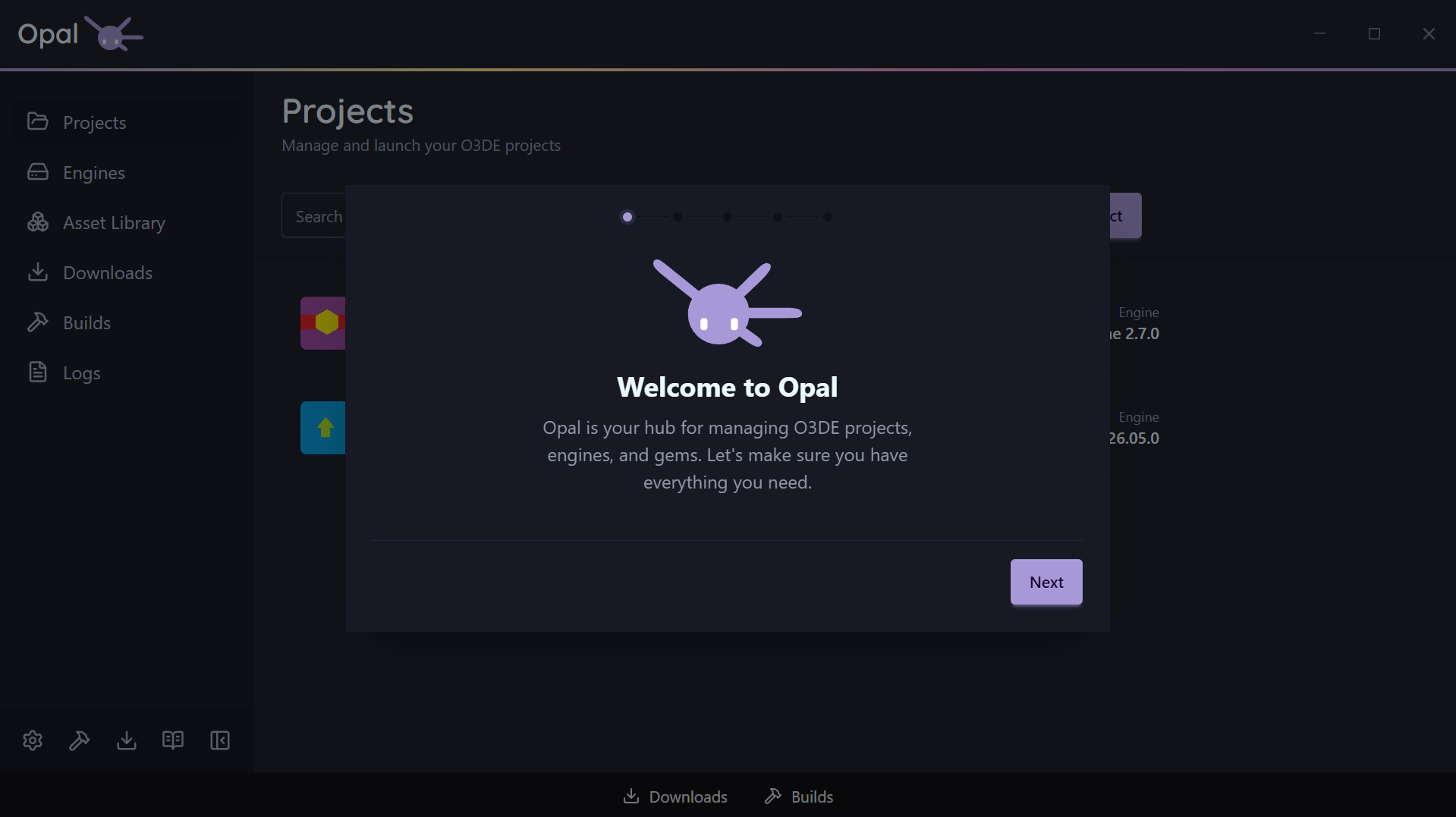
On first launch, OPAL runs a short onboarding wizard: Welcome → Usage Statistics → Build Tools → Libraries → Install Locations → Done.
The Usage Statistics step is where OPAL asks whether it may collect anonymous usage data. The box starts unticked and clicking straight past it leaves the feature off — see Privacy.
Dependencies
The wizard detects the build tools you already have — CMake, a build system (Ninja / Visual Studio / Xcode), and compilers — and offers the exact install command for anything missing, tailored to your platform’s package manager. You can re-run it any time from Settings.
Ninja Build is an optional compiler on Windows machines, but it’s recommended for the best experience using Opal and O3DE.
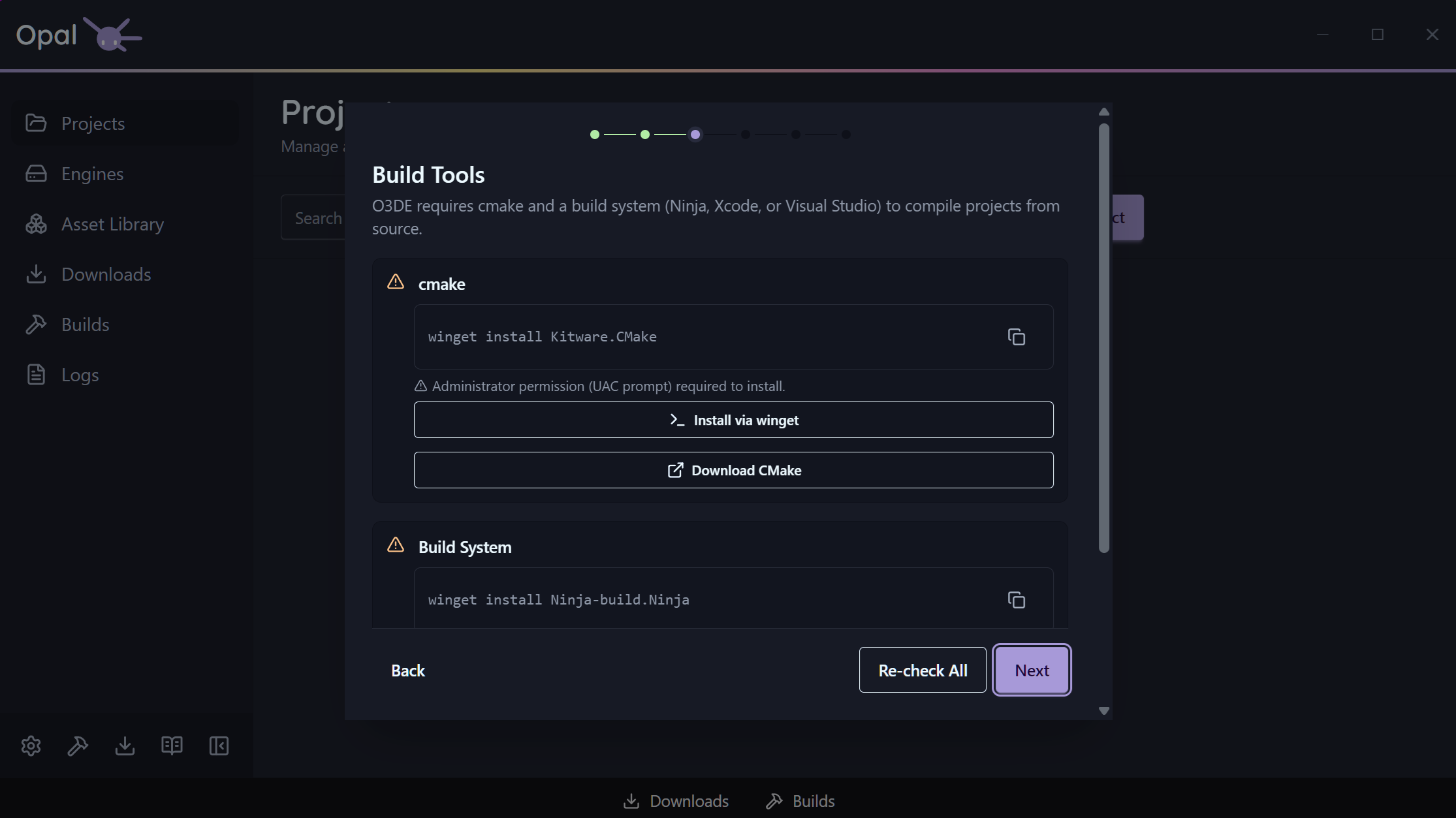
Installed a New Dependency?
If you installed new tools, like CMAKE, you will need to restart your computer to be able to build your projects successfully.Script-Only
Not planning to compile C++? Turn on Script-Only mode in the bottom of the wizard’s “Build Targets” page (or later in Settings) and OPAL skips source-build tooling entirely.
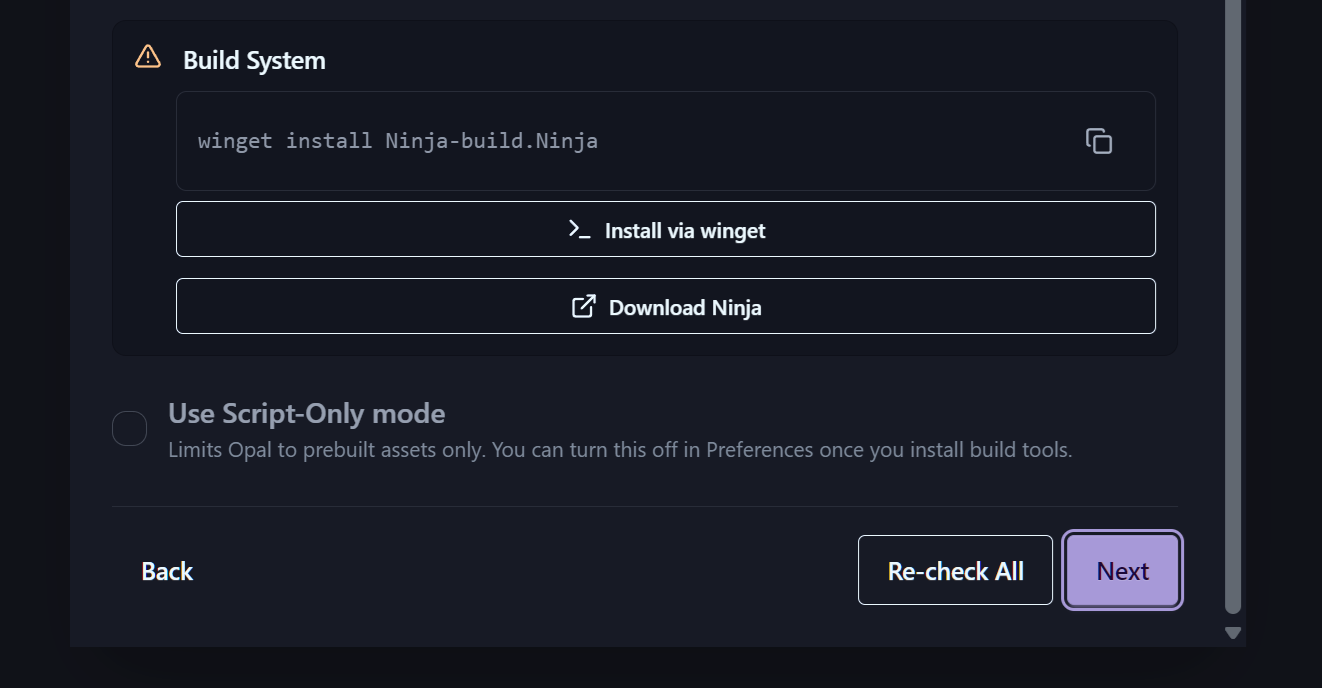
To know more, see O3DE Script-Only Projects in the O3DE Documentation.
Default Folders
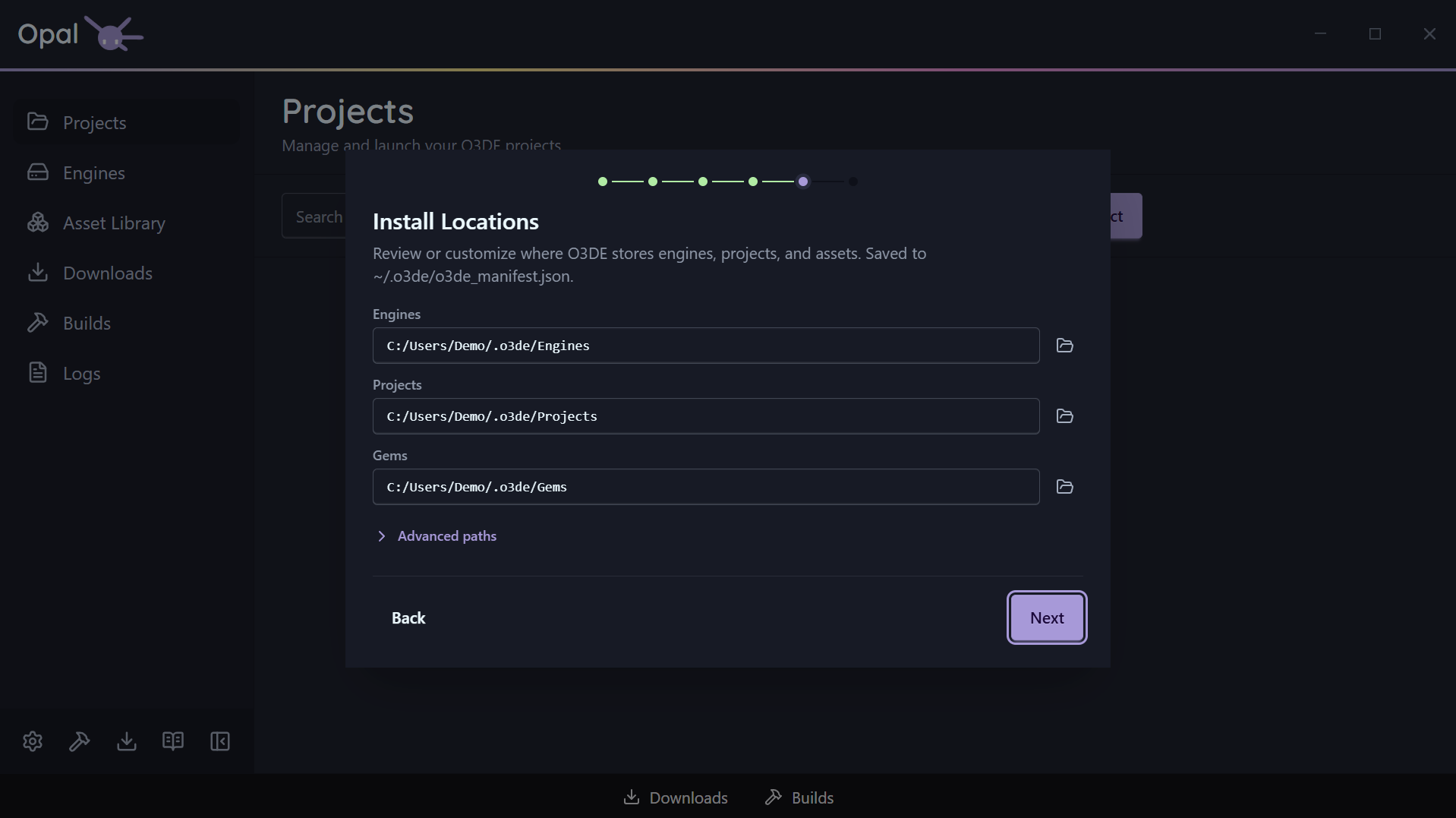
The default paths that O3DE engine and Opal use to download and detect Engines, Projects, Gems, Templates, and more. Usually fine to leave as is, but if you’d prefer to store your default files somewhere specific, change the location of these folders.
3. Install your first engine
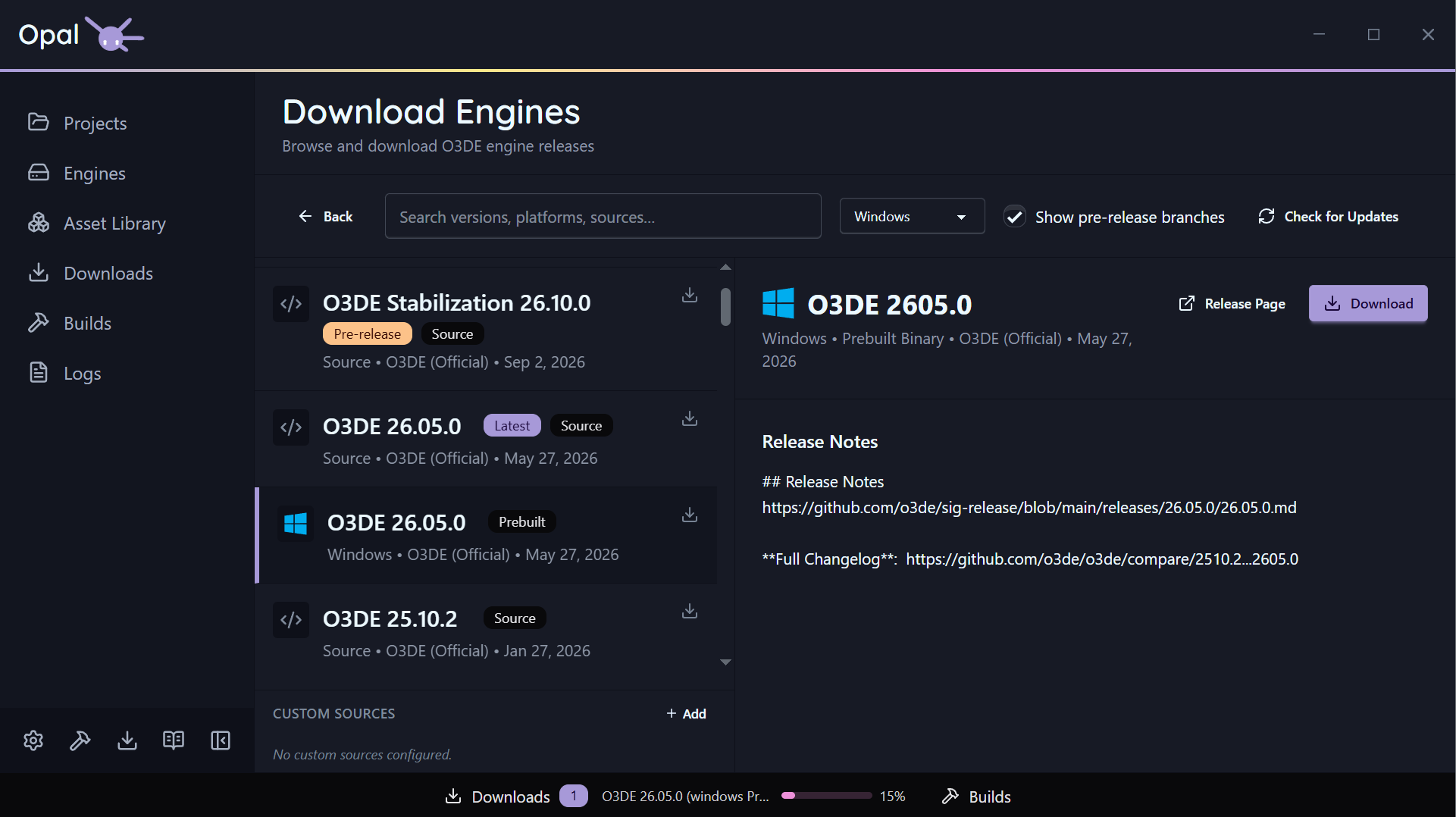
Open the Engines page and click Download Engines. OPAL reads O3DE’s release metadata and lists official builds for your platform, newest first (a Latest badge marks the current release).
- Latest release — recommended for new projects.
- Older release — pick any prior version from the list.
- Pre-release — enable “Show pre-releases” to install a
development or stabilization branch build. - Source build — install the engine as source and let OPAL build it (hidden in Script-Only mode).
Pick one. OPAL tracks the work in the Downloads queue (and the Builds queue for source engines). You can keep using the rest of the app while it runs.
Already have an engine on disk? Use Add Engine on the Engines page to register it instead.
4. Create or import a project
Once an engine is installed, go to the Projects page.
Create a new project
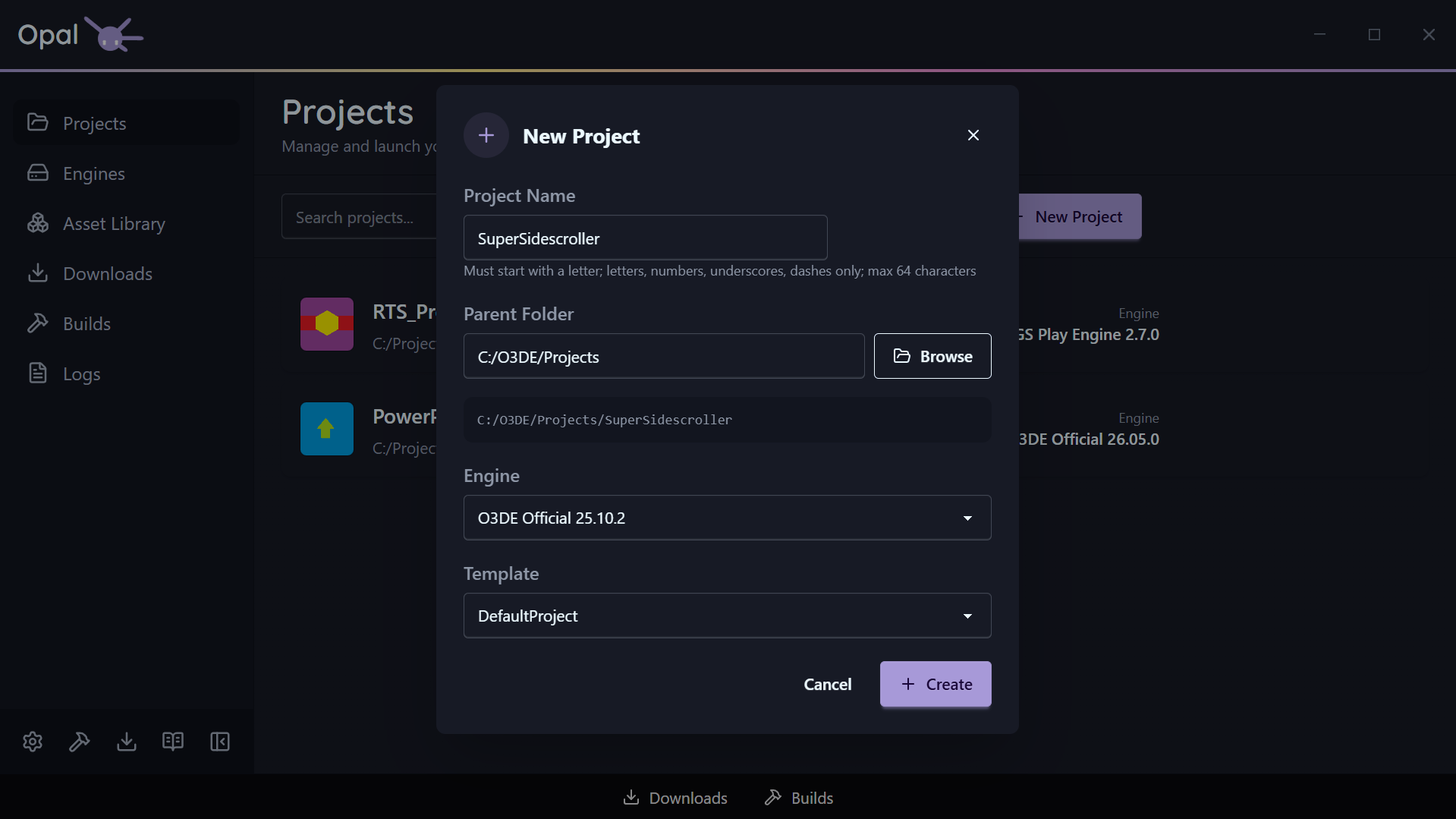
Click New Project and fill in:
- Name — validated as you type (starts with a letter; letters, numbers,
_, -; up to 64 characters). - Location — the parent folder for the project.
- Engine — defaults to your default engine; override if needed.
- Template — OPAL preselects
DefaultProject; pick another if you like.
Hit Create. OPAL writes project.json, registers the project, and adds it to the list.
Or import an existing project
Click Import and point at a folder containing a valid project.json. OPAL reads the manifest, resolves the engine, and adds the project without modifying it.
5. Build, then launch
Find the project in your list and check its status badge:
| Badge | Meaning | What to do |
|---|
| Not Built | Never configured/built | Click Build, then Launch |
| Needs Build | Changed since last build | Click Build to refresh |
| Built | Build is current | Click Launch to open the Editor |
| Build Failed | Last build errored | Open Logs to see why |
For a fresh project you’ll see Not Built. Click Build — OPAL queues the CMake configure and compile (the first build takes a while; that’s O3DE compiling your project). When it flips to Built, click Launch. The card walks through Launching → Processing Assets → Running as the Editor opens with your project loaded.
6. Next steps
2 - FAQ
Short answers to common questions.
Short answers to the questions we get most. Missing one? Ask us.
General
What is OPAL?
OPAL — O3DE Project Asset Launcher — is a third-party desktop launcher for the Open 3D Engine. It manages engine installations, projects, gems, downloads, and builds in a single app, with a much richer workflow and UX than the stock O3DE Project Manager.
Is OPAL affiliated with the O3DE Foundation?
No. OPAL is an independent project by Genome Studios. It’s built for O3DE, and O3DE users, but it’s not an official O3DE Foundation product.
What does OPAL cost?
OPAL is free to download and use. See the Licence Notice page for terms.
Keep Opal Free
Windows, macOS, and Linux.
Getting help
Something’s broken — what do I do?
- Check Troubleshooting
- Ask on Discord
- Contact us directly
How do I request a feature?
Bring it up on Discord or via the contact form. Most features start as conversations.
Install & setup
Do I need to install O3DE before OPAL?
No — that’s the whole point. OPAL installs O3DE for you. Download OPAL, open it, pick an engine version, and OPAL handles the download, install, and registration.
What does the first-run wizard do?
It detects your build tools (CMake, a build system, compilers) and offers the exact install command for anything missing, tailored to your platform. If you’re not compiling C++, you can enable Script-Only mode and skip source-build tooling. You can re-run the wizard any time from Settings.
Can OPAL coexist with the stock O3DE Project Manager?
Yes. They share the same project.json format and the same O3DE manifest. Projects and engines registered by one are visible to the other.
However, some granular data, and special settings and features like Watch Folders, do not work in original Project Manager. It is suggested to use Opal in place of the original Project Manager to ensure consistent and feature rich usage. Opal can do everything Project Manager does and more.
Can I import projects I already have?
Yes. Projects → Import → point at the project folder. OPAL reads the existing project.json and adds it without modifying anything.
Engines
Can I install multiple O3DE versions?
Yes. Every engine lives in its own folder and is registered independently. Projects pin to specific versions, and you can keep as many installed side by side as you want.
Can I install older versions and pre-releases?
Yes. The Engine Downloads list includes prior releases, and a Show pre-releases option surfaces development and stabilization branch builds.
Can I add my own engine download source?
Yes. Add a custom engine source by pointing OPAL at a JSON release manifest and mapping its fields. Your builds then appear alongside the official releases. See Install engines.
Can I build O3DE from source?
Yes. Install an engine as source and OPAL runs the build through the Builds queue. Prebuilt engines don’t offer a build action (there’s nothing to compile). See Source builds.
What happens if I delete an engine folder manually?
OPAL detects the mismatch and flags affected projects with a missing-engine state, offering to add, register, or pin an engine. Removing a source engine through OPAL sends it to the recycle bin instead, so it’s recoverable. Installer-based engines are the exception: they are uninstalled and don’t go to the recycle bin.
Projects
Yes. OPAL writes standard project.json manifests. The O3DE Editor, the o3de CLI, and the stock Project Manager all treat OPAL projects as normal O3DE projects.
Can I use different build settings per project?
Yes. A project can set its own build type (Debug / Profile / Release), its own build targets, a build tool override, and its own launch arguments — anything left alone follows the global setting. See Project settings. CMake flags and build thread count are global, in Build Tools settings.
Can I build without compiling everything?
Yes. The build button is a split button: Configure runs only the CMake configure step, and Clean Build deletes the build folder and starts from scratch. You can also narrow a build to specific targets in Project settings. See Build modes.
Can I export a finished project?
Yes. Export Project on a project’s action menu packages a standalone release build — launcher targets, bundled level assets, and an optional archive — using O3DE’s own export pipeline. See Export.
Gems & assets
Where do gems come from?
From any repositories you add (by URL), local gem folders, watch folders, and the gems bundled with your engines. See Repositories & sources.
How do I enable a gem for a project?
Open the project’s gem configuration and toggle gems on or off. OPAL keeps project.json and the CMake gem list in sync, and won’t let you disable a gem another active gem requires. See Project gems.
How do I search for a gem?
Free-text search plus filter prefixes: author:, tag:, gemType:, compatibleEngines:, downloaded:, hasUpdate:, and updatedBefore: / updatedAfter:. See Asset Library.
Downloads & builds
My download was interrupted — did I lose progress?
No. Downloads are resume-safe. On reconnect or next launch, a download picks up rather than restarting.
Can I pause a build?
Yes, up to a point. The pause checkpoint sits between the configure and compile stages, so a build stops being pausable once CMake has finished configuring and the compiler is running. Cancelling works at any time and also stops the child processes it spawned. See Builds.
How many builds can I run at once?
Configurable (default 1) — O3DE builds are memory-hungry, so 1 is a good default on a laptop. Project exports share that same limit, since they compile launchers through the same toolchain. Downloads have their own independent concurrency and connection limits.
Can I schedule downloads to run overnight?
Yes. Set a download schedule window in Settings. OPAL pauses at the window’s close and resumes at its open; overnight windows are handled correctly.
Privacy
Does OPAL collect telemetry?
Only anonymous usage data, and only if you opt in. The setting ships off — OPAL asks once during first-run onboarding, and you can change your answer any time in Settings -> Analytics. While it’s off, nothing is loaded and nothing is sent.
There is no crash-reporting service, no third-party analytics vendor, and no tracking cookie. What’s collected can’t be traced back to you, is never sold or shared, and your projects and settings never leave your machine. See the Privacy page for the full picture.
Does the website track usage?
Yes, separately from the app. The website counts page views and which downloads and links get used, such as which platform’s installer was picked, so we can see what’s useful. Turning off the app’s telemetry doesn’t change this.
That data is anonymous and collected without cookies: no account, no sign-in, no persistent identifier. It’s gathered by analytics software Genome runs on its own servers, so no third-party analytics provider is involved, and it’s never sold. The Privacy page has the full picture.
3 - Engines
Install O3DE from the launcher, manage installed engines, build from source, and prune what you don’t need.
The Engines page answers the question “which O3DE do I use?” — and lets you install any answer without leaving OPAL. Install as many versions as you want, keep them side by side, pin projects to specific ones, and remove the rest safely.
Each engine lives in its own directory and is registered independently in the O3DE manifest, so nothing you do to one engine disturbs another.
In this section
- Install engines — Download official releases, older versions, pre-releases, and source builds, or add your own download sources.
- Manage engines — Register an existing install, set the default, view logs, and handle invalid installations.
- Remove & prune — Remove a single engine, or prune every non-default engine at once — source engines go to the recycle bin; installer-based engines do not.
- Source builds — Build the engine from source, and how Script-Only mode changes what’s available.
3.1 - Install Engines
Download O3DE releases, pre-releases, and source builds from the launcher.
OPAL installs O3DE for you. The Engine Downloads page (reached from Engines → Download Engines) reads O3DE’s release metadata and presents every available build so you never have to browse the O3DE website for the right zip.
The Engine Downloads page
A two-pane layout: the release list on the left, release details on the right.
- Platform filter — All, Windows, Linux, macOS, plus Source. (The Source option is hidden when Script-Only mode is on.)
- Latest badge — marks the newest release for each platform.
- Search — filter the list by version, source, or platform.
- Installed / downloading indicators — each row shows whether that release is already installed or currently downloading.
Select a release to see its details, then start the install. Official-release downloads run in the Downloads queue; source builds also run through the Builds queue.
Older versions and pre-releases
- Older releases are simply lower down the list — pick any prior version.
- Pre-releases are hidden by default. Tick Show pre-releases to surface
development and stabilization/* branch builds.
Custom engine sources
Beyond the official releases, you can add your own download hosts — for example a studio’s internal engine builds.
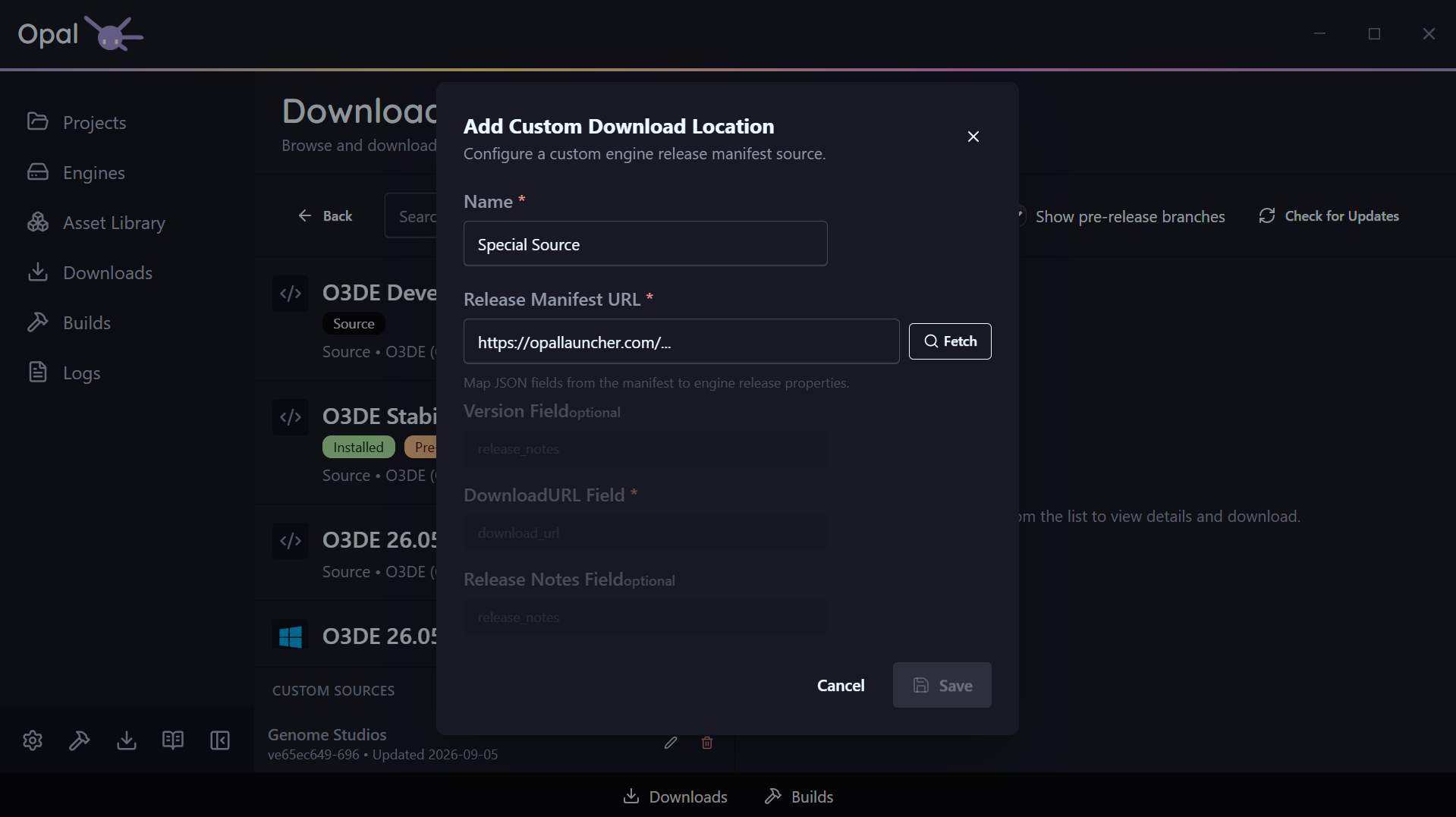
Open Custom Engine Sources, add a host, and map its JSON release manifest:
- Name — how it appears in the UI.
- Manifest URL — the JSON release manifest.
- Field mappings — which JSON keys hold the version, download URL, and release notes.
Each custom host shows its latest version and last-updated time, and a Check for Updates action refreshes them on demand. Custom-source releases appear in the list alongside official ones.
See also
3.2 - Manage Engines
Register existing installs, set the default engine, view logs, and handle invalid installations.
The Engines page lists every engine OPAL knows about, with search across name, version, and path. Each engine shows its name and display version, its path, and badges for Official and Default status, plus its build status where relevant.
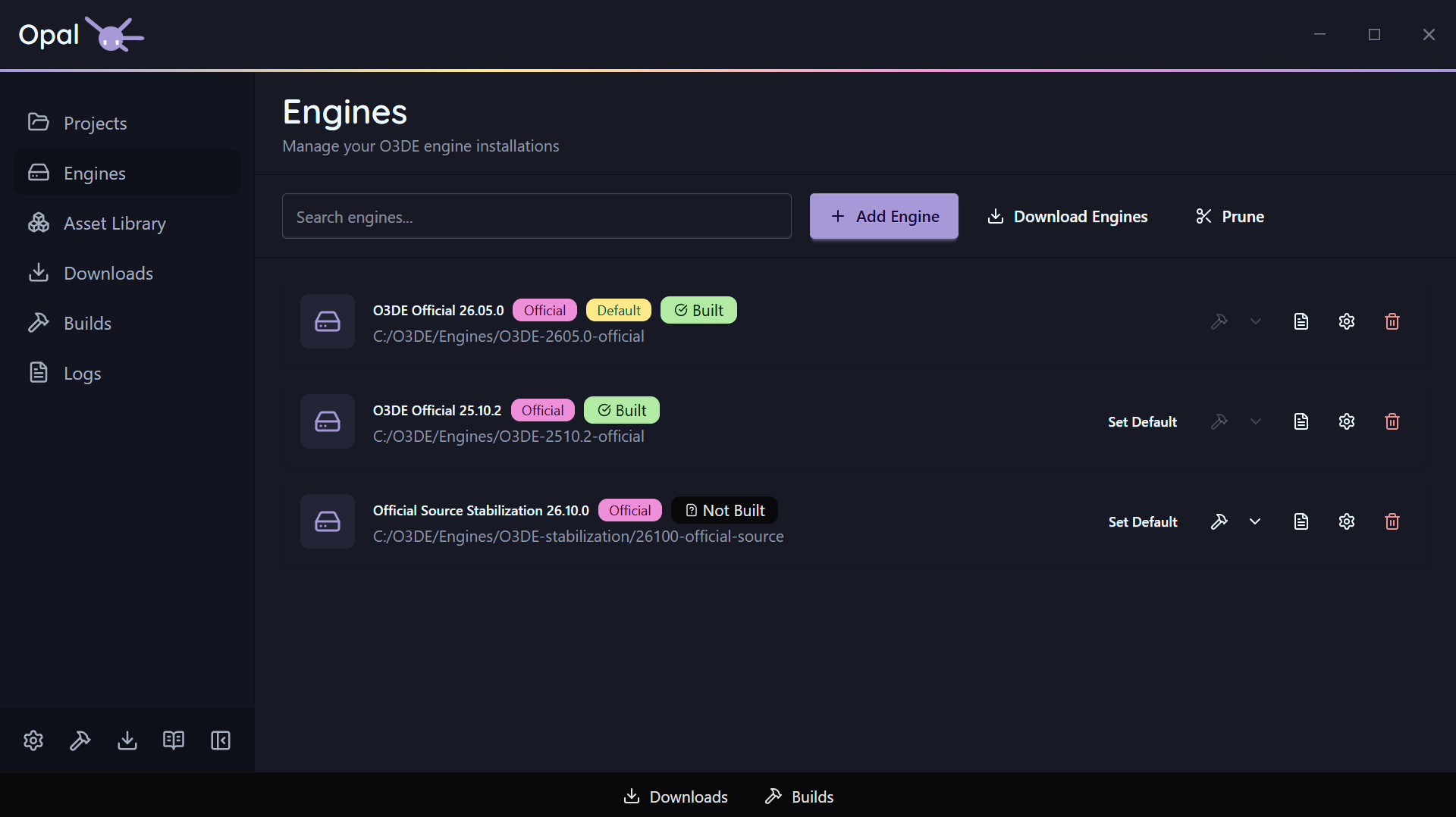
Add (register) an existing engine
If you already have an O3DE engine on disk, click Add Engine and point OPAL at its folder. OPAL validates the engine.json; if the folder isn’t a valid engine, it shows an “Invalid Engine” error instead of registering it.
If your first ever Engine is an Added Engine, it may take some time to set up.
You can view it’s progress in the Downloads Dock or Window.
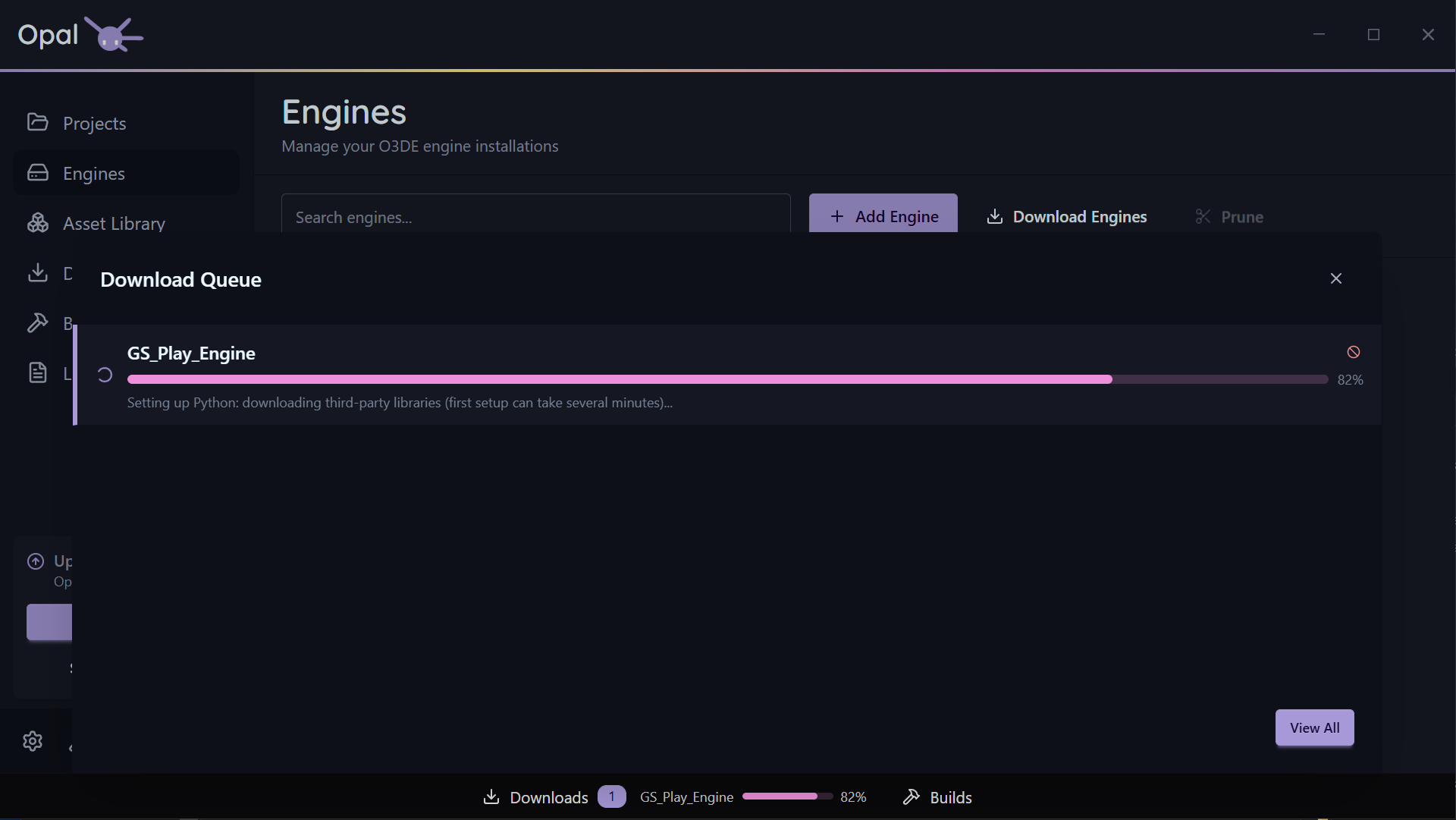
Set the default engine
Your default engine is the one preselected when you create a new project. Click Set Default on any installed engine; the Default badge moves to it.
View an engine’s log
Each engine has a View Log action for inspecting its build or install output. See Logs for the full log viewer.
Engine settings
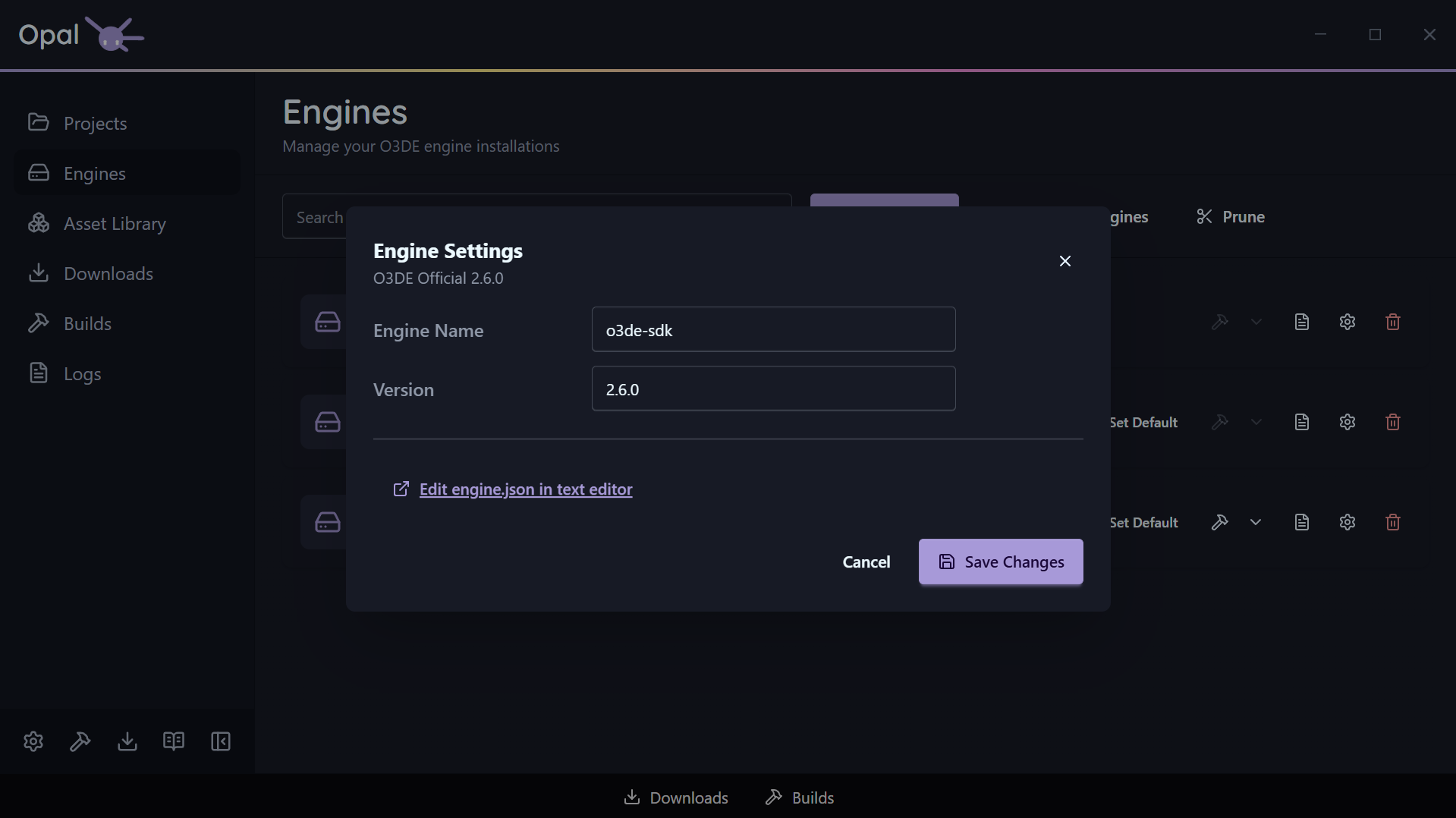
Open an engine’s Settings dialog to adjust its OPAL-tracked properties. Among these is an optional Editor-executable path override, useful for non-standard build layouts or pinning to a specific build configuration.
Invalid installations
If an engine’s files become invalid or go missing, OPAL surfaces an Invalid installation warning row with Remove and Redownload actions so you can recover in place.
See also
3.3 - Remove & Prune
Remove a single engine, or prune the engines nothing is using — with per-engine toggles.
Engines are large. When you no longer need one, OPAL removes it and cleans it out of the O3DE manifest. Source engines go to the operating system’s recycle bin / trash, not a permanent delete. Installer-based engines do not: they are uninstalled and are not recoverable from the recycle bin.
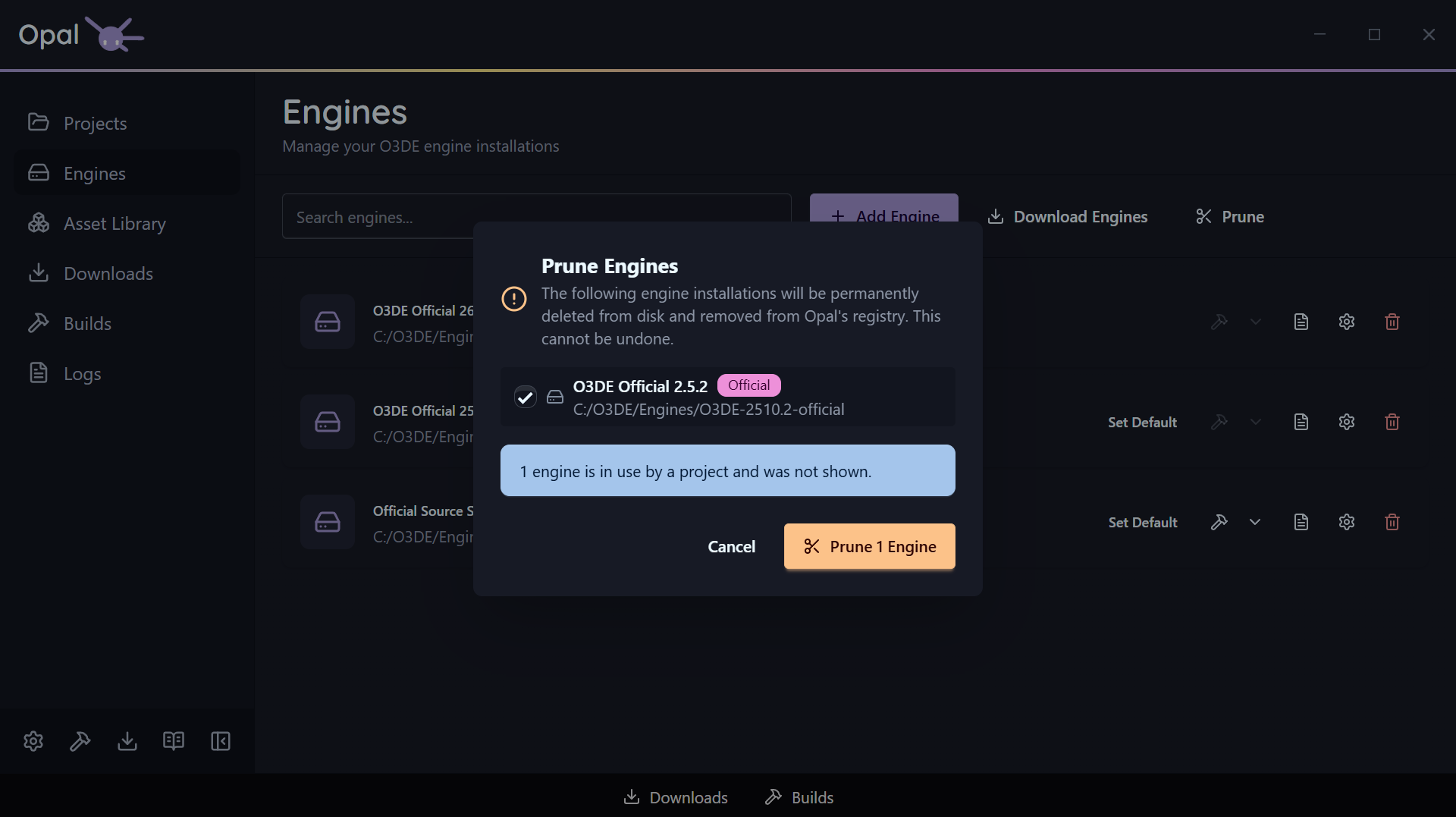
Remove a single engine
Use the Remove action on an engine (available from the engine list and from an invalid-installation warning row). OPAL confirms, unregisters it from the manifest, and removes the engine:
- Source engines are moved to the OS recycle bin / trash, so a mistake is recoverable.
- Installer-based engines are uninstalled and are not sent to the recycle bin. Removing one is permanent, so reinstall it if you need it back.
Prune unused engines
Prune, on the Engines page, reclaims space in one pass — and it only ever offers you engines that nothing is using.
Two exclusions are applied before you see the list:
- Your default engine is never listed. It is kept no matter what.
- Any engine a registered project resolves to is held back, and OPAL tells you how many were excluded for that reason. Pruning can’t take an engine out from under a project you still have.
If nothing is left after those exclusions, OPAL says so rather than presenting an empty confirmation.
Fine-tune the selection
Everything that survives the filter is listed with a checkbox, and all of them start ticked. Untick anything you want to keep — an engine you’re about to pin a new project to, a pre-release you’re still testing against — and the confirm button updates to match, reading Prune 2 Engines for two, and so on. It stays disabled while nothing is selected, so you can’t fire an empty prune.
Each row shows the engine’s name, version, path, and whether it is an official build, so you can tell near-identical installs apart before you commit.
What actually happens
For every engine you confirmed, OPAL removes its entry from the O3DE manifest, then removes the engine the same way as a single removal: source engines are moved to the OS recycle bin / trash (recoverable), while installer-based engines are uninstalled and are not recoverable from the recycle bin.
What happens to pinned projects
If a project was pinned to an engine you remove, the project stays in your list but flags a missing-engine state. See Project status & health for how to reassign or reinstall.
Because Prune skips in-use engines, this only comes up after a single Remove — or if an engine folder is deleted outside OPAL.
See also
3.4 - Source Builds
Build the O3DE engine from source, and how Script-Only mode changes what’s available.
OPAL can install O3DE either as a prebuilt binary or as a source build. Prebuilt engines are faster to get running; source builds let you patch the engine yourself. OPAL tracks which is which and only offers build actions where they make sense.
Installing a source build
On the Engine Downloads page, choose the Source platform filter (or a pre-release branch).
A source engine is usable without building it, which causes the entire source code to build alongside your project. A necessary process for source code editing/development work, but will cause longer-than-normal build times for your project.
To build it once, and be able to use it regularly thereafter, you can proceed to building your engine directly.
Building and rebuilding
Source engines expose a Build action on the Engines page. Prebuilt engines don’t — the action is disabled with a “Cannot build pre-built engine” note, since there’s nothing to compile.
OPAL runs the engine build through the Builds queue, so it’s pausable, resumable, and crash-safe like any other build.
An unbuilt source engine is clearly marked so you know it still needs a build before projects can use it prebuilt.
Script-Only mode
If you’re not compiling C++, turn on Script-Only mode (in the onboarding wizard or Settings). While it’s on, OPAL:
- Hides the Source option in Engine Downloads.
- Hides build actions on source engines.
- Notes that unbuilt source engines are unavailable in Script-Only mode.
This keeps the app focused on prebuilt, script-based work.
See also
4 - Projects
Create, import, build, run, and export O3DE projects, with status-aware cards and missing-engine recovery.
The Projects page is the landing view of OPAL. Every project you’ve created or imported lives here, each on a card that shows its state at a glance and offers the actions available right now. Search filters the list by display name, name, or path.
This is where the whole pipeline runs from — create, build, run, debug, and export — without dropping to a command line.
In this section
- Create & import — Make a new project from a template, or bring in an existing one.
- Build & run — Build, run the Asset Processor, launch the Editor, and follow live run states.
- Status & health — What each status badge means, and how OPAL guides you through a missing engine.
- Project settings — Pin an engine, override the build tool, and pass launch arguments per project.
4.1 - Create & Import
Create a new O3DE project from a template, or import an existing one.
Every project in OPAL is a standard O3DE project — OPAL writes and reads the normal project.json manifest, so projects stay compatible with the O3DE Editor, the o3de CLI, and the stock Project Manager.
Create a new project
Click New Project and fill in the dialog:
- Name — validated as you type: it must start with a letter and contain only letters, numbers,
_, or -, up to 64 characters. - Location — the parent directory the project folder is created in.
- Engine — defaults to your default engine; choose any installed engine instead.
- Template — OPAL auto-selects
DefaultProject; pick a different template if you prefer.
Click Create. OPAL creates the project, writes project.json, registers it, and adds it to your list.
Import an existing project
Click Import and select a folder that contains a valid project.json. OPAL reads the manifest, resolves which engine the project expects, and adds it to your list without modifying the project. This works for projects created anywhere — including the stock O3DE Project Manager.
See also
4.2 - Build & Run
Build, configure, or clean-build a project, run the Asset Processor, launch the Editor, and follow live run states.
From a project card you drive the core loop: build the project, process its assets, launch the Editor, and stop it again — all with real-time feedback.
Build
Click Build to queue a build using the project’s configured build tool. The build runs through the Builds queue, where it can be paused, resumed, reordered, and cancelled. Its output streams into the Logs viewer, and a View Log shortcut sits right on the item.
The first build of a project takes a while — that’s O3DE compiling your project’s modules.
What gets built is governed by Project settings: the build type (Debug / Profile / Release) and the build targets list, plus the build tool and any global CMake flags and thread count.
Installed a New Dependency?
If you installed new tools from the Wizard, you may need to restart your computer to be able to build your projects successfully.Build modes
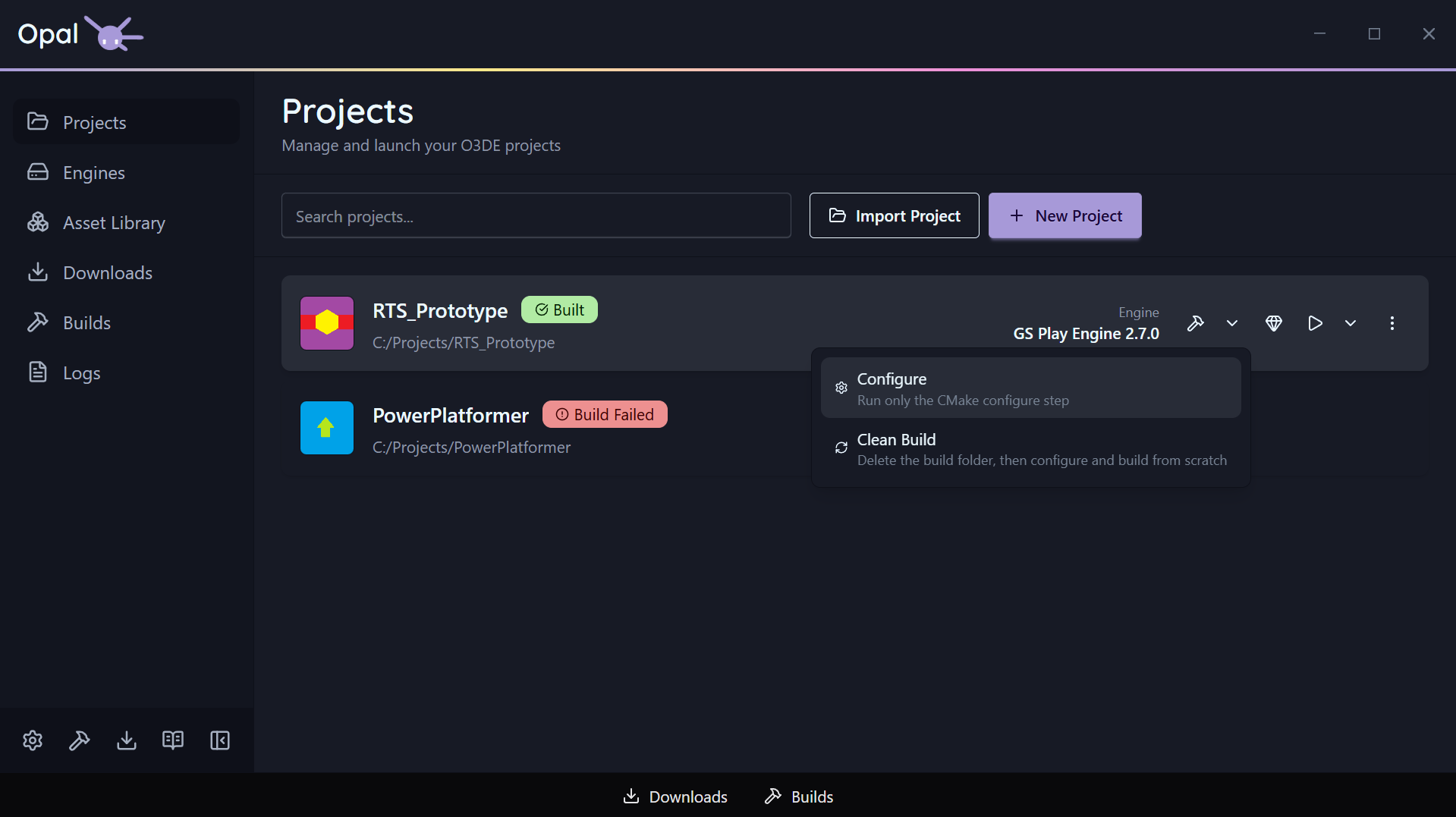
Build is a split button. The button itself runs the standard build; the dropdown beside it opens two alternate modes for when the default isn’t what you want.
| Mode | What it runs | Use it when |
|---|
| Build (default) | CMake configure, then compile | The everyday case |
| Configure | The CMake configure step only — stops before compiling | You changed gems, targets, or the build tool and want to regenerate the project without waiting for a full compile |
| Clean Build | Deletes the platform build folder, then configures and compiles from scratch | The build folder is stale or corrupt, or you’re switching generators and want nothing carried over |
Each mode is a normal queue item — same progress, same log, same cancel.
Configure finishes on its own Configured status rather than reporting a successful build, so a configure is never mistaken for something you can launch. See Status & health.
Clean Build wipes the build folder before anything else runs, so configure starts from nothing rather than a stale or partial cache. It is the slow option by design — expect a first-build-length wait.
Run the Asset Processor
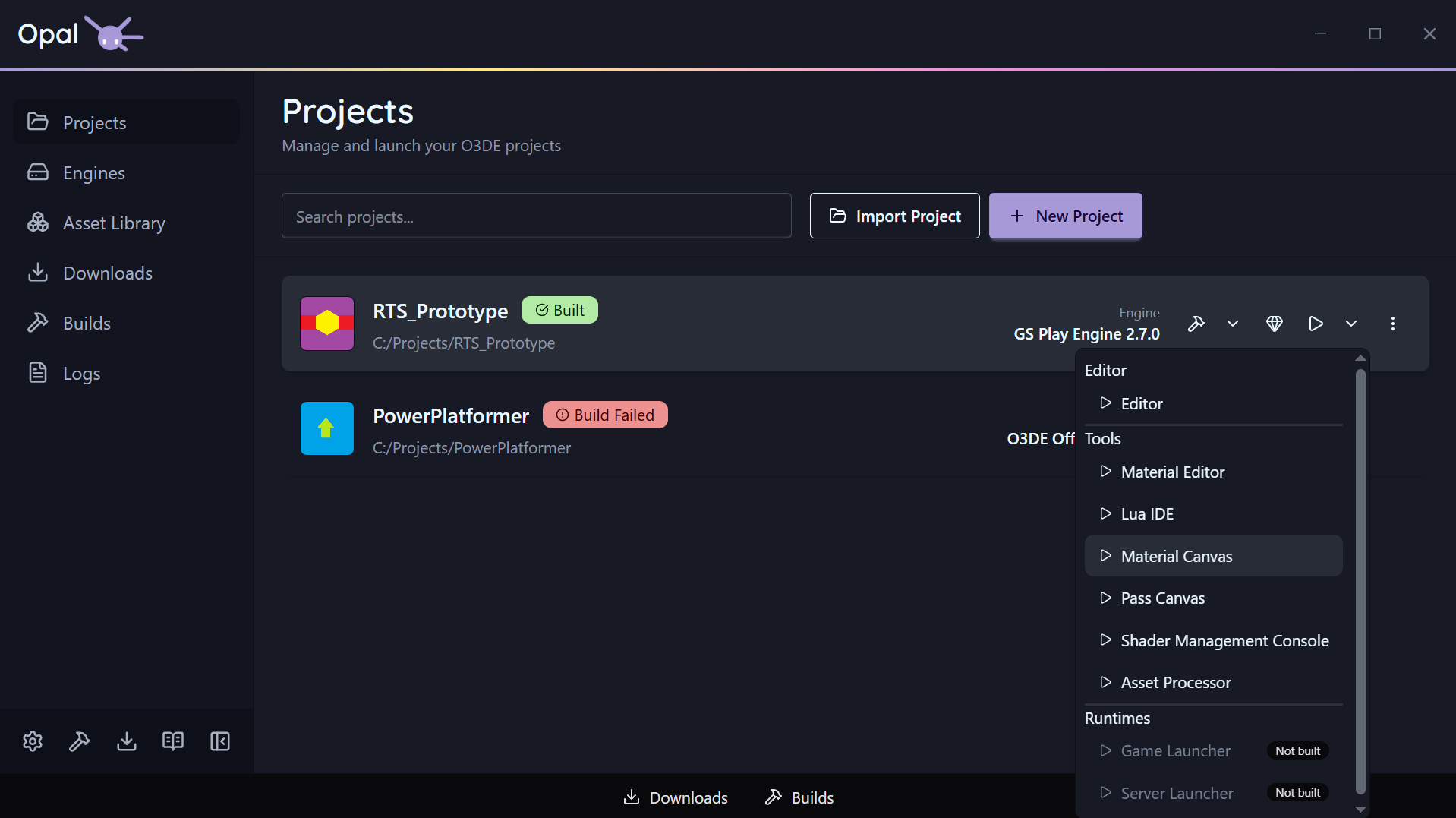
Each project has a dedicated Run Asset Processor action. It’s disabled until the project’s engine is resolved (OPAL needs to know which engine’s Asset Processor to run). Its output goes to the Logs viewer like everything else.
Launch and stop
Click Launch to open the O3DE Editor for the project. The card reflects real run states as it goes:
- Launching — the Editor is starting.
- Processing Assets — assets are being processed before the Editor is ready.
- Running — the Editor is open.
While a project is running, a Stop control replaces the quick actions so you can shut it down from OPAL.
Launch is a split button too: the dropdown lists every application OPAL found for the project, grouped into Editor, Tools, and Runtimes, each with its own launch / stop control and an Unavailable badge where the binary isn’t built. OPAL looks for those binaries in the project’s configured build type.
Any launch arguments you set in Project settings are appended to the Editor’s command line — tools and runtimes launch without them.
See also
4.3 - Status & Health
What each project status badge means, and how OPAL recovers a missing engine.
Every project card tells you its state without you having to open anything. There are two layers: the build status badge, and — when the project is running — a run state.
Build status badges
| Badge | Meaning |
|---|
| Not Built | The project exists but has never been built |
| Needs Build | The project has changed since its last successful build |
| Configuring | CMake is generating the project — the first stage of every build mode |
| Configured | A Configure run finished — the project is generated but not compiled |
| Building | A build is in progress |
| Built | The build is current — ready to launch |
| Build Failed | The last build errored — check Logs |
Every build passes through Configuring before it starts compiling. Configured is where a
Configure-only run comes to rest: the project is generated, but
there is nothing to launch yet, and the Launch button stays disabled until you build it.
Run states
While a project is launching or open, the card shows a run state instead: Launching, Processing Assets, or Running, with a Stop control to shut it down.
Missing-engine recovery
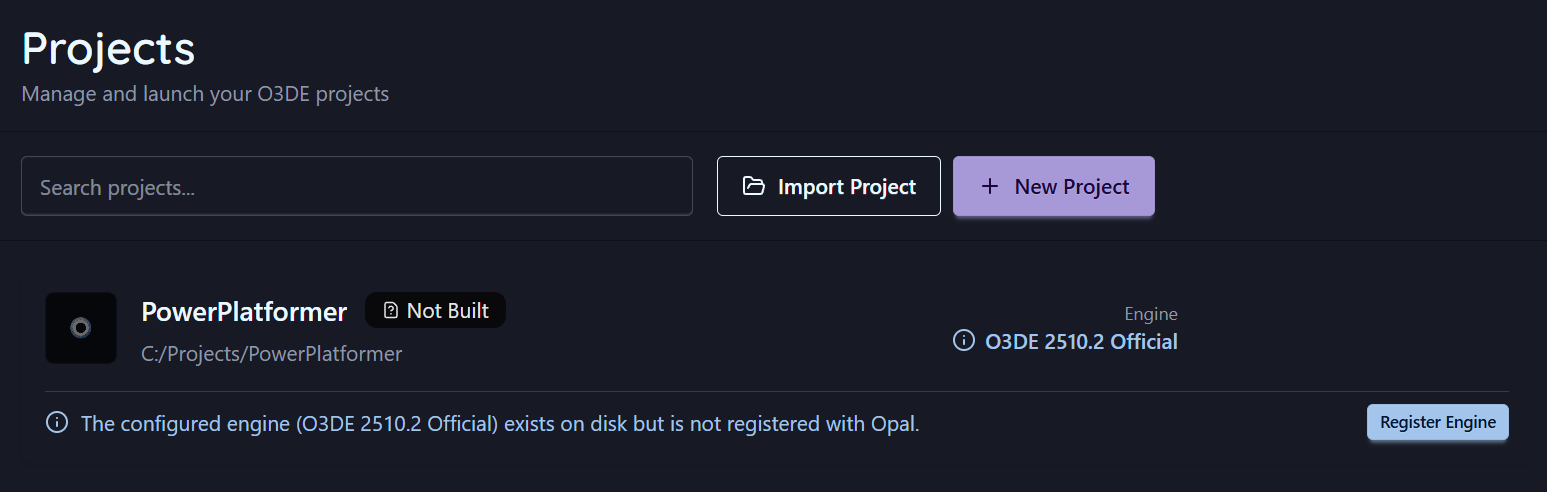
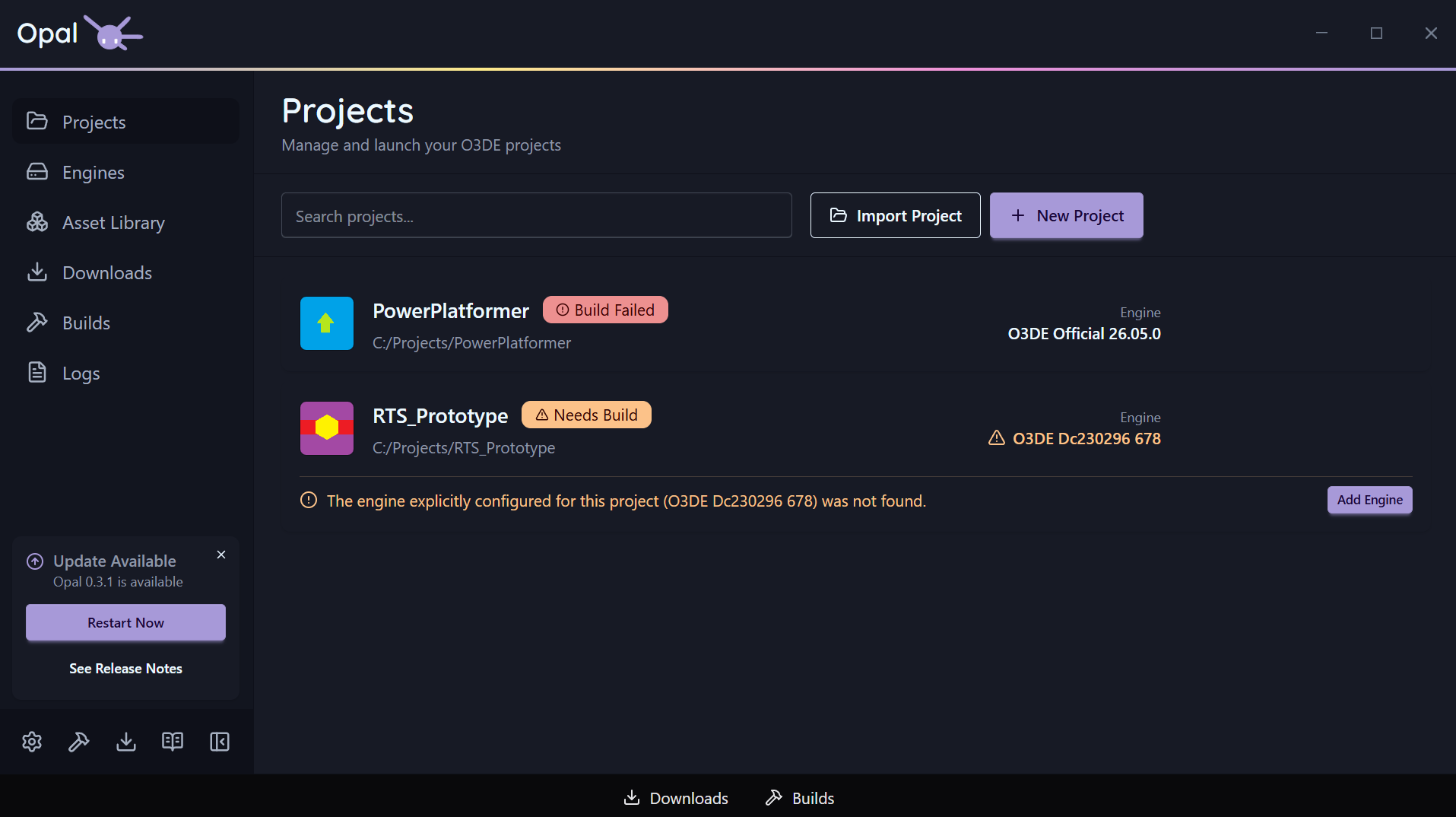
A project points at an engine. If OPAL can’t cleanly resolve that engine, it doesn’t just error — it identifies which of three situations you’re in and offers the matching fix inline on the card:
| Situation | What it means | Inline action |
|---|
| Engine not on disk | The referenced engine isn’t installed anywhere OPAL can find | Add Engine (go to Engines) |
| Engine present but unregistered | The engine folder exists on disk but isn’t registered with OPAL | Register Engine |
| Engine resolved loosely | Matched only by name/version, not an exact pinned path | Pin Engine |
Reassigning or reinstalling the engine clears the warning. See also Remove & prune for what happens to pinned projects when you remove an engine.
Missing-gem detection
OPAL also checks the gems a project references, including nested dependencies. If any can’t be found for the project’s engine, the card shows a missing gems banner, because configure will fail until they’re provided. The banner links into the gem configuration page, filtered to that project’s gems.
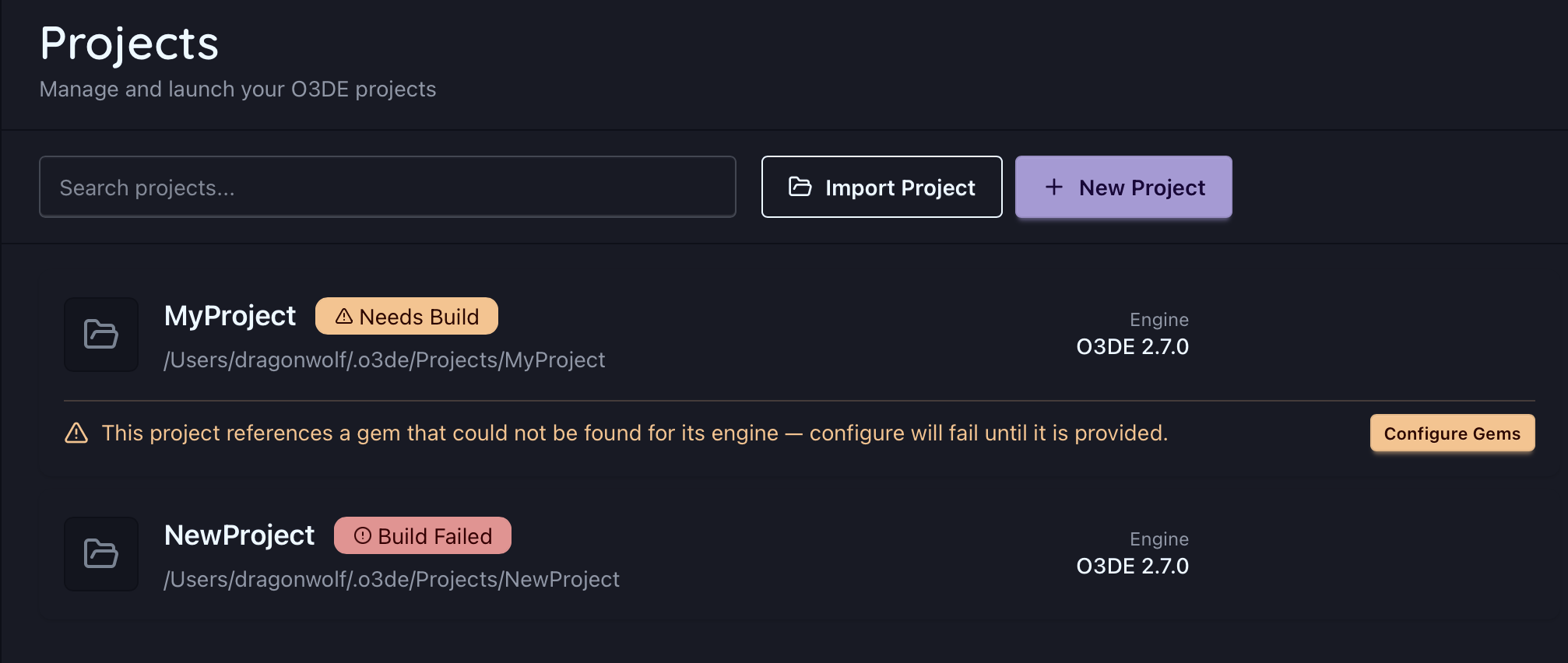
See Missing gems for how to register or download them.
See also
4.4 - Project Settings
Pin an engine, override the build type, tool, and targets, and pass launch arguments per project.
Most build behaviour is configured once, globally, in Settings. A few things, though, belong to the individual project — OPAL keeps those in per-project settings, keyed to the project’s path.
Open them from the project’s Settings action. Alongside the project.json fields (name, version, summary, icon, licence, repository, tags, gems), the dialog carries the advanced build and launch overrides below.
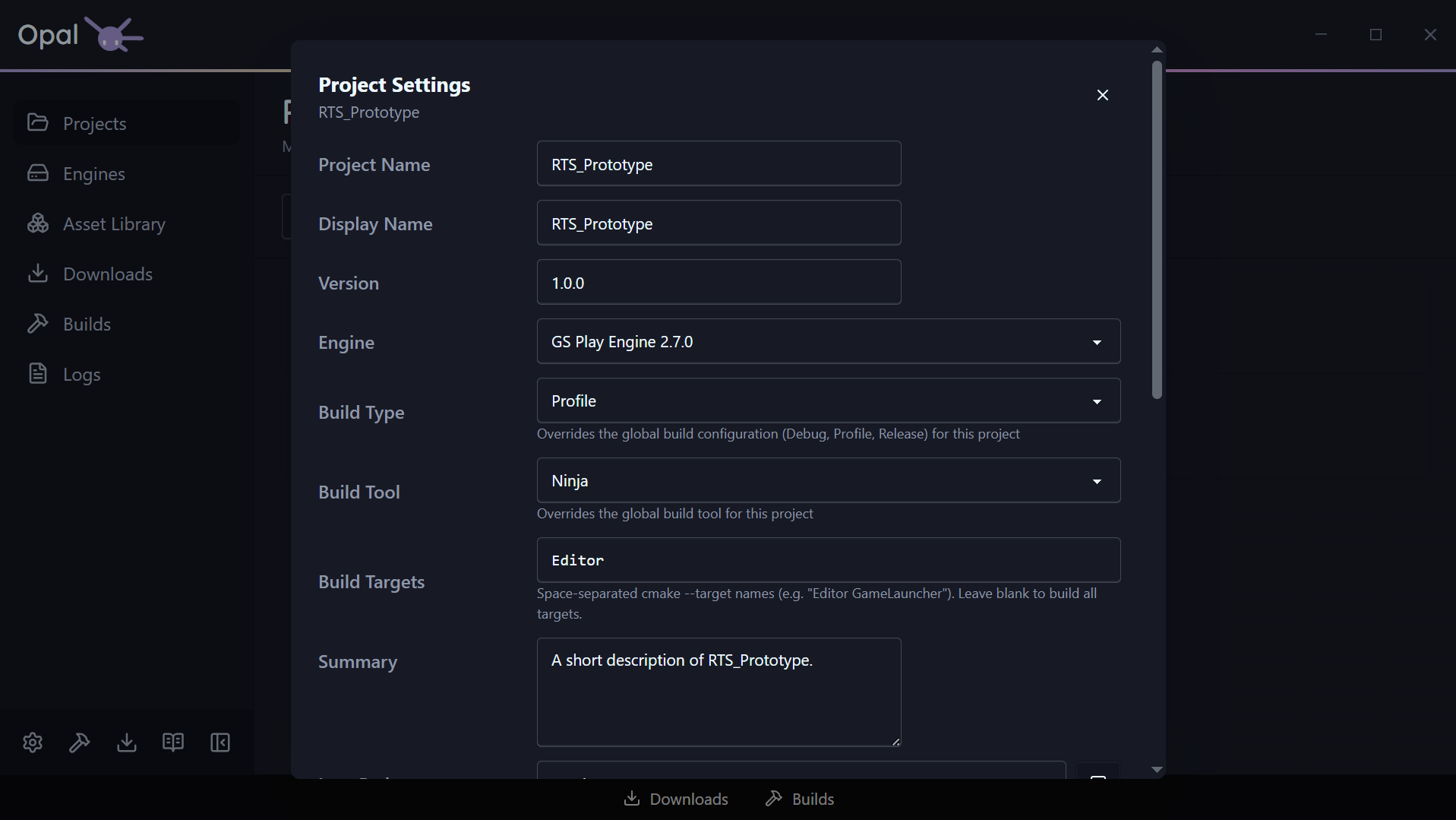
Engine pin
Each project resolves to an engine. From the project’s settings you can pin it to a specific installed engine (the same relationship the status & health page describes recovering when it breaks). If the pinned engine isn’t installed, the field warns you inline.
Build type
Choose the build configuration this project compiles and launches with: Debug, Profile, or Release.
Leave it on Use global setting and the project follows the global build configuration (Profile by default). Set it explicitly and this project alone is pinned to that configuration — useful when one project needs a Debug build for stepping through code while everything else stays on Profile.
The choice feeds both halves of the loop: it’s the configuration the build produces, and the configuration OPAL looks in when finding the Editor and other applications to launch.
Globally, OPAL uses one selected build tool (see Build Tools settings). A project can override that with its own build tool when it needs a different generator than your default — otherwise it inherits the global choice.
If the project’s existing build folder was configured with a different CMake generator than the one you’ve selected, OPAL says so right below the field. That’s a heads-up, not a block: the next build clears the cache and reconfigures with your selection.
Using the Windows optional Ninja Builder will grant granular progress reporting. Default MS Build will not.
To install it, re-run the Setup Wizard from Settings > Application, at the bottom of the window.
Build targets
By default a build compiles everything. Build targets narrows that to a specific list — space-separated cmake --target names, such as:
Leave the field blank to build all targets. Projects created through OPAL start with Editor, so a first build gets you into the Editor without compiling launchers you aren’t using yet.
Launch arguments
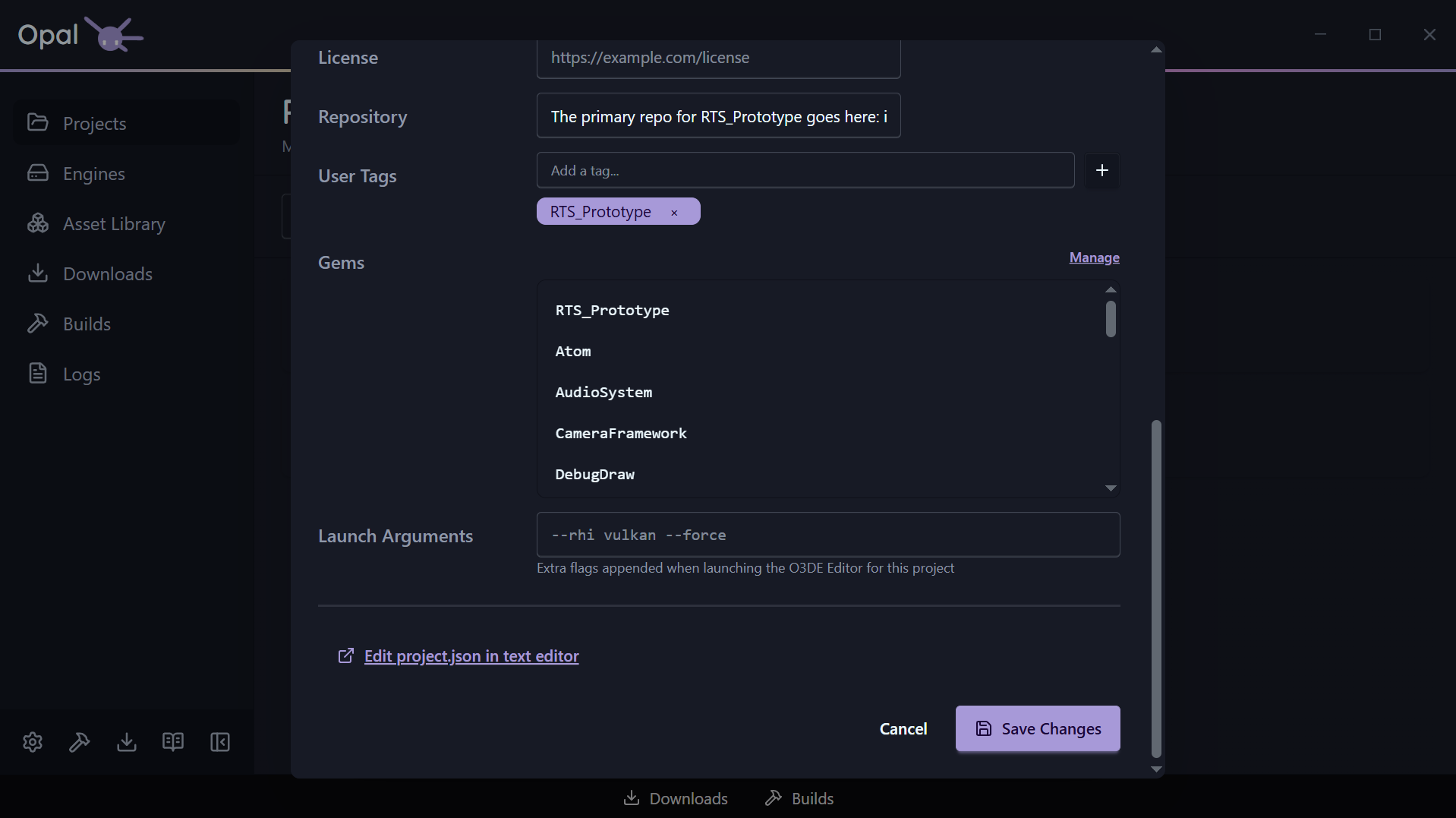
Extra command-line flags appended when this project’s O3DE Editor launches — for example:
Two things worth knowing:
- They apply to the Editor only. Tools and runtimes started from the project’s Run menu are launched without them.
- The field is validated as you type. Every flag has to be preceded by a space (
--rhi vulkan --force, not vulkan--rhi), and Save Changes stays disabled until the value parses.
Global vs per-project
CMake flags and build thread count are
global settings that apply to all projects — they live in
Build Tools settings, not here. Per-project settings are the engine pin, the build type, the build-tool override, the build targets, and the launch arguments.
See also
4.5 - Export
Package a project into a standalone, shippable release build.
Building a project gets you something you can run in the Editor. Exporting gets you something you can ship: a standalone release build with its launcher, its packaged assets, and nothing that depends on O3DE being installed on the machine that runs it.
OPAL drives O3DE’s own export-project pipeline, so the output is a normal O3DE export — OPAL supplies the configuration and the progress reporting.
Start an export
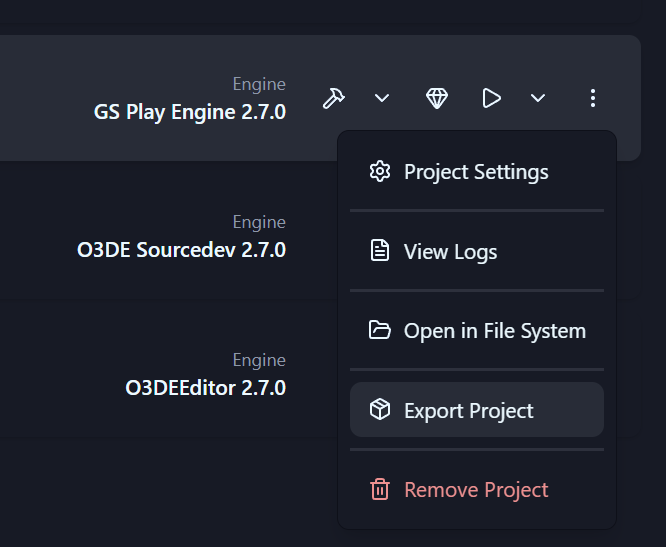
Open a project’s action menu and choose Export Project. The export dialog collects everything the pipeline needs.
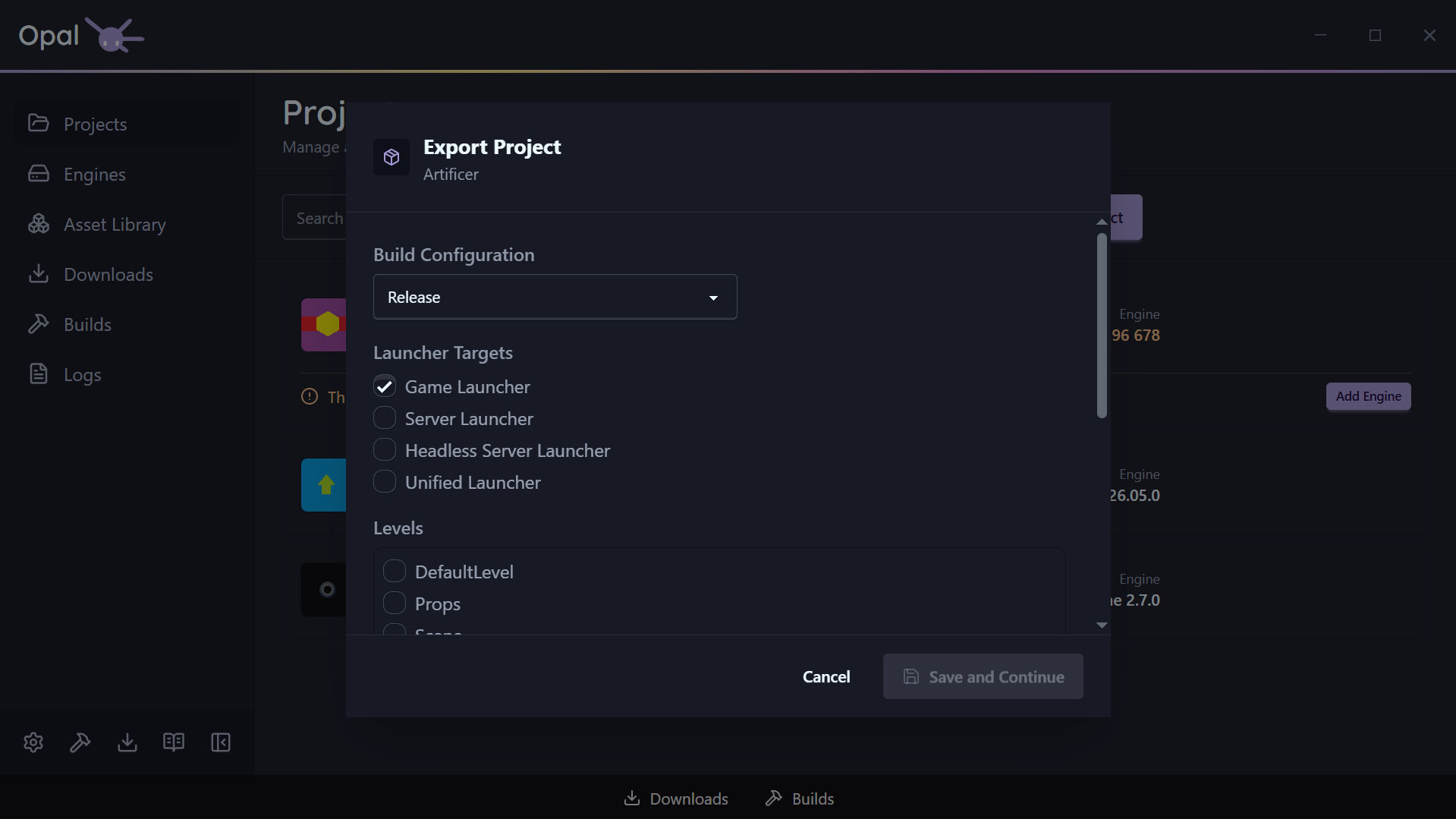
Build configuration
Debug, Profile, or Release. This is the compiled code that ends up in the shipped build, and it defaults to Release.
Launcher targets
Which executables to produce. At least one is required:
| Target | Produces |
|---|
| Game Launcher | The standard client executable (selected by default) |
| Server Launcher | A dedicated server build |
| Headless Server Launcher | A server build with no rendering |
| Unified Launcher | A single executable that can act as client or server |
Levels
OPAL reads the levels out of your project’s Levels folder and lists them. Tick the ones to include — at least one is required, because the level selection is what seeds the asset bundle. Everything those levels reference is gathered automatically; you do not have to hand-build a seed list.
If the list comes up empty, the project has no levels where O3DE expects them.
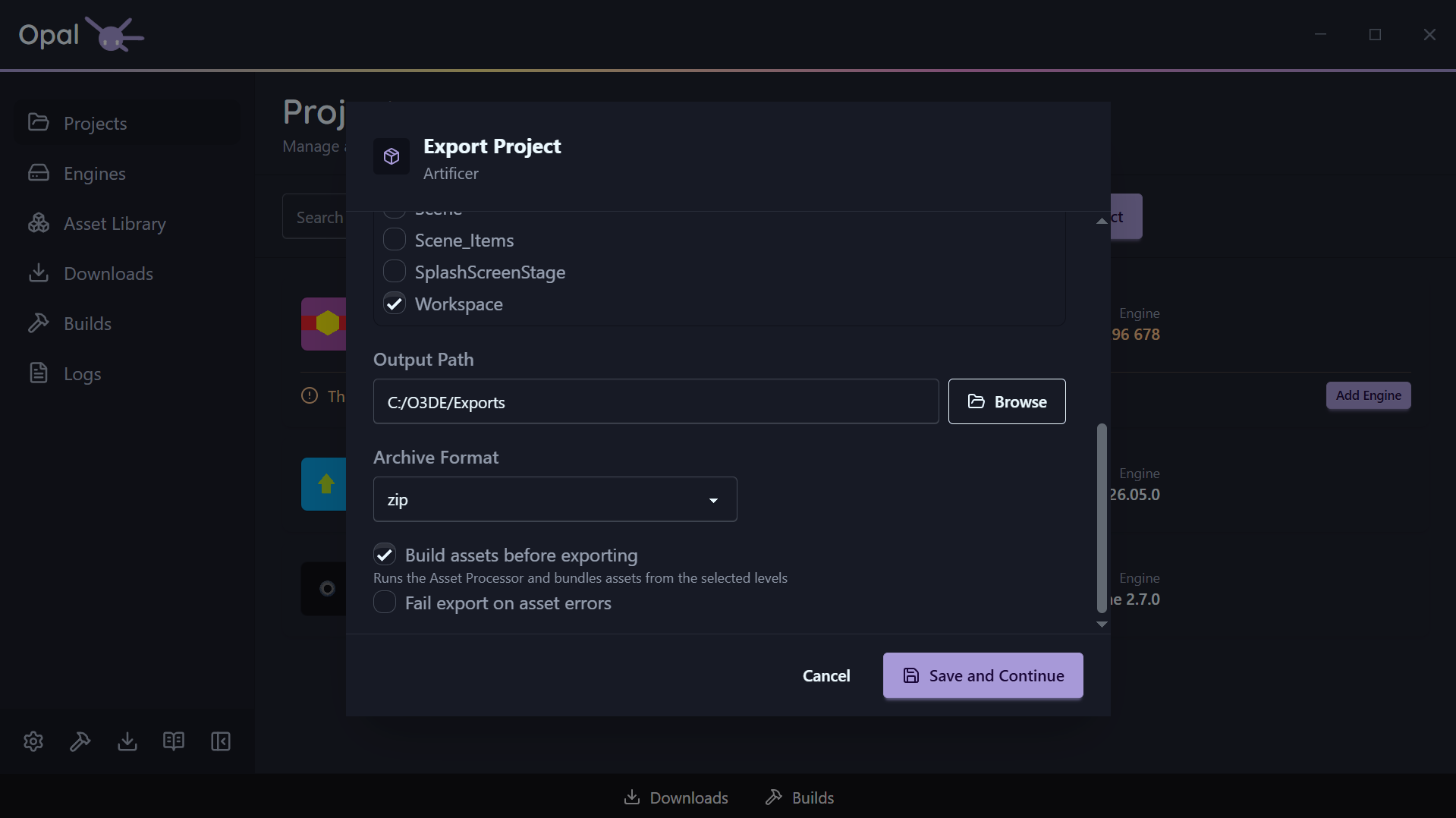
Assets
- Build assets before exporting (on by default) runs the Asset Processor and bundles the assets the selected levels pull in. Leave it on unless you have just processed assets yourself.
- Fail export on asset errors (off by default) turns asset processing errors into a hard stop instead of a warning. Turn it on for a release you intend to actually ship.
Package the output as zip, gzip, bz2, or xz, or choose None (folder only) to leave it as a plain directory. Defaults to zip.
Output path
Where the exported build is written. Choosing a folder triggers a disk space check.
The space estimate is an estimate
OPAL estimates the space required from your already-processed assets and existing build output, and doubles it when an archive format is selected — the export needs the unpacked folder and the archive on disk at the same time. A project that has never been built or asset-processed will be undercounted. If the destination doesn’t have room, OPAL saves your settings but will not start the export.Where the settings are stored
Save and Continue writes your choices into the project’s .command_settings file using O3DE’s own export-project-configure command. That file lives in the project root and is the standard O3DE export configuration — so your settings survive, can be read by anyone on the team, are versionable alongside the project, and remain usable from the command line without OPAL.
Nothing is stored in a private OPAL format. Re-opening the dialog on a project you have exported before will run against the same .command_settings the pipeline uses.
Exporting compiles launcher targets, so it needs the same toolchain a build does. If the required build tools are missing, OPAL still saves your export settings and tells you what is missing, with an Install Build Tools shortcut. The export starts once the toolchain is in place.
This also means export is unavailable in Script-Only mode, which deliberately hides source-compilation workflows.
Watching it run
An export joins the Builds queue and behaves like a build: same progress bar, same Pause / Resume, Cancel, reorder, and View Log controls. Builds and exports share one concurrency pool, because both drive the same CMake toolchain and would otherwise contend for it.
The queue item reports the stage it is in:
| Stage | What is happening |
|---|
| Building tools | Compiling the asset tooling the export needs |
| Building assets | Running the Asset Processor over the project |
| Bundling assets | Packing the level dependencies into .pak files |
| Compiling launcher | Building the launcher target(s) — reports real compile progress |
| Archiving | Packaging the output into the chosen archive format |
Export has one pause checkpoint, before the launcher compile begins. Once compiling starts, the item is no longer pausable — the same rule the Builds queue applies to a project build after its configure step.
Output is written to the Logs viewer as a project-export log for the duration, and OPAL raises a notification when the export finishes or fails.
See also
5 - Assets & Gems
Browse the Asset Library, configure gems per project, and manage repositories, local gems, and watch folders.
Gems are O3DE’s unit of reusable functionality — art, code, tools, whole frameworks. OPAL gives them a real home: a browsable Asset Library with a proper inspector, per-project gem configuration that stays in sync with project.json and CMake, and flexible ways to bring gems in — from repositories, local folders, or watch folders.
In this section
- Asset Library — Browse and filter gems, and inspect them across the five-tab inspector.
- Project gems — Enable and disable gems for a specific project, with dependencies handled for you.
- Repositories & sources — Add gem repositories, local gems, and watch folders; how caching and credentials work.
5.1 - Asset Library
Browse and filter gems, and inspect them with the five-tab Gem Inspector.
The Asset Library is OPAL’s gem browser: a gem list on the left and the Gem Inspector on the right. It gathers gems from every source you’ve configured — repositories, local gems, and the gems bundled with your engines — and lets you search and filter across all of them.
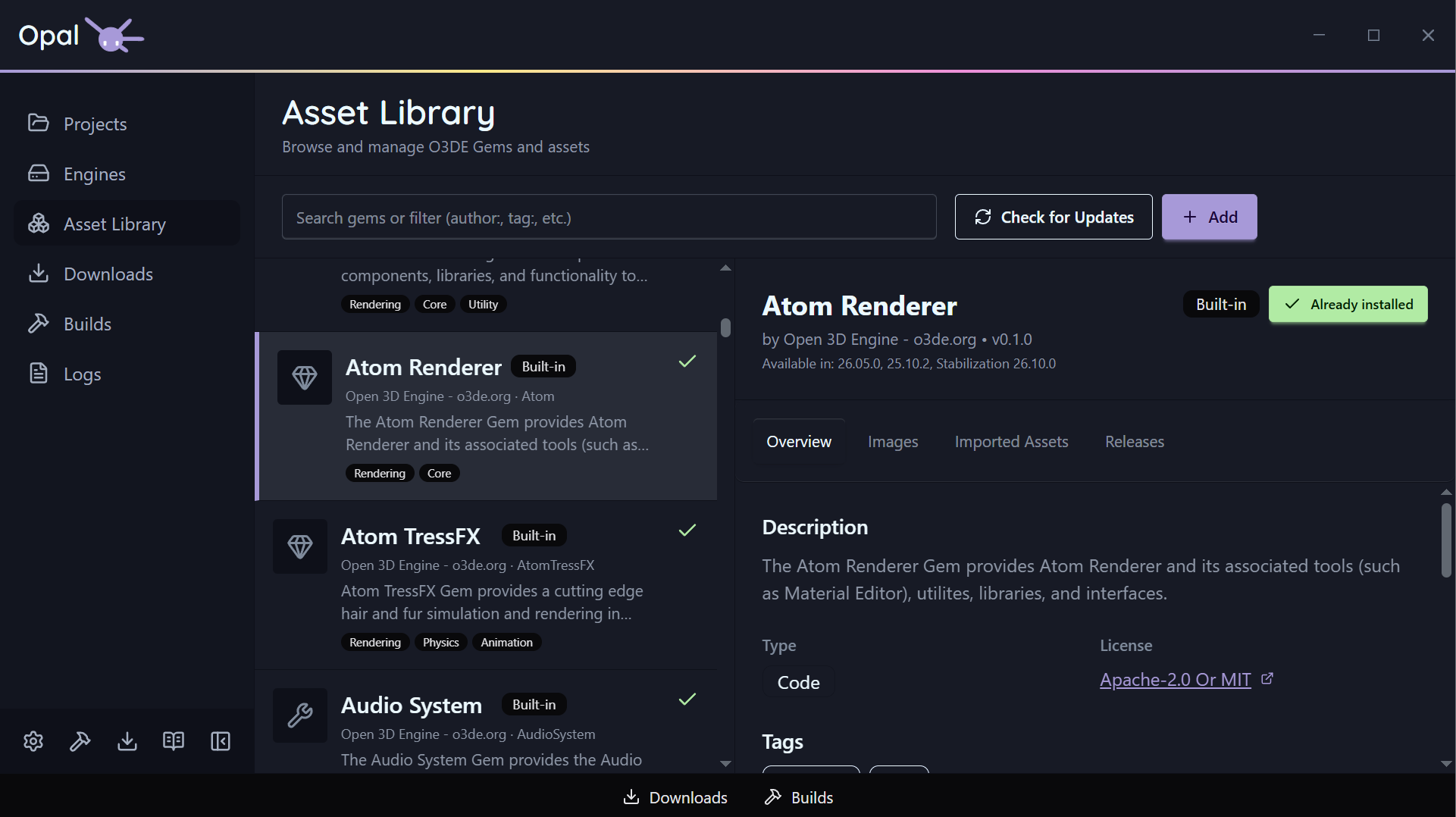
Search & filter
The search box does a live text match across gem name, display name, summary, and origin. On top of free text, you can use filter prefixes — combine as many as you like:
| Prefix | Matches |
|---|
author:<name> | Gems by a given author |
tag:<value> | Gems with a tag (repeatable; tags OR together) |
gemType:<Asset|Code|Tool> | Gems of a given type |
compatibleEngines:<engine>[,<engine>...] | Gems compatible with the given engine(s) |
downloaded:<true|false> | Downloaded (or not) gems |
hasUpdate:<true|false> | Gems with an available update |
updatedBefore:<date> / updatedAfter:<date> | Gems by last-updated date |
Free text and prefixes combine — for example author:Acme tag:audio hasUpdate:true.
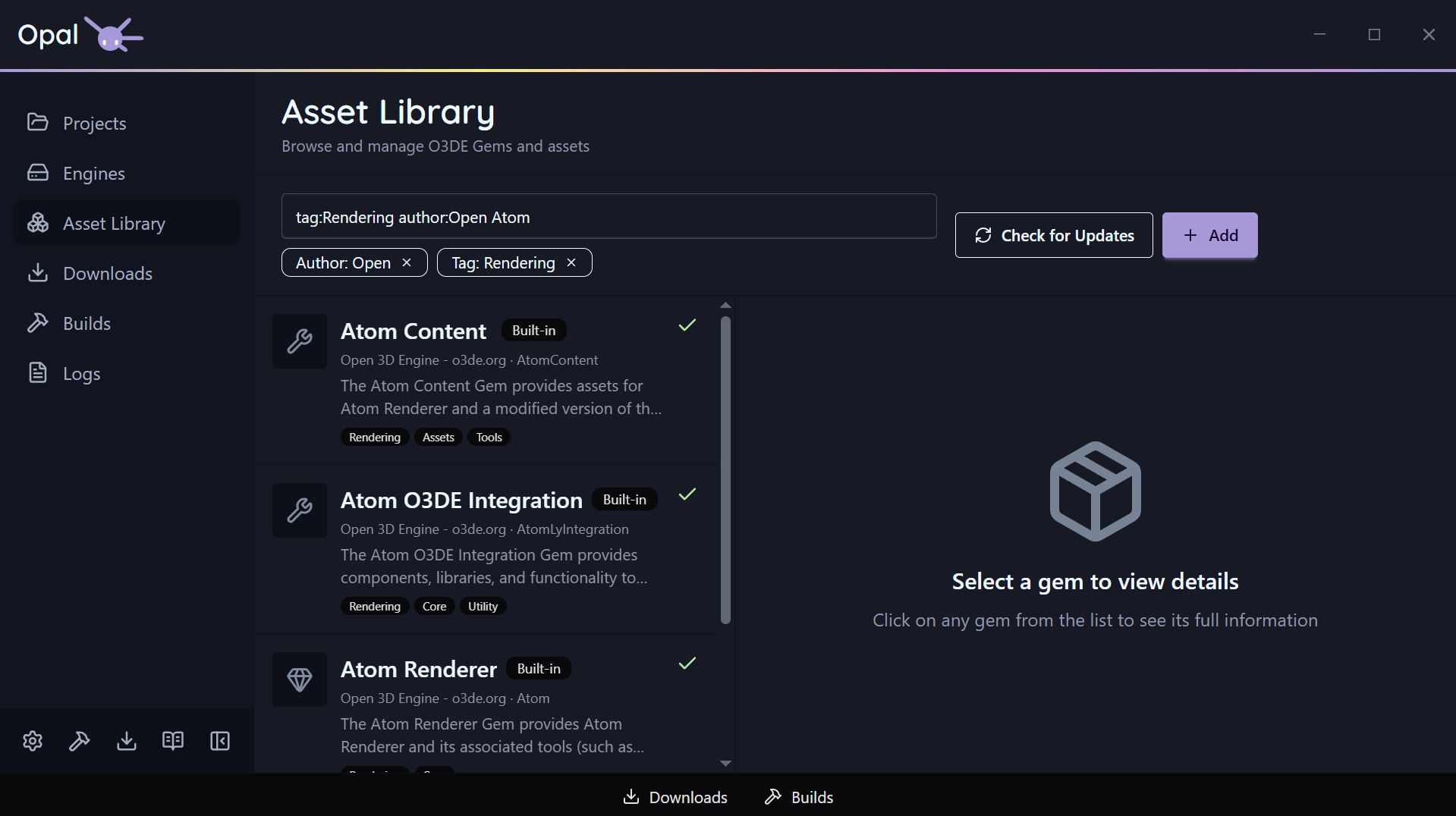
The Gem Inspector
Select a gem to open the inspector, which has five tabs:
- Overview — name, author, summary, type, license, requirements, compatible engines, dependencies.
- Images — screenshots and media the gem provides.
- Imported Assets — the assets the gem brings in.
- Releases — version history with release notes fetched automatically from the gem’s host (GitHub, GitLab, or Bitbucket).
- Instances — where the gem is present/used.
For local or user-managed gems, the inspector also supports an edit mode for fields like display name, summary, type, license, docs URL, requirements, compatible engines, and dependencies.
Kinds of gems
OPAL distinguishes local gems, engine-bundled (built-in) gems, and repository gems, so you always know where a gem came from.
See also
5.2 - Project Gems
Enable and disable gems for a specific project, with dependencies handled for you.
OPAL gives easy access to a projects gem configuration, reached from the project’s Gems quick-action button.
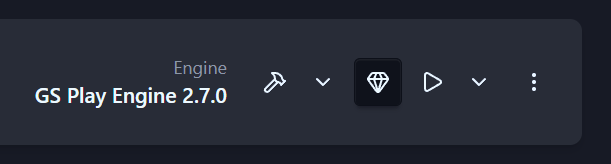
Enable and disable gems
The project gem view uses the same list-and-inspector layout as the Asset Library, but scoped to the gems available for that project’s engine plus your repository gems. Toggle a gem active or inactive for the project, and OPAL keeps the project’s gem set in sync — updating project.json’s gem list and the project’s CMake gem list together.
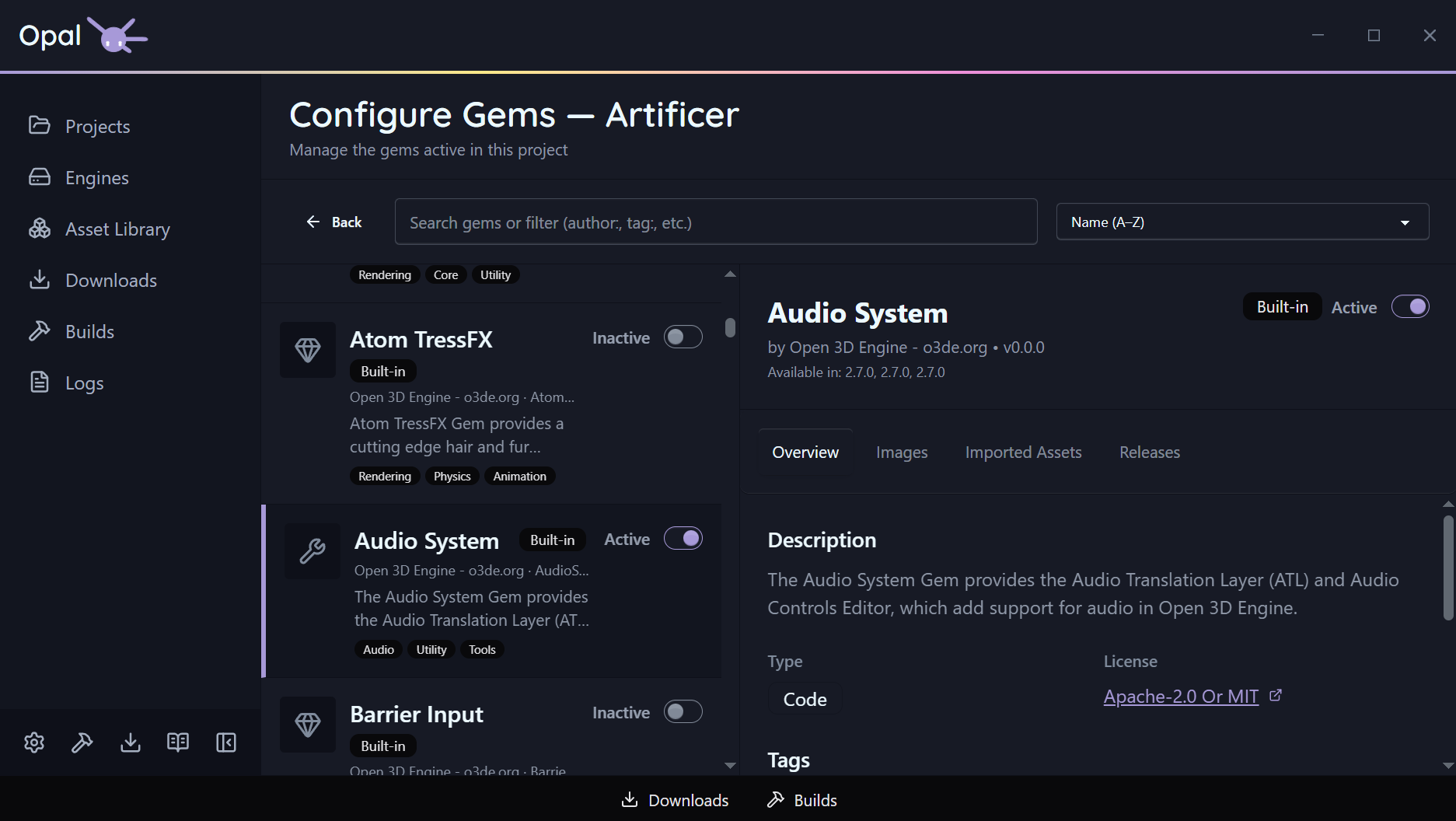
Required dependencies
Gems that are pulled in as dependencies of an active gem are marked with a Required dependency badge and can’t be switched off directly — OPAL won’t let you disable something another active gem needs.
Sorting
The search box does a live text match across gem name, display name, summary, and origin. On top of free text, you can use filter prefixes — combine as many as you like:
| Prefix | Matches |
|---|
author:<name> | Gems by a given author |
tag:<value> | Gems with a tag (repeatable; tags OR together) |
gemType:<Asset|Code|Tool> | Gems of a given type |
compatibleEngines:<engine>[,<engine>...] | Gems compatible with the given engine(s) |
downloaded:<true|false> | Downloaded (or not) gems |
hasUpdate:<true|false> | Gems with an available update |
updatedBefore:<date> / updatedAfter:<date> | Gems by last-updated date |
filter:project | Only the gems this project references (the This project’s gems scope) |
Downloading a gem’s source
Per gem, you can download the gem or its source — OPAL uses git clone or an archive download as appropriate (see Repositories & sources for how credentials and the git/archive choice work).
Missing gems
OPAL checks every gem a project references against the gems it knows about for the project’s engine. That includes gems listed explicitly in the project and gems pulled in only as dependencies of other gems, however deeply nested. Any reference that can’t be resolved is flagged.
Configure will fail until the missing gems are provided, so OPAL warns you up front. The project’s card shows a missing gems banner with a shortcut straight into the gem configuration page, already filtered to that project’s gems.
On the Configure Gems page, each unresolved gem appears as a placeholder row with a Not Found badge. Gems that are only there as another gem’s dependency also carry the Required dependency indicator. Use the This project’s gems scope (filter:project) to see just the gems the project references.
For each missing gem you can:
- Register it from a local folder. If you already have the gem on disk, point OPAL at its folder and it is added to your gem library.
- Download it from a known repository. If a configured repository provides the gem, download it from there. See Repositories & sources.
- Remove it from the project, if the project doesn’t need it.
Once every reference resolves, the banner clears and Configure can proceed.
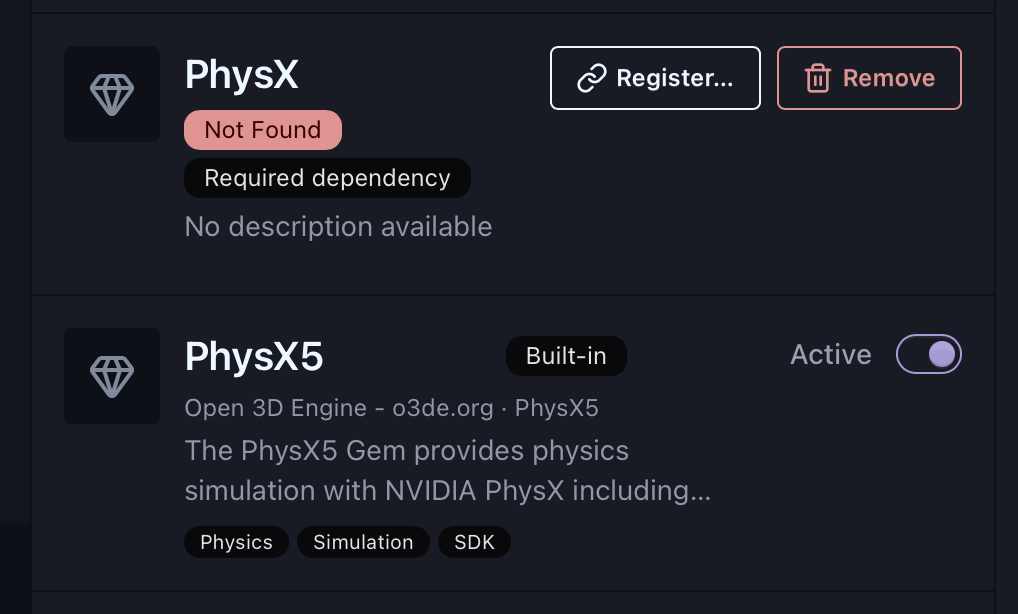
Engine not resolved
If the project’s engine can’t be resolved, the page shows an engine-missing banner — resolve the engine first (see status & health) and the gem configuration becomes available.
See also
5.3 - Repositories & Sources
Add gem repositories, local gems, and watch folders; how caching and credentials work.
The Asset Library is only as good as the gems it can see. OPAL lets you add gems from several kinds of source, all managed from the Asset Library’s Add menu.
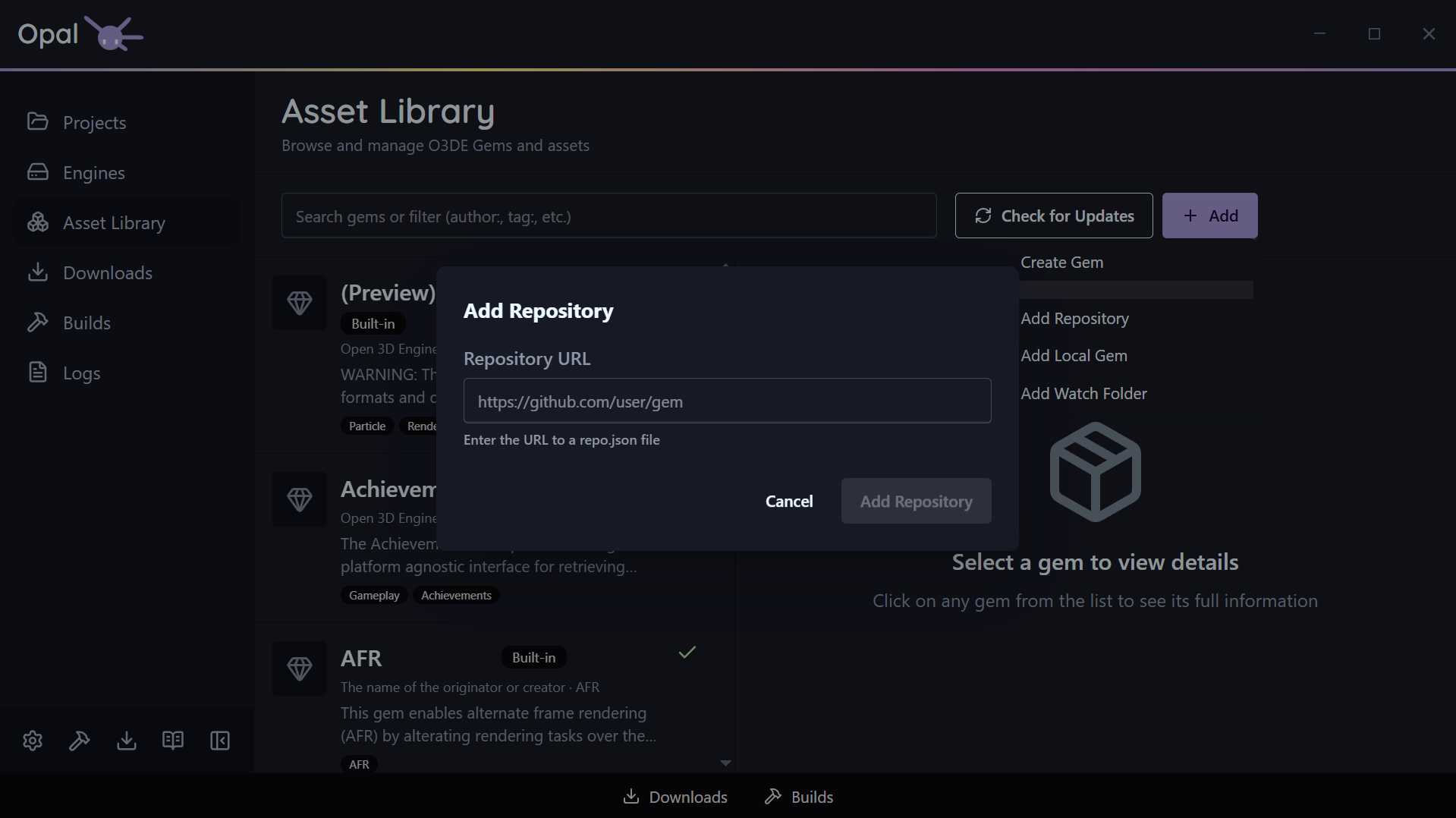
Ways to add gems
- Add Repository — point OPAL at a gem repository URL (it must end in
.json). OPAL indexes it and folds its gems into the library. - Add Local Gem — select a local gem folder to register a gem that lives on your machine.
- Add Watch Folder — choose a folder that OPAL watches and auto-syncs gems from as they appear. If a watched folder later goes missing, OPAL prompts you to keep or stop watching it.
- Create Gem — scaffold a brand-new gem from within OPAL.
Caching & refresh
OPAL caches indexed repositories and scans your installed gems on startup, so browsing works offline and stays fast. It refreshes automatically when the cache is stale and you’re online, and a Check for Updates / Refresh button forces a refresh on demand. The automatic refresh interval is configurable in Asset Library settings.

Source downloads & credentials
When you download a gem’s source, OPAL uses git clone or an archive download automatically. You can prefer git globally via the useGitForSourceDownload setting; when git isn’t available or is disabled, OPAL falls back to the HTTP archive method.
If a source needs authentication, a Git credential prompt handles it — labeling the clone versus LFS-fetch stages distinctly so you know what’s being requested.
Warnings
Opal will notify you if things change around your watched folders and remote sources, ensuring you have awareness and control of how it will handle those changes.
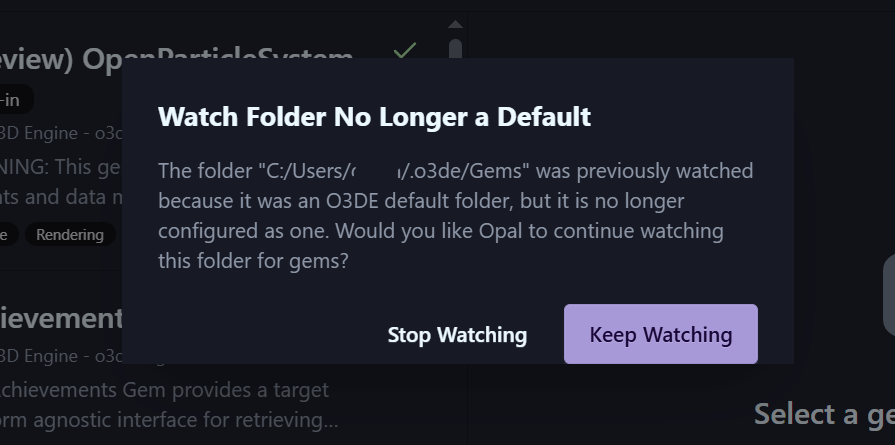
Release notes
For gems hosted on GitHub, GitLab, or Bitbucket, OPAL fetches release notes automatically (shown in the inspector’s Releases tab). The provider is detected from the gem’s metadata URLs, and the provider system is extensible for additional hosts.
See also
6 - Settings
Every configurable option in OPAL, grouped by category.
OPAL’s settings are grouped into tabs. Open them from the gear in the Quick Access Bar at the bottom of the sidebar. The defaults are chosen so most people never need to touch them.

Settings are stored in OPAL’s own config, except where a tab reads and writes the O3DE manifest directly (the O3DE tab).
In this section
- Application — Appearance, language, window behaviour, startup, downloads, and notifications.
- Build Tools — CMake and build-system detection, selected build tool, CMake flags, and thread count.
- O3DE — The O3DE manifest’s default folders, plus OPAL’s engine download location.
- Asset Library — How often the gem cache refreshes automatically.
- Script-Only mode — Restrict OPAL to prebuilt, script-based work.
6.1 - Application
Appearance, language, window behaviour, startup, downloads, and notifications.
The Application tab holds OPAL’s general preferences plus the embedded Download and Notification settings.
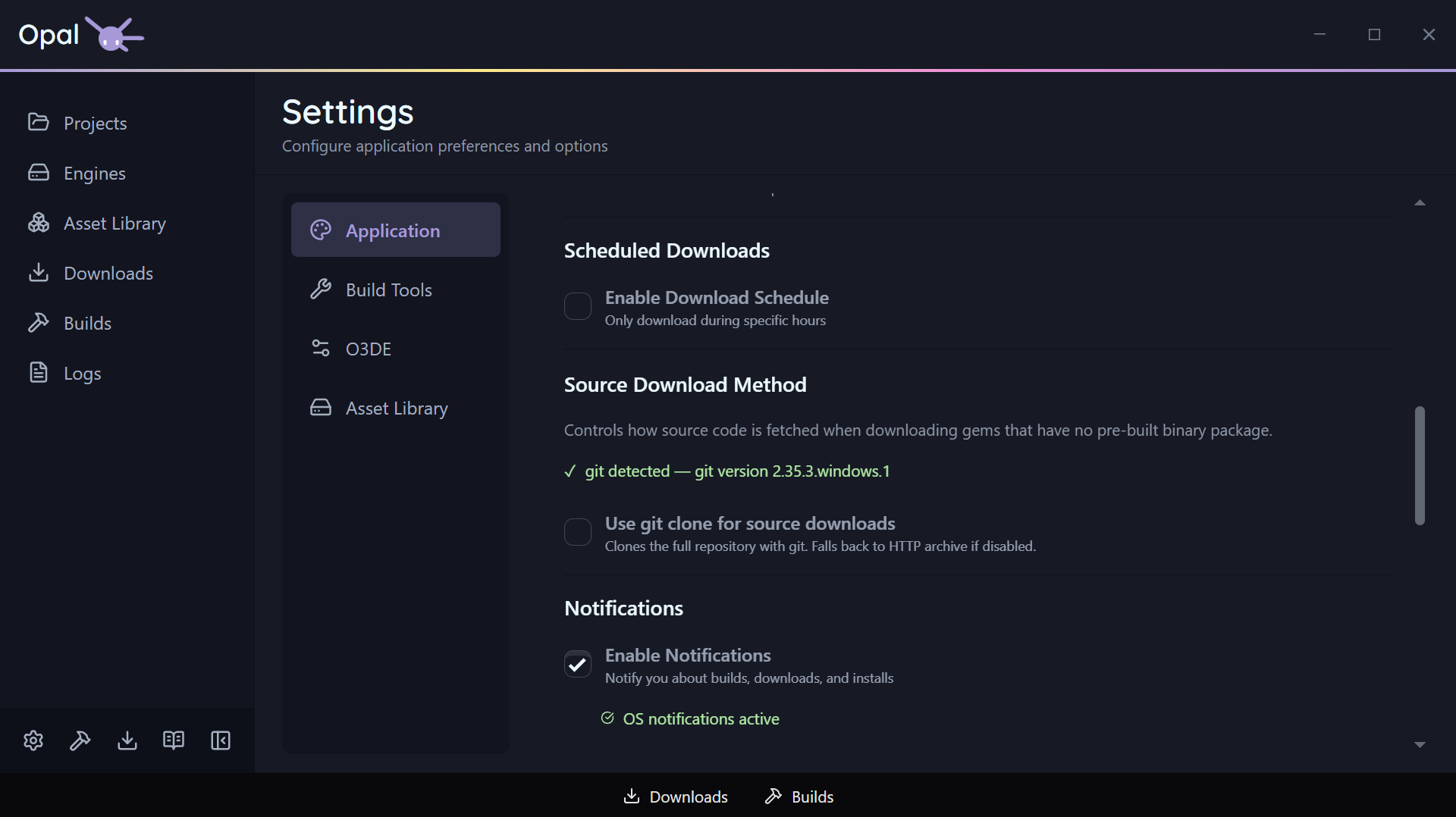
Appearance & language
| Setting | Default | Notes |
|---|
| Theme | Auto | Light / Dark / Auto — Auto follows your OS prefers-color-scheme |
| Language | Auto | Auto detects from your OS locale; registered languages selectable |
Window behaviour & startup
| Setting | Default | Notes |
|---|
| Minimize on close | Off | Closing minimizes to tray instead of exiting |
| Minimize to tray | Off | Minimize to the system tray on startup |
| Open on startup | Off | Launch OPAL when you log in |
There’s also a Rerun Setup Wizard button here to re-launch the onboarding wizard on demand.
Download settings
| Setting | Default | Notes |
|---|
| Max concurrent downloads | 3 | 0 = unlimited |
| Max connections per download | 3 | Up to 16 |
| Throttle download speed | Off | |
| Speed limit | 10 | Value paired with the unit below |
| Speed unit | Mb/s | Mb/s or Kb/s |
| Schedule downloads | Off | Restrict downloads to a time window |
| Schedule window | 00:00–23:59 | HH:mm; windows crossing midnight are handled |
See Downloads for how these behave in the queue.
Notification settings
Native OS notifications, controlled per severity. A master switch turns all of them off at once.
| Setting | Default |
|---|
| Notifications enabled (master) | On |
| Warnings | On |
| Errors | On |
| Successes | On |
| Status info (lifecycle events) | Off |
| Debug (progress/internal, throttled) | Off |
Analytics
One checkbox: Share anonymous usage statistics. It is off by default and stays off unless you tick it — OPAL asks once in the onboarding wizard, and this is where you change that answer afterwards, in either direction.
| Setting | Default |
|---|
| Share anonymous usage statistics | Off |
A Learn more button opens the same plain-language notice the wizard shows. Nothing is collected that identifies you, nothing is shared with anyone else, and while the setting is off the tracker isn’t loaded at all. Full detail on the Privacy page.
See also
6.2 - Build Tools
CMake and build-system detection, selected build tool, CMake flags, and thread count.
The Build Tools tab is where OPAL shows what it detected on your machine and lets you steer how builds run. A Recheck button re-runs detection at any time.
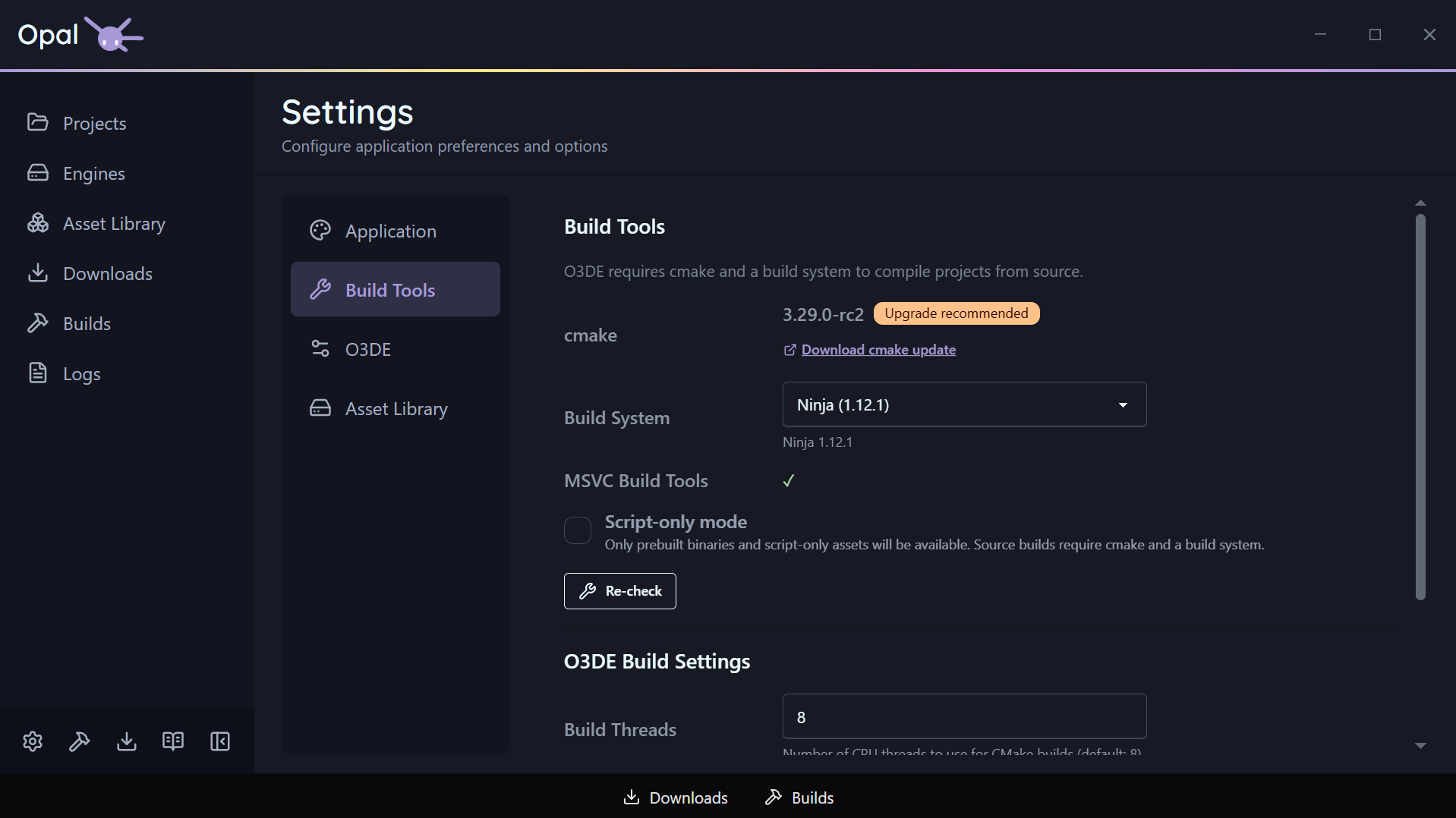
Detection
- CMake — OPAL reports the detected CMake and its version, and flags an out-of-date one with an upgrade recommendation and a link.
- Build systems — OPAL auto-detects the available build systems: Ninja, Xcode, and Visual Studio 2019 / 2022 / 2025 / 2026, as applicable to your platform.
Configuration
| Setting | Default | Notes |
|---|
| Selected build tool | Auto | The build system used after CMake configures; auto picks a sensible default |
| CMake flags | (none) | Extra space-separated arguments appended to the CMake configure for all projects |
| Build thread count | 8 | CPU threads for CMake builds; 0 = auto-detect |
Global, with a per-project escape hatch
These are
global settings. An individual project can override the build tool in its own
Project Settings; CMake flags and thread count remain global.
See also
6.3 - O3DE
The O3DE manifest’s default folders, plus OPAL’s engine download location.
The O3DE tab reads and writes your O3DE manifest (o3de_manifest.json) directly. These aren’t OPAL-private settings — they’re the same defaults the O3DE tooling uses, so changes here are visible to the engine and the stock tools too.
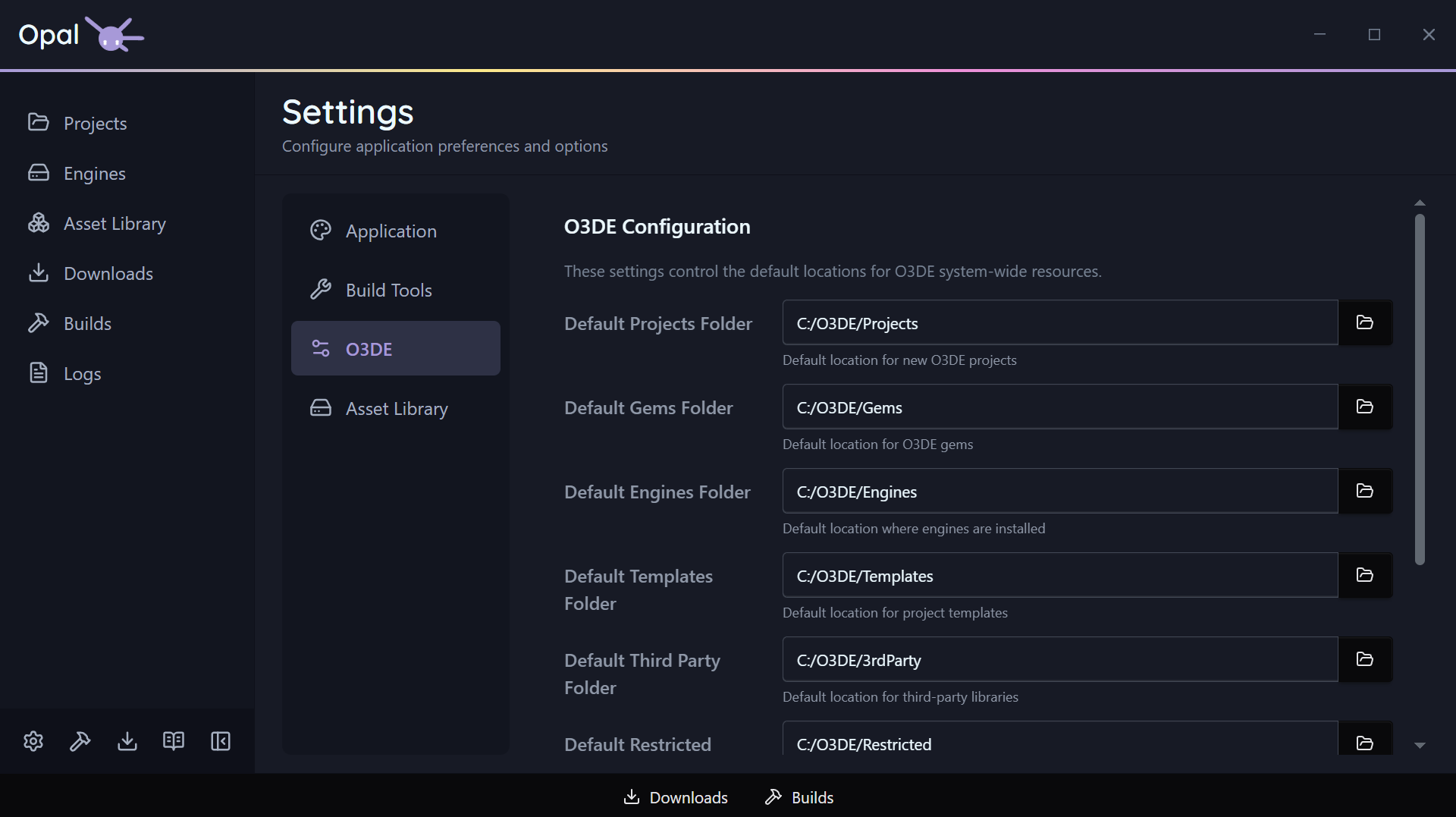
Manifest default folders
Each of these has a folder picker:
| Setting | What it is |
|---|
| Default projects folder | Where new projects are created by default |
| Default gems folder | Where gems are placed by default |
| Default templates folder | Where project/gem templates are looked up |
| Default third-party folder | O3DE’s third-party package location |
Engine download location
| Setting | Default | Notes |
|---|
| Engine download path | (manifest default) | Where engine installer files are saved during download, before install. When empty, OPAL uses the manifest’s default engines folder |
Point this at a fast or roomy drive if you download a lot of engines.
See also
6.4 - Asset Library
How often the gem cache refreshes automatically.
The Asset Library tab controls how often OPAL refreshes its cache of indexed gem repositories in the background.
| Setting | Default | Notes |
|---|
| Cache refresh interval | 1 | A number, paired with the unit below |
| Interval unit | Day | Minute / Hour / Day |
Short intervals need confirmation
Setting the interval below one hour triggers a confirmation warning — frequent refreshes hit your repositories harder and rarely help. Confirm only if you really want it.You can always force an immediate refresh from the Asset Library’s Check for Updates button, independent of this schedule. See Repositories & sources.
See also
6.5 - Script-Only Mode
Restrict OPAL to prebuilt, script-based work.
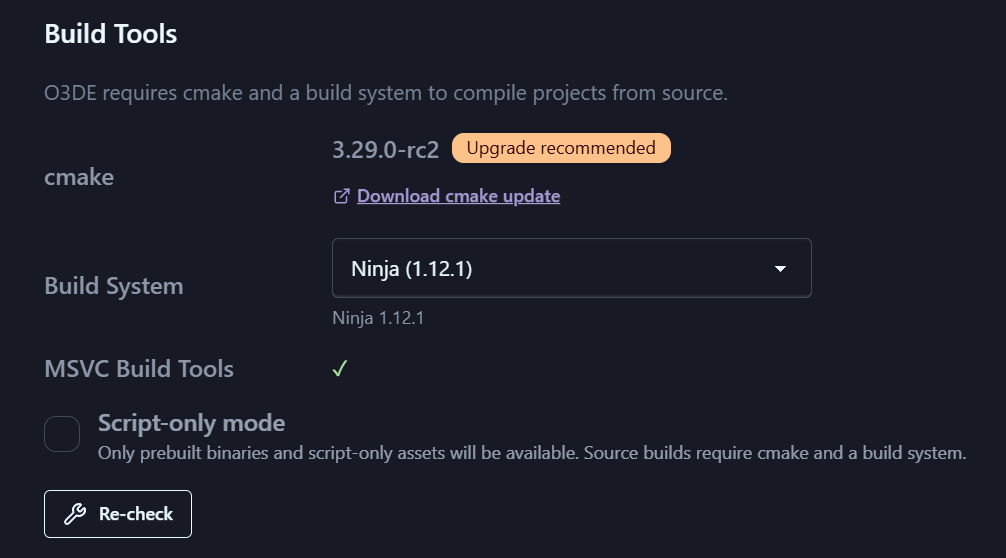
Script-Only mode is a global toggle for people who aren’t compiling C++. When it’s on, OPAL keeps the interface focused on prebuilt engines and script-based work, and hides everything to do with building from source.
You can turn it on during the onboarding wizard or any time from Settings.
What it changes
While Script-Only mode is on:
- The Source platform filter is hidden on the Engine Downloads page.
- Build actions on source engines are hidden.
- Unbuilt source engines are marked unavailable, with a note explaining why.
- Source-related options are hidden in project gem configuration.
Turn it off again and all the source-build tooling comes back.
See also
7 - Queues
Download and build queue controls — pause/resume, reorder, parallelism, speed limits, and schedules.
OPAL runs long operations through two queues: one for downloads (engines, gems, assets) and one for builds (engine source builds, project builds). They share a common look and feel — add, pause, resume, reorder, cancel — and both surface live status in the status bar at the bottom of the window.
The queues are built to survive interruption: close OPAL mid-operation and reopen later, and the queue is intact.
In this section
- Downloads — Pause/resume, reorder, cap concurrency, throttle bandwidth, and schedule download windows.
- Builds — Queue, pause/resume, cancel, reorder, and view build logs.
- Status bar — The bottom-bar widgets and drawers that show queues at a glance.
7.1 - Downloads
Pause/resume, reorder, cap concurrency, throttle bandwidth, and schedule download windows.
The Downloads queue handles engine installers, gems, and other assets. Each item shows its progress; a backend download manager does the actual work, so pausing, resuming, and resuming-after-a-crash all behave properly rather than silently restarting.
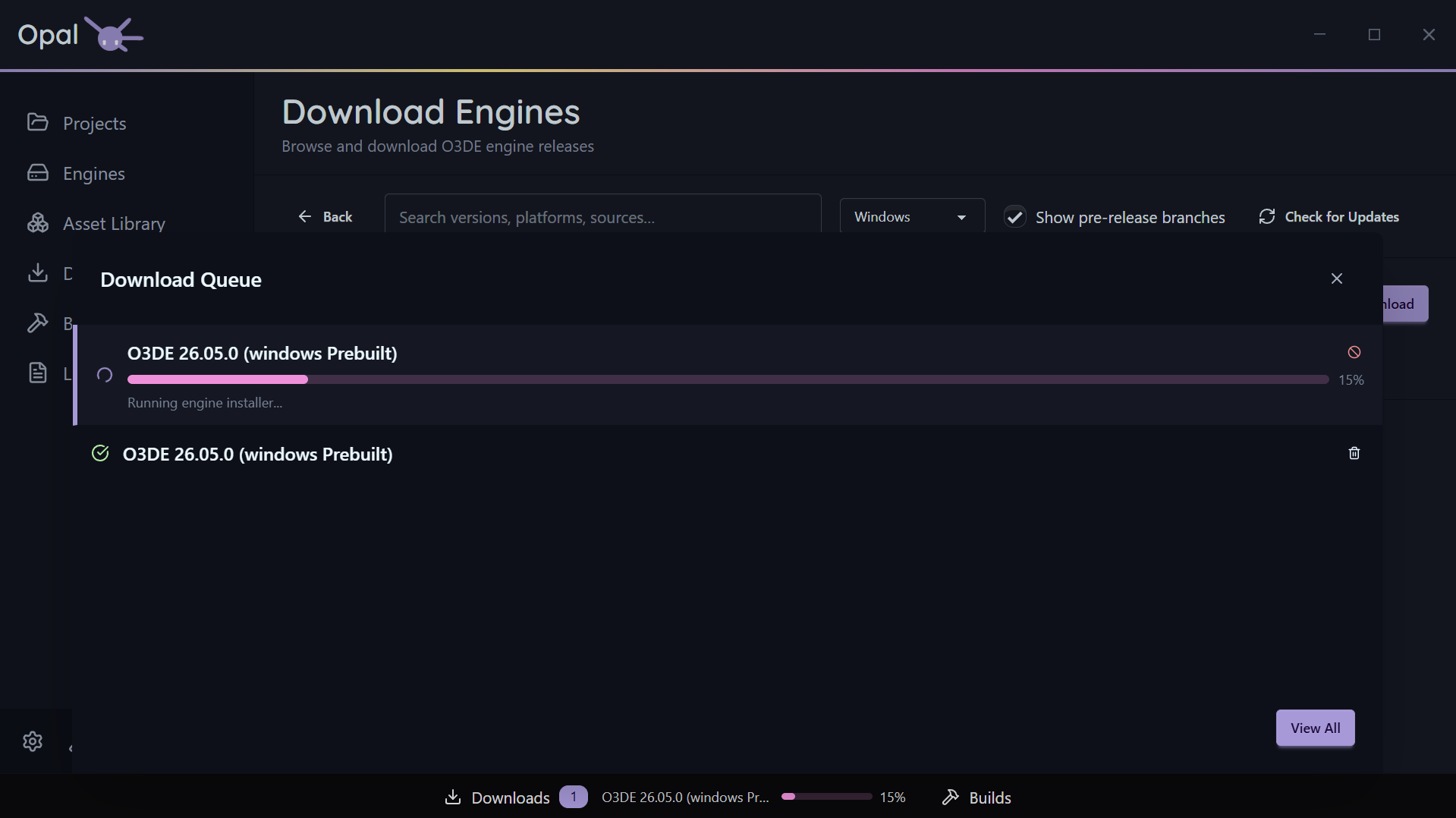
Per-item controls
- Pause / Resume an individual download.
- Cancel a download.
- Move to Top or drag to reorder the queue. OPAL is careful here: if a non-pausable active item is dragged down it snaps back, and if “move to top” has no pausable item to demote, OPAL tells you rather than doing nothing.
- Cancel & Requeue — offered for a non-pausable download that’s still running past a scheduled window’s close.
Whole-queue controls
- Pause All / Resume All toggles the entire download queue.
- Clear Completed clears finished items from the list.
Concurrency
Set how much runs at once in Settings:
- Max concurrent downloads — how many downloads run simultaneously (default 3; 0 = unlimited).
- Max connections per download — parallel connections for a single download (default 3, up to 16).
Speed limits
Enable a global download throttle and set the limit with a unit (Mb/s or Kb/s). Off by default — turn it on when OPAL is competing with a call or a metered connection.
Scheduled windows
Restrict downloads to a time window (for example 22:00–07:00). When the window closes, OPAL pauses the queue; when it opens, OPAL resumes automatically. Windows that cross midnight are handled correctly. Configure the window in Settings.
Credentials
If a download needs git authentication (for a gem source clone or LFS fetch), a secure credential prompt handles it. See Repositories & sources.
See also
7.2 - Builds
Queue, pause/resume, cancel, reorder, and view build logs.
The Builds queue handles engine source builds, project builds, and project exports — one queue and one concurrency pool, because all three drive the same CMake toolchain and would otherwise contend for it. Like downloads, each build shows progress and can be managed while it runs — and its output is always a click away in the log viewer.
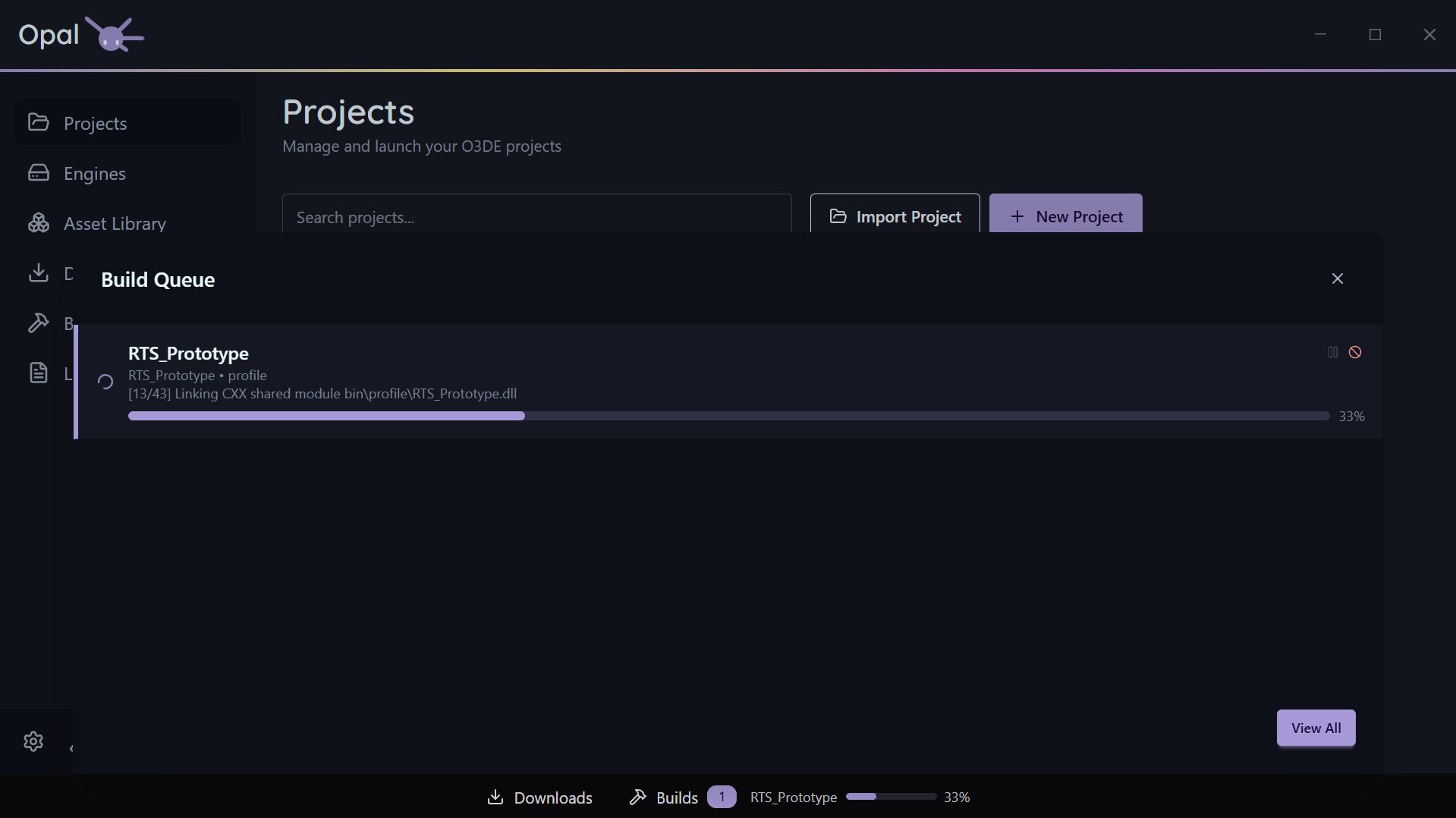
As seen in the above screenshot, using the Windows optional Ninja Builder will grant granular progress reporting. Default MS Build will not.
To install it, re-run the Setup Wizard from Settings > Application, at the bottom of the window.
Build modes
A project build enters the queue in one of three modes — Build, Configure, or Clean Build — chosen from the split build button on the project card. They behave identically in the queue; only the work differs. See Build modes.
Per-item controls
- Pause / Resume an individual build. The pause checkpoint sits between the configure and compile stages, so a build stops being pausable once CMake has finished configuring and the compiler is running. A Configure-only build finishes at that same point.
- Cancel a build. Cancelling also stops the child build processes it spawned, so nothing is left running in the background.
- Move to Top or drag to reorder, with the same smart demote / no-victim notifications as the downloads queue.
- View Log streams the build’s output into the shared Logs viewer.
Whole-queue controls
- Clear Completed clears finished builds from the list.
Concurrency
Set max concurrent builds in Settings (default 1). O3DE builds are memory-hungry, so 1 is a sensible default on a laptop; workstations can run more. Build parallelism (thread count) is set separately in Build Tools settings.
See also
7.3 - Status Bar
The bottom-bar widgets and drawers that show queues at a glance.
The status bar runs along the bottom of the OPAL window. It’s driven by a widget registry, so it shows compact, live indicators for background work without you needing to open a full page.
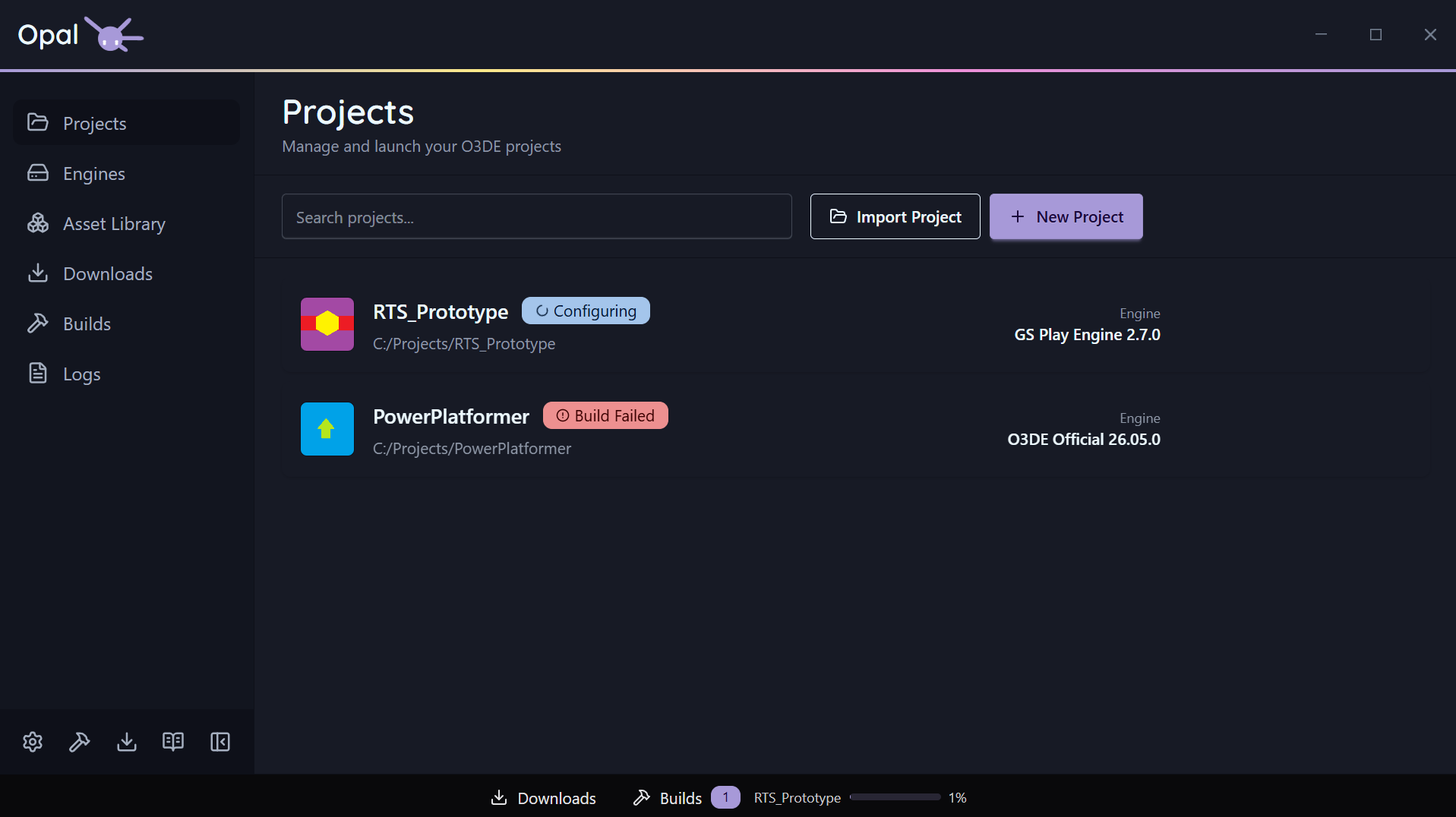
Out of the box the status bar carries Downloads and Builds widgets. A widget can show an icon, label, count, and a progress bar, and can be aligned to the left, centre, or right of the bar. The default queue widgets are centre-aligned.
Drawers
Click a queue widget to open a drawer that slides up from the bottom, showing the live queue for that widget without leaving the page you’re on. From the drawer, a button jumps to the full Downloads or Builds page when you want the complete view and controls.
See also
8 - Logs
The unified log viewer — where OPAL gathers every relevant O3DE log for debugging.
O3DE scatters its logs across build folders, editor caches, and Asset Processor directories. When a build or launch fails, finding the right log is half the battle. OPAL’s Logs page collects them into one place.
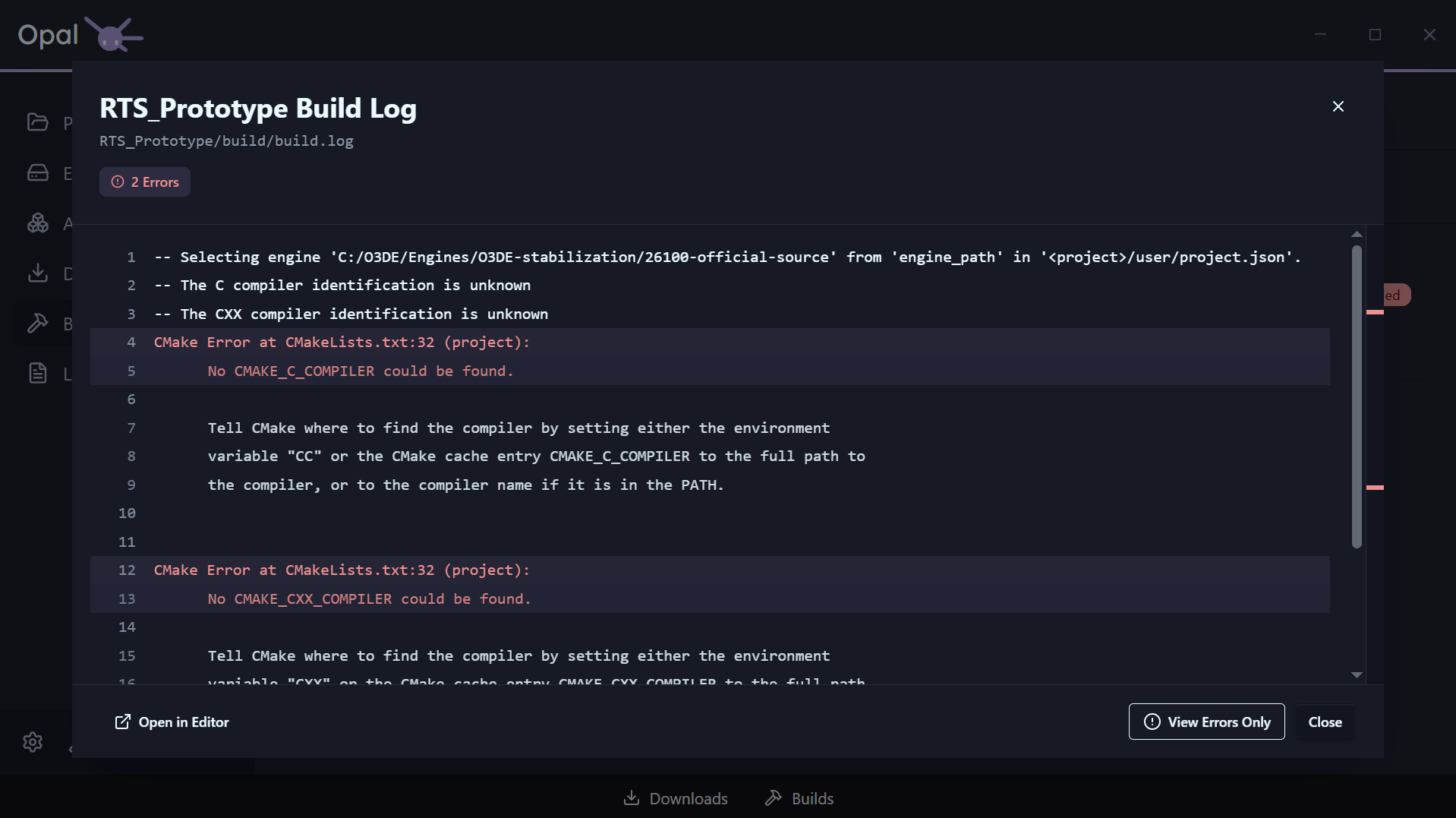
What the Logs page shows
The Logs page scans the known log locations for every registered project and engine and lists what it finds, so you can open the right log without hunting the file system. The logs it gathers include:
- Build logs and CMake configure/build output
- Project export logs
Editor.log and Game.logAssetProcessor.log and AssetBuilder.log- OPAL’s own Asset-Processor batch log
Logs from actions
Build, export, and launch actions stream their output into the same viewer as they run — so you can watch a build progress and read exactly where it failed. Beyond the Logs page, every project, engine, build, and export item has a View Log shortcut that opens the relevant log directly.
This is the “debug” step of the pipeline: when something goes wrong, you read the log — you don’t go looking for it.
See also
9 - Troubleshooting
Common symptoms, fixes, and recovery procedures.
When something goes sideways, start here. If you don’t find the answer, ping Discord or send us a message.
Quick triage
- Check the logs. Almost every failure leaves a log. Open the Logs page, or use View Log on the affected project, engine, or build.
- Does it fail outside OPAL too? For a build or install failure, try the equivalent step with O3DE’s own
o3de CLI. If the CLI fails as well, the issue is upstream of OPAL. - Does a fresh project reproduce it? If a brand-new project hits the same wall, it’s an engine/environment issue rather than your project’s state.
- Have you JUST installed tool dependencies? You may need to restart your computer to ensure all tools are properly configured in your machine.
Common symptoms
A project shows a missing-engine warning
The engine the project points at can’t be resolved. OPAL tells you which of three cases it is and offers the fix on the card:
- Add Engine — the engine isn’t installed; install or download it.
- Register Engine — the engine is on disk but not registered with OPAL.
- Pin Engine — the engine resolved only by a loose name/version match; pin the exact one.
See Project status & health.
An engine shows “Invalid installation”
The engine’s files are missing or invalid. Use the row’s Redownload to reinstall it, or Remove to clear it out (a source engine goes to the recycle bin so it’s recoverable; an installer-based engine does not).
A build fails
Open the build’s log from the Logs page or the build item’s View Log. CMake configure and compile errors are reported there. Fix the underlying issue and re-queue the build. If the same build succeeds with the o3de CLI but fails in OPAL, check that your build tools are detected correctly in Build Tools settings.
The Asset Library shows no gems
The repository cache may not have been built yet, or a fetch failed. Use the Asset Library’s Check for Updates / refresh button. If a repository still shows nothing, confirm its URL is reachable and ends in .json. See Repositories & sources.
A download won’t start or stalls
Cancel it and retry. Check that any required credentials were provided when prompted (for git-based gem sources). If a scheduled window is active, the download may be paused until the window opens — see Downloads.
Recovery: safe by default
OPAL is built so that interruptions don’t cost you work:
- Removing a source engine or a project moves it to the OS recycle bin / trash, not a permanent delete — so a mistaken removal is recoverable from there. Installer-based engines are not sent to the recycle bin and can’t be recovered that way.
- Queues persist across launches; closing OPAL mid-operation and reopening restores the queue. If a queue looks wrong after an unclean shutdown, use Clear Completed and re-queue anything still pending.
- Your engines and projects are independent of the queues — clearing a queue never touches installed engines or registered projects.
If you hit something the above doesn’t cover, grab the relevant log from the Logs page and send it to us or share it on Discord.
10 - Changelog
Release notes for OPAL.
Release notes for OPAL — what’s new, what changed, and what’s fixed in every release.
v1.0.1
Fixes
- Gem alternate names are now recognised. O3DE resolves a project’s gem entry against a gem’s
gem_name or its gem_alt_name, and OPAL now does the same. A project that lists PhysX no longer shows it as a missing gem on engines where that gem is PhysX5 (alternate name PhysX), and Configure Gems shows PhysX5 as active. OPAL never rewrites your project.json to make this work; only toggling a gem yourself changes it. Turning a gem off removes every entry that resolves to it, and turning it back on writes the gem’s real name. - Template gems are no longer picked up as real gems. Placeholder gem manifests inside template folders (names containing
${) are skipped when OPAL scans for local gems.
v1.0.0
The first full public release of OPAL. Everything below is available today.
- Windows and Linux — full support, installer and portable archive.
- macOS — coming soon.
Onboarding
- First-run Setup Wizard: Welcome → Usage Statistics → Build Tools → Libraries → Install Locations → Done.
- The wizard auto-detects build tools already on your machine (CMake, a build system, compilers) and gives you the exact install command for anything missing.
- Usage statistics are opt-in and unticked by default.
- Script-Only mode can be turned on from the wizard, or later in Settings.
- The wizard can be rerun any time from Settings → Application → Rerun Setup Wizard.
Engines
- Engine Downloads: official O3DE builds per platform with a Latest badge, installed/downloading indicators, and search across version, source, and platform.
- Show pre-releases surfaces
development and stabilization/* branch builds. - Custom Engine Sources — point OPAL at your own build host and its releases sit inline with official ones, with Check for Updates.
- Add Engine registers an already-installed engine; invalid
engine.json files are caught with an Invalid Engine error. - Set Default engine, per-engine View Log, and an Editor-executable path override for non-standard layouts.
- Prune bulk-removes unused engines only — the default engine and any engine a registered project resolves to are held back automatically, with a count of what was excluded.
- Removing a source engine moves it to the OS recycle bin, not a permanent delete. Installer-based engines are uninstalled and do not go to the recycle bin.
- Source builds compile through the Builds queue (pausable, resumable); prebuilt engines can’t be rebuilt in place.
- Newly added engines run a process to track the installation of their prerequisites, with progress visible in the Downloads dock or window. See Manage engines.
Projects
- The Projects page is OPAL’s landing view. New Project and Import (an existing
project.json, added without modification) sit side by side. - Build is a split button: full Build, Configure-only, or Clean Build — all queued, pausable, resumable, reorderable, and cancellable.
- Run Asset Processor per project, streamed straight to Logs.
- Launch is also a split button — every discovered Editor, Tool, and Runtime is independently launchable and stoppable, with an Unavailable badge for anything not yet built.
- Build status badges: Not Built / Needs Build / Configuring / Configured / Building / Built / Build Failed; run states Launching → Processing Assets → Running, with Stop.
- Missing-engine recovery offers the fix that matches the actual problem: Add Engine, Register Engine, or Pin Engine.
- Project Settings add an engine pin, a build type override, a build tool override (with a generator-mismatch warning), build targets, and Editor-only launch arguments.
- Missing gem detection (work in progress): OPAL checks a project’s explicit and transitive gem references against every known gem, and flags any that can’t be resolved for the project’s engine, since configure fails until they’re provided.
- Project cards show a missing gems banner with a shortcut into the gem configuration page, pre-filtered to that project’s gems.
- Configure Gems shows unresolved references as placeholder rows with a Not Found badge, with actions to register the gem’s folder or remove it from the project.
- New This project’s gems scope (
filter:project) in gem search. - Gems pulled in only as dependencies get a Required dependency indicator.
Export
- Export Project from a project’s action menu: build configuration, launcher targets (Game, Server, Headless Server, Unified), levels to include, asset-build toggles, an archive format, and an output path with an automatic disk-space check.
- Settings save straight into the project’s own
.command_settings file through O3DE’s standard export-project-configure — there’s no private OPAL export format, and the result is usable from the CLI without OPAL. - Runs through the shared Builds queue with pause (one checkpoint, before the launcher compile), resume, cancel, and staged progress: Building tools → Building assets → Bundling assets → Compiling launcher → Archiving.
- Not available in Script-Only mode.
Assets & Gems
- Asset Library: a gem list plus a five-tab Gem Inspector (Overview, Images, Imported Assets, Releases, Instances), with combinable filters like
author:, tag:, gemType:, compatibleEngines:, downloaded:, and hasUpdate:. - Release notes are fetched automatically for GitHub-, GitLab-, and Bitbucket-hosted gems.
- Project Gems keeps each project’s active/inactive gem list in sync across
project.json and CMake; required transitive dependencies are flagged and can’t be disabled directly. - Repositories — add a repo, a local gem, or a watch folder, or scaffold a brand-new one with Create Gem. A repository that goes offline keeps serving its last known list from cache.
- Source downloads use
git clone or an archive, with a credential prompt for authenticated sources.
Queues
- Two independent queues — Downloads and Builds — both pausable, resumable, reorderable, and cancellable, and both persist across app restarts.
- Downloads support concurrency and per-download connection limits, an optional speed cap, and scheduled download windows.
- Builds share one pool across engine source builds, project builds, and exports, with a single pause checkpoint between configure and compile.
- Status bar widgets for both queues open a live drawer without leaving the page you’re on.
Logs
- One Logs page across every registered project and engine: build and CMake output,
Editor.log, Game.log, AssetProcessor.log, AssetBuilder.log, and project export logs. - Build, export, and launch actions stream live into the same viewer while they run.
Settings
- Application — theme (Light/Dark/Auto), language, window behaviour, download defaults, per-severity notifications, and opt-in usage statistics.
- Build Tools — on-demand re-detection of CMake, Ninja, Xcode, and Visual Studio, global CMake flags, and build thread count.
- O3DE — reads and writes your real
o3de_manifest.json: default project/gem/template/third-party folders, and the engine download path. - Asset Library — a configurable cache refresh interval, with a warning below one hour.
- Script-Only Mode — one toggle that hides every source-build-only control (source engines, source builds, export) and is fully reversible.
Stay up to date
Future releases will get their own entry above this one — what was added, what changed, and what was fixed.
11 - Legal & Press
Licence terms, privacy policy, branding guidelines, and press resources for OPAL.
The legal basics for using OPAL — what you’re allowed to do with the software, and what data it touches — plus the branding rules and press material for writing about it.
Legal
- Licence Notice — The OPAL Licence Notice & README: a plain-language summary of what you may and may not do.
- End User Licence Agreement — The binding agreement. It controls wherever the summary differs.
- Privacy — What OPAL collects (nothing) and the connections it makes to do its job.
- Third-Party Notices — Every open-source and third-party component bundled with OPAL, and the licence it’s distributed under.
Press
- Branding Guidelines — How to use the OPAL name, logo, and colours. Referenced by the EULA.
- Press — Fact sheet, boilerplate, and what you may publish about OPAL.
- O3DE’s own licence — OPAL is a third-party launcher for O3DE; the engine itself is Apache 2.0 and governed separately.
- Contact — for licensing questions, bundling requests, media inquiries, or data concerns.
11.1 - Licence Notice
The OPAL Licence Notice and README - a plain-language summary of your licence.
Summary only - the EULA controls
This page reproduces the
OPAL Licence Notice & README as a summary. It
does not itself grant a licence or replace the
End User Licence Agreement.
GENOME STUDIOS INC. - OPAL LICENCE NOTICE & README
About OPAL
OPAL is proprietary standalone desktop software developed by Genome Studios Inc. It is a third-party launcher that helps manage Open 3D Engine (O3DE) projects, assets, engine installations, builds, and production workflows.
OPAL is provided without charge. It is not an official O3DE product and is not affiliated with, sponsored by, or endorsed by the Open 3D Foundation, the Linux Foundation, or the O3DE project.
Your Licence
Subject to your acceptance of the full OPAL End User Licence Agreement (the “EULA”), the EULA permits you to:
- download, install, and use OPAL for personal, educational, internal business, and commercial production purposes;
- use OPAL within a studio or other organization through its employees and contractors;
- make reasonable internal deployment and backup copies;
- use, publish, sell, license, and commercialize your own O3DE projects, assets, builds, games, software, and other output created or managed using OPAL; and
- create and monetize screenshots, videos, tutorials, reviews, streams, articles, and other media that depicts or discusses OPAL, subject to the OPAL branding rules described below.
Important Restrictions
Unless the EULA or an applicable third-party licence (solely with respect to the third-party component it governs) expressly permits it, you may not:
- reverse engineer, decompile, disassemble, circumvent, tamper with, or attempt to discover proprietary OPAL source code or non-public internals;
- modify OPAL or create derivative versions of proprietary OPAL code;
- sell, resell, sublicense, rent, lease, host as a service, or otherwise commercialize OPAL itself;
- bundle, pre-install, embed, or distribute OPAL with a game, engine build, application, hardware product, subscription, service, package manager, or other offering;
- redistribute a modified, repackaged, wrapped, advertisement-supported, incomplete, or compromised OPAL package;
- remove copyright, trademark, licence, attribution, signature, or proprietary notices; or
- use OPAL unlawfully, maliciously, or in a manner that infringes third-party rights or compromises systems or networks.
Studio Sharing and Public Mirrors
Internal studio sharing is permitted. An organization may provide the exact Official Package to its employees and contractors for work performed on the organization’s behalf, provided each such person accepts the EULA. A contractor’s right to use OPAL under this provision ceases when the contractor’s engagement with the organization ends.
A public mirror may host only a complete, exact, unmodified Official Package, without charge and without bundling, wrapping, advertising injection, added software, or removal of any EULA or notice files. The mirror must be identified as unofficial, link to the official OPAL website, avoid implying Genome endorsement, and promptly remove or replace a copy (and in any event within 48 hours) if Genome identifies a security, authenticity, legal, or compliance issue. All other redistribution requires Genome’s written permission.
You may publish truthful screenshots, videos, tutorials, reviews, streams, articles, and similar media about OPAL. The name “OPAL” must appear in all capital letters. Deliberate use of the OPAL logo, logo-and-type pairing, standalone type treatment, supplied promotional assets, or other OPAL Brand Assets must comply with the OPAL Brand Guidelines made available through the official OPAL website at https://opallauncher.com. Do not modify the logo or imply that Genome sponsors, endorses, or is affiliated with your content, product, or service unless Genome has agreed in writing.
Your Projects and Output
Genome does not acquire ownership of your projects, assets, code, builds, configurations, games, software, or media merely because you use OPAL. You remain responsible for the rights, licences, backups, security, platform requirements, and legal compliance that apply to your projects and third-party materials.
Third-Party Software
OPAL includes or uses third-party and open source components. Those components are governed by their own licence terms. The applicable third-party licence and attribution notices are included with OPAL or otherwise made available by Genome for the applicable release. Third-party licences apply only to the relevant components and do not make Genome’s proprietary OPAL code open source.
No Warranty, Updates, or Support
OPAL is provided free of charge, “as is”, “as available”, and with all faults. To the maximum extent permitted by applicable law, Genome disclaims all warranties, whether express, implied, or statutory, including any warranties of merchantability, fitness for a particular purpose, and non-infringement. Genome does not promise that OPAL will be error-free, uninterrupted, secure, compatible with any particular O3DE version or system, or suitable for a particular production. Genome’s total liability in connection with OPAL is limited as set out in the EULA. Genome has no obligation to provide updates, maintenance, support, migration, replacement software, or continued availability. Maintain independent backups and validate your builds and project workflows.
Full EULA Controls
This README is a summary only and does not itself grant a licence or replace the full EULA. In the event of any conflict or inconsistency between this README and the EULA, the EULA prevails. The EULA governs your download, installation, use, copying, media rights, internal sharing, mirror distribution, restrictions, warranties, liability, and termination. You must affirmatively accept the EULA through the official download, installer, update, or first-run process before using OPAL.
Reference
| Item | Details |
|---|
| Official OPAL Website | https://opallauncher.com |
| Full EULA | Available through the official OPAL Website and included with the Official Package. See End User Licence Agreement. |
| Brand Guidelines | Available through the official OPAL Website. See Branding Guidelines. |
| Third-Party Notices | See Third-Party Notices for the full list of bundled components and their licences. |
| Legal / Licence Contact | Use the current legal or licensing contact method published through the OPAL Website - see Contact. |
| Copyright | Copyright © 2026 Genome Studios Inc. All rights reserved. |
Last updated: 4 August 2026
11.2 - End User Licence Agreement
The full OPAL End User Licence Agreement from Genome Studios Inc.
GENOME STUDIOS INC. - OPAL END USER LICENCE AGREEMENT
Effective Date: the date on which this EULA is first accepted for the applicable version of OPAL.
IMPORTANT - PLEASE READ CAREFULLY. This End User Licence Agreement (the “EULA”) is a legal agreement between Genome Studios Inc., a corporation incorporated under the laws of Alberta (“Genome”), and the individual or organization that accepts this EULA (“User”, “you”, or “your”).
By clicking “I Agree”, “Accept”, or a similar button through the OPAL website, installer, update process, or first-run process, you agree to be bound by this EULA. If you accept this EULA for an organization, you represent that you have authority to bind that organization, and “User” includes that organization. If you do not agree, do not download, install, copy, access, or use OPAL, and delete any copies in your possession or control.
OPAL is Genome’s proprietary standalone desktop application that helps users manage Open 3D Engine (O3DE) projects, assets, engine installations, builds, and production workflows. OPAL is an independent third-party product. It is not an official O3DE product and is not affiliated with, sponsored by, or endorsed by the Open 3D Foundation, the Linux Foundation, or the O3DE project.
1. Definitions
(a) “Affiliate” means, with respect to a party, any entity that directly or indirectly controls, is controlled by, or is under common control with that party, where “control” means the ownership or control of more than fifty percent (50%) of the voting securities or equivalent ownership interest.
(b) “Authorized User” means an individual employee, officer, contractor, or consultant of an Organization who requires access to OPAL for that Organization’s activities and is subject to obligations consistent with this EULA.
(c) “Brand Assets” means the OPAL name, logos, logo-and-type pairings, standalone type treatments, colour palettes, templates, screenshots supplied for promotional use, and other brand materials made available by Genome.
(d) “Brand Guidelines” means Genome’s then-current OPAL branding guidelines made available through the Website or another location designated by Genome.
(e) “Documentation” means any user guides, release notes, help materials, technical instructions, and other documentation that Genome provides for OPAL.
(f) “Media Content” means screenshots, audiovisual recordings, livestreams, tutorials, reviews, articles, presentations, documentation, social media posts, and other media that depicts, discusses, or demonstrates OPAL.
(g) “Official Package” means the complete, unmodified OPAL installer or distribution package obtained from Genome’s official website or another distribution source expressly approved by Genome, including all EULA files, notices, signatures, checksums, and accompanying materials supplied with it.
(h) “OPAL” means Genome’s proprietary software currently marketed as the “OPAL Launcher”, together with its proprietary code, interface, Documentation, updates, upgrades, fixes, and other materials supplied by Genome, but excluding Third-Party Components to the extent governed by separate licences.
(i) “Organization” means a corporation, partnership, studio, educational institution, non-profit organization, government body, or other legal entity on whose behalf an individual accepts or uses OPAL.
(j) “Project Materials” means a User’s projects, source code, scripts, assets, builds, configurations, engine installations, data, content, and other materials that the User creates, owns, licenses, manages, processes, builds, or launches using OPAL.
(k) “Third-Party Components” means third-party and open source software, data, fonts, icons, libraries, frameworks, plugins, and other materials included in or used by OPAL and identified in notices supplied with OPAL or otherwise made available by Genome for the applicable release.
(l) “Website” means Genome’s official OPAL website at https://opallauncher.com and any successor URL designated by Genome.
2. Acceptance; Eligibility; and Organizational Use
(a) This EULA becomes effective when User first affirmatively accepts it through Genome’s website, installer, update process, first-run process, or another electronic acceptance mechanism. Merely visiting the Website or reviewing this EULA does not by itself constitute acceptance.
(b) An individual accepting for an Organization represents and warrants that the individual has authority to bind the Organization. The Organization is responsible for the acts and omissions of its Authorized Users and for ensuring that they comply with this EULA.
(c) An individual accepting in a personal capacity must have reached the age of majority and have legal capacity to enter into this EULA. A person who does not meet those requirements may use OPAL only through, and under the responsibility of, a parent, legal guardian, or Organization that validly accepts this EULA where permitted by law.
(d) If User is prohibited by applicable law from receiving or using OPAL, User may not accept this EULA or use OPAL.
3. Licence Grant and Permitted Use
(a) Subject to User’s continuing compliance with this EULA, Genome grants User a no-charge, non-exclusive, worldwide, non-transferable (except as expressly permitted in this EULA), non-sublicensable licence to download, install, execute, and use OPAL for personal, educational, internal business, and commercial production purposes. The licence continues until terminated under section 14.
(b) User may install and use OPAL on devices owned, leased, or controlled by User and may make a reasonable number of copies of the Official Package for backup, disaster recovery, and internal deployment purposes.
(c) An Organization may allow its Authorized Users to install and use OPAL solely for the Organization’s activities. User may provide an exact copy of the Official Package internally to Authorized Users and may permit contractors to use OPAL solely on User’s behalf, provided they are bound by confidentiality and use restrictions that protect Genome and OPAL at least as effectively as this EULA.
(d) User may use OPAL to create, manage, build, launch, publish, distribute, sell, license, and otherwise exploit User’s Project Materials and products created from them, including commercial games and software, without paying Genome a royalty or obtaining further permission, subject to any rights and obligations that apply to O3DE, other engines, third-party tools, assets, software, platforms, or content used by User.
(e) No source-code licence or ownership interest is granted. All rights not expressly granted are reserved by Genome and its licensors.
4. Internal Distribution and Public Mirrors
(a) Internal Distribution. User may distribute the Official Package within the same Organization to Authorized Users as permitted by section 3. Internal distribution does not permit delivery to customers, portfolio companies, unrelated studios, or other third parties except contractors using OPAL solely on User’s behalf.
(b) Public Mirrors. Genome grants a limited permission to host and redistribute the Official Package through a public mirror only if the mirror operator:
- distributes the complete, exact, unmodified Official Package obtained from Genome or verifies it against Genome’s published signature or checksum;
- does not charge a fee for OPAL, sell OPAL, condition access on payment, or use OPAL as consideration for another transaction;
- does not modify, repackage, wrap, inject advertising into, add software to, remove files from, or otherwise alter the Official Package;
- does not bundle OPAL with a game, engine build, application, hardware product, subscription, service, package manager, app-store listing, download manager, or other product or offering;
- preserves this EULA, the Licence Notice / README, all third-party licence and attribution notices, copyright notices, digital signatures, and other proprietary notices included by Genome;
- clearly identifies the source as an unofficial mirror, links users to the Website, and does not state or imply that Genome sponsors, endorses, operates, or is responsible for the mirror;
- uses commercially reasonable security measures and does not knowingly distribute a compromised, obsolete, or materially vulnerable version after Genome has requested its removal or replacement; and
- promptly removes or disables access to the mirrored copy if Genome reasonably notifies the operator that the mirror violates this EULA, presents a security or legal risk, or no longer reflects an authentic Official Package.
(c) No Other Redistribution. Except for internal distribution and compliant public mirrors under this section, User may not distribute, publish, transmit, make available, or provide OPAL to any third party without Genome’s prior written permission.
(d) The permissions in this section do not grant any right to use Genome’s or OPAL’s trademarks except for accurate identification of the software and source in accordance with section 7.
5. Restrictions
Except to the limited extent that a restriction is prohibited by applicable law or a separate Third-Party Component licence grants broader rights solely for that component, User will not, and will not permit any other person to:
(a) reverse engineer, decompile, disassemble, decode, translate, or attempt to derive or discover OPAL’s proprietary source code, underlying structure, algorithms, file formats, non-public interfaces, or trade secrets;
(b) circumvent, disable, defeat, tamper with, or interfere with any security feature, integrity check, access control, update mechanism, digital signature, technical limitation, or protective measure in OPAL;
(c) modify, adapt, translate, create derivative works of, or combine proprietary portions of OPAL with other software except through interfaces and configuration methods that Genome makes available for that purpose;
(d) sell, resell, license, sublicense, rent, lease, lend, commercialize, time-share, provide as a hosted or managed service, or otherwise exploit OPAL itself for the benefit of a third party;
(e) redistribute OPAL except as expressly permitted by section 4, or bundle, pre-install, embed, package, or deliver OPAL with any other product, service, application, engine build, game, hardware, or commercial offering;
(f) extract, copy, publish, post, disclose, or distribute proprietary OPAL code, application resources, Documentation, or non-public technical materials except as necessary for User’s permitted use;
(g) remove, alter, obscure, or misrepresent any copyright, trademark, licence, attribution, digital signature, or proprietary notice in OPAL or the Official Package;
(h) use OPAL to introduce malicious code, gain unauthorized access, infringe third-party rights, violate law, or damage, disrupt, test, probe, or interfere with systems or networks without authorization; or
(i) represent that OPAL is User’s own software, an official O3DE product, or sponsored, certified, supported, or endorsed by Genome, the Open 3D Foundation, the Linux Foundation, or the O3DE project when that is not true.
Where applicable law gives User a non-waivable right to reverse engineer or obtain interoperability information, User must first give Genome reasonable written notice and a reasonable opportunity to provide the information through a lawful alternative, except where notice is prohibited by law.
6. Ownership; Project Materials; and Feedback
(a) Genome Ownership. As between Genome and User, Genome and its licensors own all right, title, and interest in and to OPAL, the Documentation, Brand Assets, and all updates, improvements, modifications, and derivative works of the foregoing, including all related copyrights, trade secrets, trademarks, and other intellectual property rights.
(b) User Ownership. As between Genome and User, User retains all right, title, and interest in and to User’s Project Materials. This EULA does not transfer ownership of Project Materials to Genome. User is responsible for securing all rights required for Project Materials and for complying with all licences and laws that apply to them.
(c) No Implied Rights. Except for the express licence in section 3 and the media permissions in section 7, no right or licence is granted by implication, estoppel, exhaustion, or otherwise.
(d) Feedback. If User voluntarily provides ideas, suggestions, bug reports, enhancement requests, or other feedback concerning OPAL (“Feedback”), User grants Genome a perpetual, irrevocable, worldwide, royalty-free, transferable, and sublicensable right to use, reproduce, modify, commercialize, and otherwise exploit the Feedback without restriction or obligation, and User waives any moral rights in the Feedback to the extent permitted by law. Genome is not required to publicly identify User as the source without permission. User should not provide Feedback subject to confidentiality obligations owed to another person.
7. Media Content; OPAL Branding; and Public References
(a) Media Permission. User may create, reproduce, publish, display, distribute, and monetize Media Content that truthfully depicts, demonstrates, reviews, teaches, comments on, or otherwise discusses OPAL, including screenshots and recordings of OPAL’s user interface, subject to this section and applicable law.
(b) Ordinary Commentary. Genome’s advance approval is not required for truthful reviews, criticism, tutorials, journalism, educational materials, streams, screenshots, or factual references to OPAL that do not use supplied Brand Assets beyond what is reasonably incidental to depicting the software and do not imply endorsement.
(c) Brand Guidelines. Any custom promotional, marketing, co-branded, or community media that deliberately uses the OPAL logo, logo-and-type pairing, standalone OPAL type treatment, supplied promotional assets, or other Brand Assets must comply with the Brand Guidelines. Without limiting the Brand Guidelines:
- Brand Assets may be used only in the approved forms designated by Genome, including the logo alone, logo-and-type pairing, or type alone;
- approved colour specifications, clear space, proportions, and other presentation requirements must be followed;
- Brand Assets may not be modified, distorted, recoloured, animated, combined into another logo, or used as the primary source identifier for User’s own product or service without Genome’s written approval;
- User may not state or imply that Genome sponsors, endorses, certifies, or is affiliated with User or User’s content, products, or services unless Genome has agreed in writing.
(d) Reasonable Updates. Genome may update the Brand Guidelines prospectively. An update will not retroactively make Media Content non-compliant if it was created and published in good faith under the then-current Brand Guidelines, but Genome may require changes to ongoing campaigns, new publications, or continued prominent use of Brand Assets where reasonably necessary to prevent confusion, misuse, or harm.
(e) Legal Rights Preserved. Nothing in this EULA limits lawful fair dealing, criticism, review, news reporting, parody, or other rights that cannot be restricted by contract under applicable law.
8. Third-Party Components and O3DE
(a) OPAL includes or uses Third-Party Components identified in notices supplied with OPAL or otherwise made available by Genome for the applicable release. Those components are governed by their applicable third-party licence terms. If this EULA conflicts with a third-party licence, that third-party licence controls solely with respect to the affected Third-Party Component.
(b) This EULA does not restrict rights granted directly under an open source licence for a Third-Party Component, and no open source licence expands User’s rights in Genome’s proprietary OPAL code, Brand Assets, Documentation, or other materials.
(c) User is responsible for obtaining and complying with the licences, terms, permissions, and technical requirements that apply to any O3DE installation, engine build, Gem, SDK, repository, asset, package, platform, or third-party service that User obtains or uses separately from OPAL.
(d) Open 3D Engine, O3DE, and related names and logos are trademarks of their respective owners. No trademark licence or endorsement relating to O3DE is granted by this EULA.
9. Updates; Changes; Support; and Availability
(a) No Commitment. Genome has no obligation to maintain, update, upgrade, improve, continue developing, make available, or support OPAL, and makes no commitment regarding any release, feature, roadmap, compatibility target, response time, or service level.
(b) Optional Updates. Genome may, but is not required to, release updates, fixes, security patches, changes, or replacement versions. Updates may add, remove, disable, or change features, interfaces, dependencies, compatibility, or system requirements.
(c) Updated Terms. Genome may require User to affirmatively accept a then-current EULA or supplemental terms before downloading, installing, or using an update or new version. Those accepted terms govern the update or new version and User’s use after acceptance. Genome will not unilaterally reduce the licence rights for a previously installed version solely by posting new terms, except where reasonably necessary to address a security vulnerability, legal compliance obligation, intellectual property dispute, or regulatory requirement. Continued distribution, download, online functionality, or support may be conditioned on then-current terms to the extent permitted by law.
(d) Discontinuation. Genome may discontinue OPAL, the Website, download availability, update channels, compatibility, or any related feature at any time. Genome is not required to provide source code, replacement software, migration services, or continued access after discontinuation.
(e) Support. No technical support, training, maintenance, consultation, migration, troubleshooting, or other service is included. Any service Genome agrees to provide must be governed by a separate written agreement or other written terms accepted by Genome.
10. User Systems; Project Data; Third-Party Services; and Privacy
(a) User Responsibility. User is solely responsible for selecting, configuring, securing, maintaining, and backing up User’s devices, systems, repositories, credentials, O3DE installations, Project Materials, and production environments. User should maintain independent, tested backups before using OPAL to move, rename, modify, build, or launch Project Materials.
(b) Local and Third-Party Access. At User’s direction and depending on User’s configuration, OPAL may access local files, invoke external applications, interact with engines or command-line tools, and connect to third-party repositories, websites, services, or infrastructure. User authorizes those actions when initiated or configured by User and is responsible for the necessary access rights, credentials, and third-party terms.
(c) No Custodial Role. Unless Genome expressly agrees otherwise in a separate written agreement, Genome is not a custodian, escrow agent, backup provider, fiduciary, system administrator, or regulated service provider for User’s Project Materials, credentials, repositories, or systems.
(d) Privacy. To the extent Genome collects, uses, discloses, retains, or otherwise processes personal information in connection with OPAL, Genome will describe that processing in a privacy notice made available through the Website or OPAL. Third-party services used or accessed through OPAL may have their own privacy practices and terms.
11. Warranty Disclaimer
(a) OPAL is developed and provided without charge. TO THE MAXIMUM EXTENT PERMITTED BY LAW, OPAL, THE DOCUMENTATION, THE WEBSITE, UPDATES, AND ALL RELATED MATERIALS ARE PROVIDED “AS IS”, “AS AVAILABLE”, “WITH ALL FAULTS”, AND WITHOUT ANY WARRANTY, REPRESENTATION, CONDITION, GUARANTEE, OR COMMITMENT OF ANY KIND.
(b) TO THE MAXIMUM EXTENT PERMITTED BY LAW, GENOME AND ITS LICENSORS DISCLAIM ALL EXPRESS, IMPLIED, STATUTORY, AND COLLATERAL WARRANTIES AND CONDITIONS, INCLUDING MERCHANTABILITY, MERCHANTABLE QUALITY, FITNESS FOR A PARTICULAR PURPOSE, TITLE, QUIET ENJOYMENT, NON-INFRINGEMENT, ACCURACY, SECURITY, AVAILABILITY, COMPATIBILITY, DURABILITY, AND WARRANTIES ARISING FROM COURSE OF DEALING, USAGE, OR TRADE.
(c) Genome does not warrant that OPAL will meet User’s requirements; operate without interruption, delay, vulnerability, or error; remain compatible with any operating system, O3DE version, engine build, project, asset, plugin, repository, service, or hardware; preserve data; produce accurate or successful builds; or that defects will be corrected.
(d) Some jurisdictions do not permit the exclusion of certain warranties or conditions. Nothing in this EULA excludes a warranty, condition, remedy, or other right that applicable law does not permit the parties to exclude.
12. Limitation of Liability
(a) TO THE MAXIMUM EXTENT PERMITTED BY LAW, GENOME, ITS AFFILIATES, LICENSORS, CONTRIBUTORS, SERVICE PROVIDERS, AND THEIR RESPECTIVE DIRECTORS, OFFICERS, EMPLOYEES, AND AGENTS WILL NOT BE LIABLE FOR ANY INDIRECT, INCIDENTAL, SPECIAL, CONSEQUENTIAL, EXEMPLARY, AGGRAVATED, OR PUNITIVE DAMAGES, OR FOR ANY LOSS OF PROFITS, REVENUE, BUSINESS, OPPORTUNITY, GOODWILL, REPUTATION, PRODUCTION TIME, PROJECT MATERIALS, DATA, BUILDS, OR ANTICIPATED SAVINGS, ARISING OUT OF OR RELATING TO OPAL OR THIS EULA, EVEN IF ADVISED OF THE POSSIBILITY.
(b) TO THE MAXIMUM EXTENT PERMITTED BY LAW, THE TOTAL AGGREGATE LIABILITY OF GENOME AND THE OTHER PERSONS IDENTIFIED IN SECTION 12(a), ARISING OUT OF OR RELATING TO OPAL OR THIS EULA, WILL NOT EXCEED THE GREATER OF: (i) ONE HUNDRED CANADIAN DOLLARS (CAD $100); AND (ii) THE AMOUNT USER PAID DIRECTLY TO GENOME SPECIFICALLY FOR OPAL DURING THE TWELVE (12) MONTHS BEFORE THE EVENT GIVING RISE TO THE CLAIM. FOR CLARITY, THE LIMITATIONS IN THIS SECTION DO NOT LIMIT OR CAP USER’S INDEMNIFICATION OBLIGATIONS UNDER SECTION 13.
(c) The exclusions and limitations in this section apply regardless of the form of action, legal theory, failure of essential purpose, or availability of another remedy. They do not exclude or limit liability to the extent that applicable law prohibits exclusion or limitation, including any mandatory liability for death or personal injury caused by negligence where it cannot be excluded, fraud, or other non-excludable liability.
(d) User acknowledges that the no-charge nature of OPAL and the allocation of risk in this EULA are material bases of Genome’s decision to make OPAL available.
13. Organizational User Indemnity
(a) If User is an Organization, or an individual using OPAL for commercial or professional purposes other than personal, family, or household use, User will indemnify, defend, and hold harmless Genome, its Affiliates, licensors, and their respective directors, officers, employees, and agents from third-party claims, damages, liabilities, costs, and reasonable legal fees arising from: (i) User’s or an Authorized User’s unlawful use of OPAL; (ii) Project Materials alleged to infringe or violate third-party rights; (iii) unauthorized distribution, resale, bundling, modification, or representation of OPAL; or (iv) a material breach of this EULA by User or an Authorized User.
(b) Genome will give the Organization reasonably prompt notice of a claim for which indemnity is sought; provided, however, that a failure or delay in providing notice will not relieve the Organization of its obligations under this section except to the extent the Organization demonstrates material prejudice directly caused by the delay. Genome will permit the Organization to control the defence and settlement with counsel reasonably acceptable to Genome, and provide reasonable cooperation at the Organization’s expense. The Organization may not settle a claim in a manner that admits liability by Genome, imposes non-monetary obligations on Genome, or fails to provide Genome with a full release, without Genome’s written consent.
(c) This section does not apply to an individual using OPAL solely for personal, family, or household purposes to the extent prohibited by applicable consumer law.
14. Term and Termination
(a) This EULA begins when accepted and continues until terminated. User may terminate it at any time by permanently ceasing all use of OPAL and deleting all copies in User’s possession or control.
(b) Genome may terminate this EULA and User’s OPAL licence if User materially breaches this EULA and fails to cure the breach within fifteen (15) days after written notice, if the breach is capable of cure. Genome may terminate or suspend access immediately where reasonably necessary to address unauthorized resale or distribution, malicious use, circumvention, a material security risk, infringement, fraud, illegality, or a breach that cannot reasonably be cured.
(c) On termination, User must immediately stop using OPAL and, within thirty (30) days, delete all copies of OPAL and Documentation in User’s possession or control. A mirror operator must also remove mirrored copies. User is not required to delete Project Materials, products, builds, screenshots, videos, articles, or other User-owned output that does not itself contain proprietary OPAL code or Documentation, but User may not continue using OPAL to maintain, rebuild, or modify them after termination.
(d) Sections 5 through 8, 10 through 17, and any other provision that by its nature should survive, will survive termination to the extent necessary to give effect to their meaning.
15. Compliance with Laws; Export and Sanctions
(a) User will use OPAL in compliance with applicable laws and will not use, export, re-export, transfer, or make OPAL available in violation of applicable export control, economic sanctions, anti-corruption, or trade laws.
(b) User represents that User is not prohibited from receiving OPAL under applicable sanctions or export laws and will not make OPAL available to a prohibited person, entity, destination, or end use.
16. General
(a) Governing Law and Courts. This EULA is governed by the laws of the Province of Alberta and the federal laws of Canada applicable in Alberta, without regard to conflict-of-law rules. Subject to any mandatory consumer forum rights, the parties irrevocably attorn to the exclusive jurisdiction of the courts of Alberta for disputes arising out of or relating to this EULA or OPAL. User acknowledges that a breach of sections 5, 6, or 7 may cause irreparable harm to Genome for which monetary damages would be inadequate, and Genome may seek injunctive or equitable relief in any court of competent jurisdiction to protect intellectual property, confidential information, security, or distribution rights without the necessity of proving actual damages or posting a bond.
(b) Mandatory Consumer Rights. If User is a consumer, nothing in this EULA excludes, restricts, or waives any non-waivable right, remedy, jurisdiction, or protection available under applicable consumer law. Any provision inconsistent with such a mandatory right will apply only to the maximum extent permitted.
(c) Assignment. User may not assign or transfer this EULA or the OPAL licence without Genome’s prior written consent, except that an Organization may assign this EULA in connection with a merger, amalgamation, reorganization, or sale of substantially all of its business or assets if the assignee agrees in writing to be bound and Genome has provided prior written consent (not to be unreasonably withheld). Genome may assign this EULA to an Affiliate or in connection with a corporate reorganization, financing, merger, amalgamation, or sale of all or substantially all of its business or assets relating to OPAL.
(d) Entire Agreement. This EULA and any additional terms expressly accepted for an update or new version constitute the entire agreement between Genome and User concerning OPAL and supersede prior or contemporaneous understandings on that subject. Third-Party Components remain governed by their applicable third-party licences, as identified in notices supplied with OPAL, and nothing in this EULA modifies those licences. A separate written services agreement governs any services purchased from Genome.
(e) Severability; Waiver. If a provision is held invalid or unenforceable, it will be enforced to the maximum permissible extent and the remaining provisions will continue. A waiver must be in writing and applies only to the specific instance stated. Delay in enforcing a right is not a waiver.
(f) Electronic Contracting. Electronic acceptance, records, and signatures have the same effect as originals to the extent permitted by law. User should retain a copy of this EULA for its records.
(g) Headings; Language. Headings are for convenience only. “Including” means “including without limitation”. This EULA is made available in English. Genome will make any other language version required by applicable law available before acceptance in the manner required by law. If Genome has not made a mandatory language version available, OPAL is not offered for acceptance in the jurisdiction where that version is required.
(h) Notices. Genome may provide operational notices through OPAL, the Website, release notes, or email. Legal notices to Genome must be sent using the legal contact information then published through the Website and by a delivery method that provides confirmation of receipt where the notice concerns termination, infringement, or a legal claim.
Current product, licensing, and legal contact information is available through the Website:
| Item | Details |
|---|
| Licensor | Genome Studios Inc. |
| OPAL Website | https://opallauncher.com |
| Legal / Licence Contact | Use the current legal or licensing contact method published through the OPAL Website - see Contact. |
Last updated: 4 August 2026
11.3 - Privacy
The OPAL Privacy Policy from Genome Studios Inc.
GENOME STUDIOS INC. - OPAL PRIVACY POLICY
Last updated: 9 September 2026
This Privacy Policy describes how Genome Studios Inc., a corporation incorporated under the laws of Alberta, Canada (“Genome”, “we”, “us”, or “our”), collects, uses, discloses, and retains information in connection with the OPAL website at https://opallauncher.com (the “Website”) and the OPAL desktop application (“OPAL”). It is the privacy notice referred to in section 10(d) of the End User Licence Agreement.
Please read this Policy carefully. By using the Website or OPAL, you acknowledge the practices described in this Policy.
1. Summary
This summary is provided for convenience only and does not replace the sections that follow.
- We collect anonymous usage data only.
- We do not use cookies to track Website or OPAL usage.
- Anonymous usage tracking in OPAL is optional and is disabled by default.
- Anonymous usage data is collected directly by Genome. No third-party analytics provider is involved.
- We do not sell, rent, or trade information to third parties.
- Your projects, settings, and other application data remain on your device.
(a) Anonymous usage data. We collect anonymous usage data relating to the Website and OPAL. Anonymous usage data does not identify you and is not associated with any individual. We do not create user accounts, require you to sign in, or assign you a persistent identifier.
(i) Website. The Website collects anonymous page-view data recording which pages are viewed. This applies to all visitors.
(ii) OPAL. Anonymous usage tracking in OPAL is disabled by default. OPAL requests your consent once during first-run setup, and the setting may be changed at any time under Settings > Analytics. While the setting is disabled, the tracking component is not loaded and no usage data is transmitted. While the setting is enabled, OPAL records which application screens are opened. Pre-release and development builds do not transmit usage data.
(b) Information you provide to us. If you submit the contact form on the Website, we collect the name, email address, subject category, and message content that you provide. If you contact us by email or through community channels such as Discord, we receive the information contained in that communication. You are not required to provide this information in order to download or use OPAL.
(c) Information we do not collect. Genome does not collect, through the Website or OPAL:
- your name, email address, or account credentials, except where you provide them to us under section 2(b);
- the contents of your projects, including
project.json, gem.json, source code, or assets; - the names, contents, or file system locations of your projects;
- which engines you install, or what you build;
- file paths, machine names, or hardware identifiers.
3. Cookies and Similar Technologies
We do not use cookies to track Website or OPAL usage. We do not use tracking pixels, advertising cookies, cross-site trackers, or third-party cookies for this purpose. The Website does not present a cookie consent banner because no such tracking technology is deployed.
OPAL stores your application preferences in local storage on your own device. That local storage is used to operate the application and is not transmitted to Genome. See section 6.
We use the information described in section 2 only for the following purposes:
- to understand how the Website and OPAL are used, in aggregate, and to guide improvements to both;
- to identify and diagnose defects, errors, and usability problems;
- to respond to enquiries, support requests, bug reports, and media requests that you send to us;
- to comply with applicable law and to enforce the End User Licence Agreement.
We do not use collected information for advertising, profiling, automated decision-making, or any purpose unrelated to operating and improving the Website and OPAL.
(a) No sale, and no third-party analytics. We do not sell, rent, trade, licence, or otherwise disclose collected information to third parties for their own purposes. Anonymous usage data is collected and processed using analytics software operated by Genome on Genome’s own infrastructure at metrics.genomestudios.ca. No third-party analytics provider, advertising network, or data broker receives this data.
(b) Service providers. Contact form submissions described in section 2(b) are transmitted and delivered to us through Formspree, a third-party form-processing service, which processes that information on our behalf and is not authorized to use it for its own purposes. Formspree’s handling of that information is also subject to its own privacy practices.
(c) Legal requirements. We may disclose information where we reasonably believe disclosure is required by applicable law, regulation, legal process, or enforceable governmental request, or where necessary to establish, exercise, or defend legal claims, or to protect the rights, property, or safety of Genome, our users, or the public.
(d) Business transfers. If Genome is involved in a merger, amalgamation, reorganization, financing, or sale of all or substantially all of its business or assets relating to OPAL, information held by Genome may be transferred as part of that transaction, subject to this Policy or a successor policy providing comparable protection.
6. Local Application Data
OPAL stores its configuration and cached data on your device, including your application settings, the O3DE manifest data it reads, and its cache of indexed gem repositories.
This data remains on your device. It is not transmitted to Genome, is not uploaded or backed up to Genome, and is not recorded for usage-tracking purposes. Enabling anonymous usage tracking does not change this.
You are responsible for the security and backup of your own device and project materials, as set out in section 10 of the End User Licence Agreement.
7. Network Connections Initiated by OPAL
Separately from usage tracking, OPAL connects to external services in order to perform actions that you initiate or configure:
| Connection | Purpose | Under your control |
|---|
| O3DE release metadata | List installable engine versions | Used only when you open Engine Downloads |
| Custom engine sources | List engine builds from hosts you add | Only the hosts you configure |
| Configured gem repositories | Index gems for the Asset Library | Only the repositories you add; remove one to stop |
| Gem and engine downloads | Retrieve the files you choose to install | Only what you queue |
| Git hosts (GitHub, GitLab, Bitbucket) | Retrieve release notes and clone gem source | Only for gems you inspect or download |
Each connection occurs in response to an action you take or a source you configure. Removing a configured source ends the corresponding connection.
8. Third-Party Websites and Services
The Website and OPAL contain links to, and may connect to, websites and services operated by third parties, including those listed in section 7 and community channels such as Discord. Genome does not control those websites and services, and this Policy does not apply to them. We encourage you to review the privacy policies of any third-party website or service that you access.
9. Data Retention
We retain anonymous usage data for as long as necessary for the purposes described in section 4. Because that data is anonymous, it is retained in aggregate form and is not associated with any individual.
We retain information you provide under section 2(b) for as long as necessary to respond to your enquiry and to maintain a reasonable record of the correspondence, after which it is deleted or archived in accordance with our internal retention practices.
10. Security
We maintain administrative, technical, and physical safeguards intended to protect information against loss, theft, and unauthorized access, disclosure, alteration, and destruction, appropriate to the sensitivity of the information. No method of transmission over the internet, and no method of electronic storage, is completely secure, and we cannot guarantee absolute security.
11. International Transfers
Genome operates in Canada. Information collected through the Website or OPAL may be processed and stored in Canada, the United States, or other jurisdictions in which we or our service providers operate. Those jurisdictions may have data protection laws that differ from those of your jurisdiction, and information may be accessible to courts, law enforcement, and national security authorities in accordance with the laws of those jurisdictions.
12. Your Choices and Rights
(a) Usage tracking. You may enable or disable anonymous usage tracking in OPAL at any time under Settings > Analytics. Disabling it takes effect immediately.
(b) Anonymous data. Because anonymous usage data is not associated with you, it cannot be located, retrieved, corrected, exported, or deleted on an individual basis.
(c) Information you have provided. Subject to applicable law, you may request access to, correction of, or deletion of information you have provided to us under section 2(b) by using the contact details in section 15. We may require information reasonably necessary to verify your request, and we may retain information where retention is permitted or required by law.
(d) Complaints. If you have a concern about our handling of your information, please contact us using the details in section 15. You may also have the right to lodge a complaint with the privacy regulator in your jurisdiction.
13. Children’s Privacy
The Website and OPAL are not directed to children. Consistent with section 2(c) of the End User Licence Agreement, an individual accepting in a personal capacity must have reached the age of majority and have legal capacity to do so. We do not knowingly collect personal information from children. If you believe that a child has provided personal information to us, please contact us using the details in section 15 and we will take reasonable steps to delete it.
14. Changes to This Policy
We may update this Privacy Policy from time to time. The “Last updated” date above indicates when it was last revised. Material changes will be recorded in the Changelog following OPAL’s public release. Your continued use of the Website or OPAL after a revision takes effect constitutes acknowledgement of the revised Policy.
| Item | Details |
|---|
| Organization | Genome Studios Inc. - Alberta, Canada |
| OPAL Website | https://opallauncher.com |
| Privacy Contact | Use the contact method published through the OPAL Website - see Contact. |
11.4 - Third-Party Notices
Open-source and third-party components bundled with OPAL, and their licences.
OPAL is built on a large number of open-source and third-party components. The
list below is generated directly from the project’s dependency manifests at
build time, and covers every package bundled with the JavaScript/Tauri
front end and the Rust back end, along with the licence each is distributed
under.
These are the terms that govern the third-party code itself; they don’t
change your own licence to use OPAL. See the Licence Notice
for how the two relate.
Generated by yarn generate:notices (scripts/generate-notices.ts). This is a
hand-off artifact for the opallauncher.com Third-Party Notices page — the
desktop app links to that page rather than rendering this list itself.
JavaScript (639 packages)
Rust (697 crates)
11.5 - Branding Guidelines
The OPAL Brand Guidelines — name, logo, colour, and typography rules, with the source deck available to download.
This page reproduces that document as a browsable reference, and is the Brand Guidelines referenced by section 7 of the End User Licence Agreement. If anything below and the PDF ever disagree, the PDF is authoritative — let us know so we can fix the page.
The short version
If you are reviewing, teaching, reporting on, or streaming OPAL, you already have permission — go ahead. You do not need our approval, and you may monetize it. The rules below matter when you deliberately use our logo or type treatment in your own promotional material.
Using the OPAL name
- Refer to the product as OPAL or OPAL Launcher.
- Do not use OPAL, or anything confusingly similar, as the name of your own product, service, app, or company.
- Do not incorporate OPAL into your own logo, wordmark, domain name, or social handle in a way that suggests it is ours or that we back it.
Accurate, factual references are always fine — “built with OPAL”, “OPAL tutorial”, “a review of OPAL”.
The brand, in one line
Every colour of OPAL is you.
The underlying meaning and core to the brand is:
Opal is what you make of it. Start with an idea, bring it to Opal, and discover endless outcomes.
With opal stones, one light source splits into multiple, beautiful colours. Opal’s message is similar: one software, multiple projects; one application, countless assets and tools.
Additional Taglines
The brilliance is yours; OPAL makes sure it shines.
The one that’s with you from first engine to finished game.
The OPAL logo may be used in exactly three approved forms:
| Form | Use it when |
|---|
| Logo alone | The mark on its own, where OPAL is already named nearby |
| Logo and type pairing | The default lockup — mark plus wordmark, in the supplied proportions |
| Type alone | The standalone OPAL type treatment, where the mark would be too small to read |
Use the supplied artwork as-is. Do not rebuild, retrace, or approximate it.
The mark itself
The logo — nicknamed Pal — is a companion that visually embodies the values and intentions behind OPAL. It’s a reference to opal stones’ play-of-colour: when light hits an opal’s surface, it diffracts and splits into multiple pure spectral colours, because the stone’s body is made of silica spheres. One light source, many colours out — the same relationship OPAL has with what you build in it.
Logomark and wordmark
Correct application of the OPAL logo is required to retain brand integrity — colours, proportions, and position must be maintained. When the wordmark and logomark appear together, the wordmark always sits on the left-hand side of the logomark, in the supplied proportions, to keep the pairing balanced.
Alignment. The wordmark’s height lines up with the marks above — its baseline matches the bottom of Pal’s circular body, and its cap height matches the highest point where Pal’s body meets its leftmost ray.
Spacing. To get the gap between wordmark and logomark right, take the inside strokeline of the O in “Opal” and rotate it 90 degrees. That’s the breathing space to leave between the two elements.
Clear space. The logo must always be surrounded by clear space based on the inside strokeline of the a in “Opal”. For the top and bottom margins, rotate that same strokeline 90 degrees.
Minimum size. To protect legibility, don’t run the logomark smaller than 16px in height for web or digital use.
Bubbles variant
A bubbles variant exists for occasions where a bigger footprint is called for, or where the default lockup leaves awkward empty space. Because the mark’s rays give it a wide, uneven silhouette, the bubbles are there to fill that space back in for better balance — not as a decoration to add at will.
Colour and orientation options
Every lockup — with or without bubbles — is available in full-colour, solid black, and solid white. Pick whichever keeps the mark legible against its background; the bubbles variant and the vertical lockup below both follow the same three-way split.
A vertical lockup — logomark stacked above the wordmark — is also approved, for square or narrow formats such as social avatars where the horizontal lockup won’t fit.
Colour variations
On occasions where the default violet isn’t being used, the logo may exist in these four colours instead, each paired with the background shown. These are the only secondary colours the logo is permitted to take — see Colour palette below for the values.
What you may not do with brand assets
Per section 7(c) of the EULA, OPAL Brand Assets may not be:
- modified, distorted, stretched, rotated, or otherwise altered;
- recoloured outside the palette above, including tinting, gradients, or duotone treatments;
- animated, or given effects such as shadows, glows, or bevels;
- combined or locked up with another logo to form a new mark;
- set within a sentence, or have the wordmark’s letter spacing altered;
- used as the primary source identifier for your own product or service, without our written approval.
You also may not remove or obscure copyright, trademark, or attribution notices, and you may not state or imply that Genome Studios sponsors, endorses, certifies, or is affiliated with you or your work unless we’ve agreed to it in writing.
Colour palette
The violet used throughout the logo and bubbles is OPAL’s core colour, its default across every surface. Four colours make up the primary palette, each with a darker “high contrast” partner for use against light or busy backgrounds — and every one of the four is identical whether the surface around it is dark or light. What changes with theme is the contrast partner, not the brand colour itself.
Primary palette
| Colour | Hex | RGB | CMYK |
|---|
| Violet | #A799D8 | 167, 153, 216 | 23, 29, 0, 15 |
| Yellow | #FCE989 | 252, 233, 137 | 0, 8, 46, 1 |
| Pink | #ED90D9 | 237, 144, 217 | 0, 39, 8, 7 |
| Navy | #455DAC | 69, 93, 172 | 60, 46, 0, 33 |
Dark high-contrast palette
Used against light or busy backgrounds, and as the gradient’s far stop (see Gradients below). Gives the brand flexibility while keeping readability and visual consistency.
| Colour | Hex | RGB | CMYK |
|---|
| D Violet | #7B6CBA | 123, 108, 186 | 34, 42, 0, 27 |
| D Yellow | #F7D35C | 247, 211, 92 | 0, 15, 63, 3 |
| D Pink | #DA63BC | 218, 99, 188 | 0, 15, 63, 3 |
| D Navy | #273881 | 39, 56, 129 | 70, 57, 0, 49 |
Software styling legend
The neutral scale and status colours OPAL’s own interface is built from — five depths per background tint, for dark-mode software surfaces.
Purple background palette — High #8C92A9 · Mid #171A25 · Back #12151F · D Back #0E1019 · Footer #09090B
| Alert | Hex | | D Alert | Hex |
|---|
| Blue | #A4C5EB | | D Blue | #78A2D6 |
| Green | #B1EBA4 | | D Green | #89D678 |
| Orange | #FCC289 | | D Orange | #F79D5C |
| Red | #ED9090 | | D Red | #DA6363 |
Gradients
Gradients appear frequently in OPAL’s own interface — most often as the fill on primary and secondary buttons. Each pairing below runs its base tone into its high-contrast partner.
| Gradient | 0% | 100% |
|---|
| Violet #A799D8 | D Violet #7B6CBA |
| Pink #ED90D9 | D Pink #DA63BC |
| Yellow #FCE989 | D Yellow #F7D35C |
| Navy #455DAC | D Navy #273881 |
| Blue #A4C5EB | D Blue #78A2D6 |
| Green #B1EBA4 | D Green #89D678 |
| Orange #FCC289 | D Orange #F79D5C |
| Red #ED9090 | D Red #DA6363 |
Light-surface variants
The guidelines deck publishes a second, light-background version of every palette above. The four primaries (violet, yellow, pink, navy) don’t change — what changes is the high-contrast partner and the direction of the gradient, which now runs from the light tone into the base tone rather than base into dark.
Light high-contrast palette
| Colour | Hex | RGB | CMYK |
|---|
| L Violet | #C1BAE3 | 193, 186, 227 | 15, 18, 0, 11 |
| L Yellow | #FFEDB3 | 255, 237, 179 | 0, 7, 30, 0 |
| L Pink | #F0B5E1 | 240, 181, 225 | 0, 25, 6, 6 |
| L Navy | #9BA3C8 | 155, 163, 200 | 23, 19, 0, 22 |
Light software styling legend — Purple background: High #EEECF4 · Mid #E8E5F0 · Back #DDD8E9 · D Back #D5CFE6 · Footer #8C859C.
Light alert palette — Blue #A4C5EB · Green #B1EBA4 · Orange #FCC289 · Red #ED9090, contrasted against L Blue #BFD5EF, L Green #C8EFBF, L Orange #FFD2B1, L Red #F1B5B5.
Light gradients — the same eight pairings as above, reversed: L Violet #C1BAE3 → Violet #A799D8; L Pink #F0B5E1 → Pink #ED90D9; L Yellow #FFEDB3 → Yellow #FCE989; L Navy #9BA3C8 → Navy #455DAC; L Blue #BFD5EF → Blue #A4C5EB; L Green #C8EFBF → Green #B1EBA4; L Orange #FFD2B1 → Orange #FCC289; L Red #F1B5B5 → Red #ED9090.
Do not recolour the logo into any of the software-styling or alert colours above — those are interface tones, not logo colours. The logo is restricted to the primary palette and the colour variations shown earlier.
Typography
Primary — Quicksand Variable. An elegant, smooth, edgeless typeface that pairs with the OPAL logo and its overall visual language. Reserved for the wordmark and all headlines. Source
Every colour of OPAL is you.
Secondary — Arial. Used for body copy, labels, paragraphs, and UI/interface text such as navigation and button text. It complements the primary typeface while keeping long-form text readable across digital applications.
Lorem ipsum dolor sit amet, consectetur adipiscing elit, sed do eiusmod tempor incididunt ut labore et dolore magna aliqua.
| Role | Typeface | Use |
|---|
| Primary headline | Quicksand Variable, Bold | The wordmark, and every bold, attention-grabbing headline |
| Secondary headline | Quicksand Variable, Medium | Smaller headlines |
| Body / paragraphs / UI text | Arial, Regular | Body copy, labels, paragraphs, button text |
Headline line height. Short copy set in Quicksand Bold should run 105-110% line height. Longer copy set in Quicksand Medium should run a slightly looser 110-115%. Tighter than that starts to feel cramped.
Composition. Two rules the deck calls out specifically:
- When text is the primary content of a visual, keep it centre-aligned.
- Give the logo and any accompanying text proper breathing room — don’t crowd the mark against copy.
Brand use examples
A few applications from the guidelines deck, shown as reference for tone and layout rather than as templates to copy directly.
Screenshots, video, and streams
You may capture, publish, and monetize screenshots and recordings of OPAL’s interface. No approval needed, and no special treatment required — screenshots of the software as it actually looks are not restricted by the logo rules above.
Two asks, both practical rather than legal: show a current version where you can, and if you’re demonstrating something that has since changed, say which version you captured.
OPAL and O3DE are different things
OPAL is an independent, third-party launcher for O3DE. It is not an official O3DE product, and it is not affiliated with, sponsored by, or endorsed by the Open 3D Foundation, the Linux Foundation, or the O3DE project. Please don’t describe it as official, bundled, or endorsed.
Open 3D Engine, O3DE, and related names and logos are trademarks of their respective owners, and nothing here grants any right to use them.
Requesting assets or approval
For raw logo files in a format not shown here, a co-branding or partnership arrangement, or written approval for a use the rules above don’t cover — get in touch.
11.6 - Press
Fact sheet, boilerplate, and what you may publish about OPAL.
Writing about OPAL, recording a tutorial, or putting together a review? Everything you need is on this page. You do not need our permission, and you do not need to check in with us first.
In one line
OPAL is a free, third-party launcher for the Open 3D Engine — install engines, manage projects and gems, and run builds from a single desktop app.
Boilerplate
Quotable, and safe to reproduce verbatim:
OPAL is a third-party launcher that helps manage Open 3D Engine (O3DE) projects, assets, engine installations, builds, and production workflows. It is developed by Genome Studios Inc., a corporation incorporated in Alberta, Canada, and is provided free of charge. OPAL is not an official O3DE product and is not affiliated with, sponsored by, or endorsed by the Open 3D Foundation, the Linux Foundation, or the O3DE project.
Fact sheet
| |
|---|
| Product | OPAL — the O3DE Project Launcher |
| Developer | Genome Studios Inc. — Alberta, Canada |
| Category | Desktop launcher, project manager, and asset browser for Open 3D Engine (O3DE) |
| Price | Free of charge |
| Licence | Proprietary. Not open source. See the EULA |
| Version | 1.0.1 |
| Windows | Windows 10 21H2 or later — x64 |
| Linux | Ubuntu 22.04+, Fedora 38+, Arch current |
| macOS | macOS 12 Monterey or later, Universal — in development |
| Engine support | O3DE, current and prior releases |
| Telemetry | Anonymous usage data only. Opt-in and off by default in the application; self-hosted, no cookies, no third-party analytics, no crash reporting — see Privacy |
| Website | opallauncher.com |
| Community | Discord |
| Media contact | Contact form — choose Media / Press |
Taglines
|
|---|
| Every colour of OPAL is you. |
| The brilliance is yours; OPAL makes sure it shines. |
| The one that’s with you from first engine to finished game. |
What you may publish
Section 7 of the EULA grants this outright. You may create, publish, distribute, and monetize media that truthfully depicts, demonstrates, reviews, teaches, or comments on OPAL — screenshots, recordings of the interface, tutorials, reviews, livestreams, articles, and presentations.
No advance approval is required for reviews, criticism, tutorials, journalism, educational material, streams, or screenshots. That includes unfavourable coverage. The EULA also expressly preserves fair dealing, criticism, review, news reporting, and parody rights that cannot be restricted by contract.
The one place to check the rules is deliberate use of our logo or type treatment in your own promotional material — see the Branding Guidelines. Using the name OPAL in prose, or showing the software as it looks, needs nothing from us beyond spelling OPAL in capitals.
Assets
OPAL’s official 4K wallpaper, in dark and light versions.
In the meantime: the Features page carries current product screenshots you’re welcome to use, and you can request specific assets under Media / Press. Tell us what you’re working on and what resolution you need.
Please don’t
- Describe OPAL as an official O3DE product, or as bundled with, endorsed by, or affiliated with the Open 3D Foundation, the Linux Foundation, or the O3DE project.
- Redistribute the OPAL installer yourself. Link to opallauncher.com instead — see the mirror rules in section 4 of the EULA if you want to host a copy.
- Present a modified build, or screenshots of one, as OPAL.